Question

Inherited class 'Type ...' not found

  • November 27, 2025
  • 4 replies
  • 41 views

ajSauro

I installed the latest Personal Edition of Visual COBOL.

I'm trying to create a class that inherits from base and I'm getting the message "Inherited class 'Type base' not found".

How do I fix this?

4 replies

Chris Glazier
Forum|alt.badge.img+3

Hello,

I am assuming that this is Visual Studio?

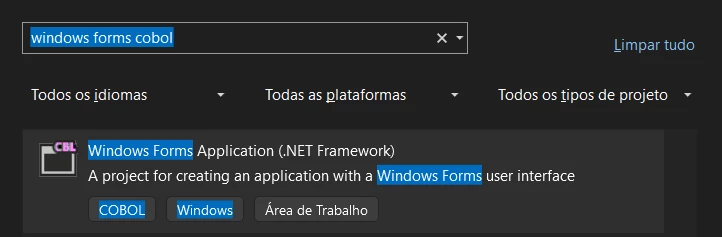
What project template did you select when creating your project?
If you are using native OO syntax like inheriting from the base class, then you must select one of the native project templates. The native OO syntax isn’t supported in the .NET Framework templates.

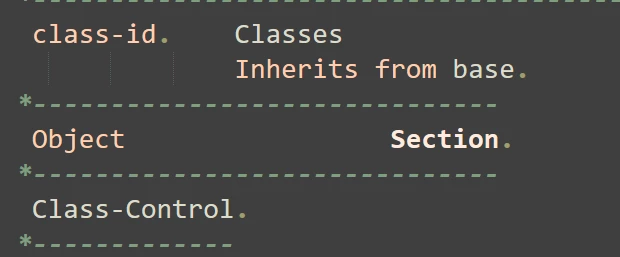
If you are using a native template, then perhaps you could show us what your source code looks like?


ajSauro
  • Author
  • New Participant
  • December 2, 2025

Hi, man, thank you.

You're right, it's Visual Studio.

I started a new project from


Then, I copied an existing class.


There are no directives in this classe.


Chris Glazier
Forum|alt.badge.img+3

Yes, you are using the old style native syntax with a .NET Framework Windows Forms project. This will not work as the native class libraries such as base do not exist in managed code (.NET Framework).

If you have existing native OO-COBOL programs that you are bringing over from a previous product such as Net Express, you will have to either rewrite them to work with the newer syntax which is integrated into the .NET Framework classes or you will have to use a native project template in order to run the code as it ran previously.

The .NET COBOL docs can be found here and there are quite a few samples in the .NET tutorials in the docs and within the Samples Browser which is accessible from the Visual COBOL folder on the Windows Start menu.


ajSauro
  • Author
  • New Participant
  • December 12, 2025
I managed to make it work, I started a new class, and, "Voilà".

Thank you, man.