Solved

What is a 9D,25 error In Visual COBOL?

  • December 15, 2025
  • 14 replies
  • 49 views

Amy McDonough
Forum|alt.badge.img

Hi! 

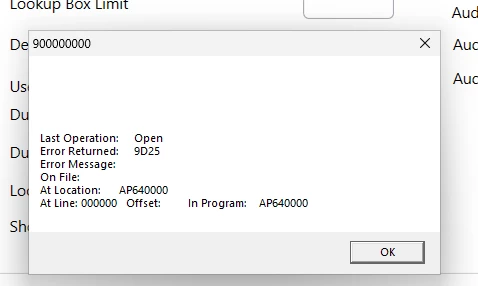
I am currently testing Visual COBOL 11 against my software, and when I run a program that has Database Connectors in them, I get a 9D,25 error on all the SQL tables that are in the program.

Copilot tells me that the 9D,25 means the XFD is corrupt, but I re-created the XFDs and I am still getting the error. 

I re-created the Aculock DB, and made sure that my ACUFH file is pointing to the correct folder, and I have a valid license.  

Is there anything else I can look at? 

Best answer by Chris Glazier

The change is not in the database itself; it is in the ODBC driver. The trace shows it is using ODBC driver 18 for  SQL Server which has the new encryption option set to on.

If you change TrustServerCertificate to Yes it might solve it.

Look at this config option: A_MSSQL_TRUST_SERVER_CERTIFICATE

14 replies

Martin Turner
Forum|alt.badge.img+1
  • Moderator
  • December 15, 2025

I don’t see 25 as a possible return code - https://docs.rocketsoftware.com/bundle/vcedmessages_rg_110/page/axt1742952571302.html

It’s possible that it’s a return code from the database, and it’s getting truncated. The messages in a trace could be more useful to determine the issue - https://docs.rocketsoftware.com/bundle/visualcobolvs2022_ug_110/page/mxq1742952553560.html


Chris Glazier
Forum|alt.badge.img+3
  • Moderator
  • December 15, 2025

Hi Amy,

What database are you using? SQL Server, Oracle, ODBC? On SQL Server this might mean an invalid connection string.

On what statement do you get the error? Is it on the OPEN?

You might try doing a CTF trace on your application to get more information.

Create a CTF.CFG file containing:

mftrace.dest = textfile
mftrace.emitter.textfile#location  = .\
mftrace.emitter.textfile#file = $(APPNAME). $(EMITTER).$(PID).$(PLATFORM).log
mftrace.level.mf.rts              = debug
mftrace.comp.mf.rts#eprintf=true

SET MFTRACE_CONFIG to point to this file:

and in the file pointed to by A_CONFIG add the options:
FILE_TRACE=9
FILE_TRACE_FLUSH=1
 

then run your application to create a ctf trace file.


Amy McDonough
Forum|alt.badge.img
  • Author
  • Participating Frequently
  • December 15, 2025

@Chris Glazier 

I am using SQL Server,  and the statement I am getting the error on is the Open.


And this is what the LOG is saying: 


10:45:09.624 MF.RTS 51 1 "   0 = SQLAllocHandle(2, 00000000014FDC50, 0000000000BA4E08 (000000001FD9B180))"
10:45:09.624 MF.RTS 51 1 "   Using installed SQL Server driver 'ODBC Driver 18 for SQL Server'"
10:45:09.624 MF.RTS 51 1 "   Trying to open a connection to server WIN11_TEST\SQLEXPRESS"
10:45:09.639 MF.RTS 51 1 "   report_status called from 1360"
10:45:09.639 MF.RTS 51 1 "    [1] 08001 -2146893019 - [ODBC Driver 18 for SQL Server]SSL Provider: The certificate chain was issued by an authority that is not trusted.


Does that mean I have certificate issues?


Amy McDonough
Forum|alt.badge.img
  • Author
  • Participating Frequently
  • December 15, 2025

I am getting the error statement on the Open Command: 


I also ran the software with the CTF trace on, and this is what the log says: 

10:44:54.720 MF.RTS 51 1 " find_MSSQLConn"
10:44:54.720 MF.RTS 51 1 "  Checking value of DEFAULT-CONNECTION"
10:44:54.720 MF.RTS 51 1 " Leaving through call to init_MSSQLConn"
10:44:54.720 MF.RTS 51 1 " init_MSSQLConn"
10:44:54.720 MF.RTS 51 1 "  init_connection"
10:44:54.720 MF.RTS 51 1 "   0 = SQLAllocHandle(2, 00000000014FDC50, 0000000000BA4608 (000000001FD95CB0))"
10:44:54.720 MF.RTS 51 1 "   Using installed SQL Server driver 'ODBC Driver 18 for SQL Server'"
10:44:54.720 MF.RTS 51 1 "   Trying to open a connection to server WIN11_TEST\SQLEXPRESS"
10:44:54.736 MF.RTS 51 1 "   report_status called from 1360"
10:44:54.736 MF.RTS 51 1 "    [1] 08001 -2146893019 - [ODBC Driver 18 for SQL Server]SSL Provider: The certificate chain was issued by an authority that is not trusted. "
10:44:54.736 MF.RTS 51 1 ""
10:44:54.736 MF.RTS 51 1 "    [2] 08001 -2146893019 - [ODBC Driver 18 for SQL Server]Client unable to establish connection. For solutions related to encryption errors, see https://go.microsoft.com/fwlink/?linkid=2226722"
10:44:54.736 MF.RTS 51 1 "   No more messages"
10:44:54.736 MF.RTS 51 1 "   Retrying connection after yield"
10:44:54.752 MF.RTS 51 1 "   report_status called from 1360"
10:44:54.752 MF.RTS 51 1 "    [1] 08001 -2146893019 - [ODBC Driver 18 for SQL Server]SSL Provider: The certificate chain was issued by an authority that is not trusted. "
10:44:54.752 MF.RTS 51 1 ""
10:44:54.752 MF.RTS 51 1 "    [2] 08001 -2146893019 - [ODBC Driver 18 for SQL Server]Client unable to establish connection. For solutions related to encryption errors, see https://go.microsoft.com/fwlink/?linkid=2226722"
10:44:54.752 MF.RTS 51 1 "   No more messages"
10:44:54.752 MF.RTS 51 1 "   0 = SQLFreeHandle(2, 000000001FD95CB0)"
10:44:54.752 MF.RTS 51 1 "  SQLDriverConnect failed after 1 attempts"
10:44:54.752 MF.RTS 51 1 " Leaving, init_connection"
10:44:54.752 MF.RTS 51 1 " A1"
10:44:54.752 MF.RTS 51 1 " A2"
10:44:54.752 MF.RTS 51 1 "Leaving, find_MSSQLConn"
10:44:54.752 MF.RTS 51 1 "Aset_file_status() f_errno: 19"
10:44:54.752 MF.RTS 51 1 "  f_errno: 19"
10:44:54.752 MF.RTS 51 1 "  f_int_errno: -2146893019"
10:44:54.752 MF.RTS 51 1 "  f_int2_errno: 0"
10:44:54.752 MF.RTS 51 1 "  f_errmsg: [ODBC Driver 18 for SQL Server]SSL Provider: The certificate chain was issued by an authority that is not trusted.


So, it has something to do with a certificate in SQL?  


Amy McDonough
Forum|alt.badge.img
  • Author
  • Participating Frequently
  • December 15, 2025

I have replied to this twice now, and for some reason, the moderators have not posted by reply.

 So, I have another question.  How do I tell if the Database Connectors are active and working?  I know it is not a SQL error because I have embedded SQL in my programs as well, and a program that has only embedded SQL in it processes with no errors.  It is only the programs with Database Connector code that is getting these errors. 


Chris Glazier
Forum|alt.badge.img+3
  • Moderator
  • December 15, 2025

Receiving a 9D error is an indicator that database connectors are being used as this is specific to that module.

The CTF trace should give us more definitive information.


Amy McDonough
Forum|alt.badge.img
  • Author
  • Participating Frequently
  • December 15, 2025

Ok, maybe when I posted my response earlier the moderators didn’t like the image I posted (which was the error from my program.  Here is what the trace says: 


10:44:54.720 MF.RTS 51 1 " find_MSSQLConn"
10:44:54.720 MF.RTS 51 1 "  Checking value of DEFAULT-CONNECTION"
10:44:54.720 MF.RTS 51 1 " Leaving through call to init_MSSQLConn"
10:44:54.720 MF.RTS 51 1 " init_MSSQLConn"
10:44:54.720 MF.RTS 51 1 "  init_connection"
10:44:54.720 MF.RTS 51 1 "   0 = SQLAllocHandle(2, 00000000014FDC50, 0000000000BA4608 (000000001FD95CB0))"
10:44:54.720 MF.RTS 51 1 "   Using installed SQL Server driver 'ODBC Driver 18 for SQL Server'"
10:44:54.720 MF.RTS 51 1 "   Trying to open a connection to server WIN11_TEST\SQLEXPRESS"
10:44:54.736 MF.RTS 51 1 "   report_status called from 1360"
10:44:54.736 MF.RTS 51 1 "    [1] 08001 -2146893019 - [ODBC Driver 18 for SQL Server]SSL Provider: The certificate chain was issued by an authority that is not trusted. "
10:44:54.736 MF.RTS 51 1 ""
10:44:54.736 MF.RTS 51 1 "    [2] 08001 -2146893019 - [ODBC Driver 18 for SQL Server]Client unable to establish connection. For solutions related to encryption errors, see https://go.microsoft.com/fwlink/?linkid=2226722"
10:44:54.736 MF.RTS 51 1 "   No more messages"
10:44:54.736 MF.RTS 51 1 "   Retrying connection after yield"
10:44:54.752 MF.RTS 51 1 "   report_status called from 1360"
10:44:54.752 MF.RTS 51 1 "    [1] 08001 -2146893019 - [ODBC Driver 18 for SQL Server]SSL Provider: The certificate chain was issued by an authority that is not trusted. "
10:44:54.752 MF.RTS 51 1 ""
10:44:54.752 MF.RTS 51 1 "    [2] 08001 -2146893019 - [ODBC Driver 18 for SQL Server]Client unable to establish connection. For solutions related to encryption errors, see https://go.microsoft.com/fwlink/?linkid=2226722"
10:44:54.752 MF.RTS 51 1 "   No more messages"
10:44:54.752 MF.RTS 51 1 "   0 = SQLFreeHandle(2, 000000001FD95CB0)"
10:44:54.752 MF.RTS 51 1 "  SQLDriverConnect failed after 1 attempts"
10:44:54.752 MF.RTS 51 1 " Leaving, init_connection"
10:44:54.752 MF.RTS 51 1 " A1"
10:44:54.752 MF.RTS 51 1 " A2"
10:44:54.752 MF.RTS 51 1 "Leaving, find_MSSQLConn"
10:44:54.752 MF.RTS 51 1 "Aset_file_status() f_errno: 19"
10:44:54.752 MF.RTS 51 1 "  f_errno: 19"
10:44:54.752 MF.RTS 51 1 "  f_int_errno: -2146893019"
10:44:54.752 MF.RTS 51 1 "  f_int2_errno: 0"
10:44:54.752 MF.RTS 51 1 "  f_errmsg: [ODBC Driver 18 for SQL Server]SSL Provider: The certificate chain was issued by an authority that is not trusted. "
10:44:54.752 MF.RTS 51 1 "                                                                                                                                        


Amy McDonough
Forum|alt.badge.img
  • Author
  • Participating Frequently
  • December 15, 2025

@Chris Glazier - I’ve tried 3 times now to post the trace error here and I keep getting the message “Your post has been submitted. It will be published after a review by our moderators.”


How else can I share it with you?


Chris Glazier
Forum|alt.badge.img+3
  • Moderator
  • December 15, 2025

I am a moderator of this forum and i have not been notified of any pending message from you. I will check the site coordinator, but this may better be solved through a support incident. If you create a new case, upload the trace file to it, and put “assign to Chris Glazier” in the description I will take a look at it.


Amy McDonough
Forum|alt.badge.img
  • Author
  • Participating Frequently
  • December 15, 2025

@Chris Glazier 

Okeee Dokeee.  I will do that. Thanks for your help :)


Chris Glazier
Forum|alt.badge.img+3
  • Moderator
  • December 15, 2025

The trace message posts have now been released and I can see the problem in the trace text.

Did you upgrade from SQL Server  ODBC driver 17 to 18, by any chance? This is a new error because of a change in the default encryption options being used. The link points to:
 

Certificate chain errors

If you see "SSL Provider: The certificate chain was issued by an authority that is not trusted." or "SSL routines::certificate verify failed: unable to get local issuer certificate" in your error:

  • Connection encryption is enabled by default in version 18 and newer. Users switching from previous versions of ODBC might see these errors if connection encryption was previously not used.
  • Users can choose to set the Encrypt connection string keyword to no/optional to disable connection encryption to match the default behavior prior to version 18. In the DSN Configuration UI, this option is set using the Connection Encryption dropdown list.
  • If connection encryption is desired, TrustServerCertificate can also be set to yes to skip server certificate validation.

Amy McDonough
Forum|alt.badge.img
  • Author
  • Participating Frequently
  • December 15, 2025

No, I am still on 2019 Expresss,.  Encrypt is not on in my DB connection: 


Data Source=WIN11_TEST\SQLEXPRESS;Initial Catalog=MSI;Persist Security Info=False;User ID=mcdonougha;Password=xxxxxx;Pooling=False;MultipleActiveResultSets=False;Encrypt=False;TrustServerCertificate=False;Application Name="SQL Server Management Studio";Command Timeout=0


I put x’s in the password field, that is not my passsword


Chris Glazier
Forum|alt.badge.img+3
  • Moderator
  • Answer
  • December 15, 2025

The change is not in the database itself; it is in the ODBC driver. The trace shows it is using ODBC driver 18 for  SQL Server which has the new encryption option set to on.

If you change TrustServerCertificate to Yes it might solve it.

Look at this config option: A_MSSQL_TRUST_SERVER_CERTIFICATE


Amy McDonough
Forum|alt.badge.img
  • Author
  • Participating Frequently
  • December 15, 2025

Dangit! I tried that earlier today, and it didn’t work. I must have typed it in wrong. GRRRRR.

It is working now! Thank you so much for your help - I will go and close the support call too.