Question

How to add production agent to the "Select Default Agent" in Zena Development

  • October 27, 2025
  • 1 reply
  • 21 views

Vina Nguyen

When creating a new task or process, we create them in Zena Dev and then import them to Zena Prod. In the new process, the "Select Default Agent" list includes all agents from both Zena Prod and Zena Dev environments. However, when creating a new task in the Zena Dev Web Client, the list only displays agents available in the Zena Dev environment. How can we configure the list to include agents from both Prod and Dev environments?  Thanks.

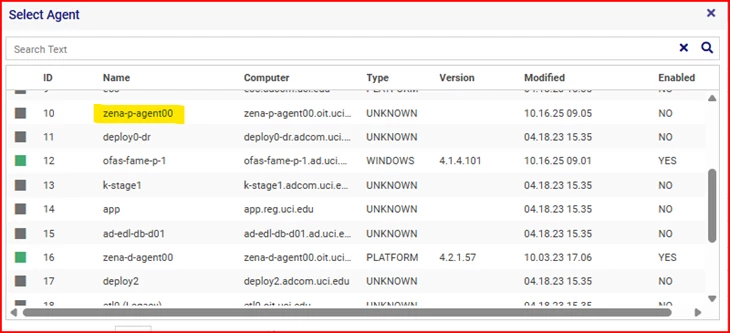
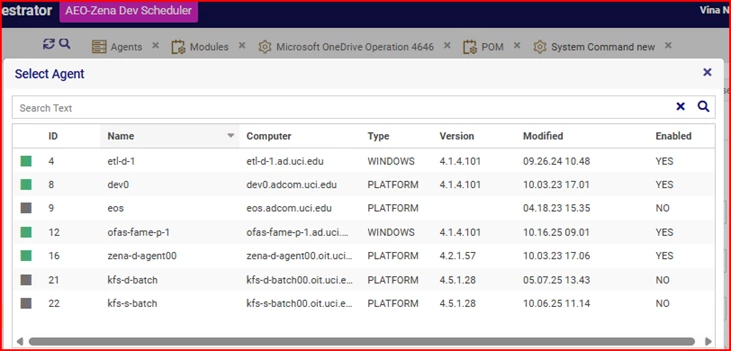
The first picture is the Select Agent list for new Task.  There is no zena-p-agent listed.  The second picture is the Select Agent list for new Process.  It includes zena-p-agent.  
 

1 reply

Mende Domazetovski

Zena’s agent deployment process is designed to maintain strict environment isolation, and the UID-based mapping is key to that.

Processes and Tasks, only show agents registered in the environment where they are created (in this case, Zena Dev).

To include Prod agents in the Dev, you would need to register those agents in Zena Dev. However, this approach introduces risk because it technically exposes production systems in the development environment, which you want to avoid.

The recommended method is:

  1. Register the agent in Zena Dev first. This assigns a unique UID.
  2. When deploying to Prod, carry over the same UID and update the Computer Name to the production host name.

This ensures that when tasks are deployed to Prod, they automatically use the Prod agent that shares the same UID as the selected agent in Dev, maintaining proper mapping and environment isolation.

For tasks created in Dev, select the appropriate Dev agent. After migration, the mapping will resolve to the correct Prod agent based on the UID.

Why This Is Important.

  • It prevents Prod systems from being exposed in Dev, which is critical for compliance and security.
  • It ensures that Dev tasks cannot accidentally execute on Prod resources.
Hope this information is helpful to you.