

Tree widget nodes

  • May 8, 2019
  • 14 replies
  • 0 views

Roger Wallin
Forum|alt.badge.img

Hi,

I have struggled with the Uniface tree-widget for the first time and programmatically succeeded to Expand, Collapse and setting a new representation for a node.
However I wonder if it's possible to dynamically set different node glyphs in the same tree. Eg, initializing the tree

$TREEREPR$ = "root=·!·;NODE·!·;root·;A=root·!·;NODE·!·;A·;B=root·!·;NODE·!·;B·;B1=B·!·;NODE·!·;B1·;B2=B·!·;NODE·!·;B2·;B3=B·!·;NODE·!·;B3·;C=root·!·;NODE·!·;C"
$valrep(testtree) = $TREEREPR$
testtree = ""
edit

;Is it above possible to change one of the nodes to PERSONBLUE
$TREEREPR$ = "root=·!·;NODE·!·;root·;A=root·!·;NODE·!·;A·;B=root·!·;NODE·!·;B·;B1=B·!·;NODE·!·;B1·;B2=B·!·;PERSONBLUE·!·;B2·;B3=B·!·;NODE·!·;B3·;C=root·!·;NODE·!·;C"


I can't get this to work. I can change the representation of a node, eg. changing the text B2 to B2*, but is it possible to change some of the Node-glyphs?

I can change the Node glyph of the whole tree by setting PERSONBLUE first in the form "Define Types of Tree Items", but can I mix NODE and PERSONBLUE?
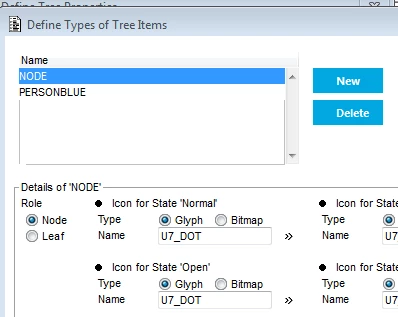

Regards RogerW.

14 replies

  • Rocketeer
  • May 8, 2019

Hi,

I have struggled with the Uniface tree-widget for the first time and programmatically succeeded to Expand, Collapse and setting a new representation for a node.
However I wonder if it's possible to dynamically set different node glyphs in the same tree. Eg, initializing the tree

$TREEREPR$ = "root=·!·;NODE·!·;root·;A=root·!·;NODE·!·;A·;B=root·!·;NODE·!·;B·;B1=B·!·;NODE·!·;B1·;B2=B·!·;NODE·!·;B2·;B3=B·!·;NODE·!·;B3·;C=root·!·;NODE·!·;C"
$valrep(testtree) = $TREEREPR$
testtree = ""
edit

;Is it above possible to change one of the nodes to PERSONBLUE
$TREEREPR$ = "root=·!·;NODE·!·;root·;A=root·!·;NODE·!·;A·;B=root·!·;NODE·!·;B·;B1=B·!·;NODE·!·;B1·;B2=B·!·;PERSONBLUE·!·;B2·;B3=B·!·;NODE·!·;B3·;C=root·!·;NODE·!·;C"


I can't get this to work. I can change the representation of a node, eg. changing the text B2 to B2*, but is it possible to change some of the Node-glyphs?

I can change the Node glyph of the whole tree by setting PERSONBLUE first in the form "Define Types of Tree Items", but can I mix NODE and PERSONBLUE?


Regards RogerW.

Hi RogerW,

You are looking for the properties of the tree. $valrep gives you the structure of the tree. If you want to change the glyph of a node then you have to look at $properties (e.g. 'vTreeProperties = $properties(testtree)').

I hope this helps.

Kind regards,

Daniel Iseli
Uniface Technical Support


Iain Sharp
Forum|alt.badge.img+5
  • Inspiring
  • May 8, 2019

Hi,

I have struggled with the Uniface tree-widget for the first time and programmatically succeeded to Expand, Collapse and setting a new representation for a node.
However I wonder if it's possible to dynamically set different node glyphs in the same tree. Eg, initializing the tree

$TREEREPR$ = "root=·!·;NODE·!·;root·;A=root·!·;NODE·!·;A·;B=root·!·;NODE·!·;B·;B1=B·!·;NODE·!·;B1·;B2=B·!·;NODE·!·;B2·;B3=B·!·;NODE·!·;B3·;C=root·!·;NODE·!·;C"
$valrep(testtree) = $TREEREPR$
testtree = ""
edit

;Is it above possible to change one of the nodes to PERSONBLUE
$TREEREPR$ = "root=·!·;NODE·!·;root·;A=root·!·;NODE·!·;A·;B=root·!·;NODE·!·;B·;B1=B·!·;NODE·!·;B1·;B2=B·!·;PERSONBLUE·!·;B2·;B3=B·!·;NODE·!·;B3·;C=root·!·;NODE·!·;C"


I can't get this to work. I can change the representation of a node, eg. changing the text B2 to B2*, but is it possible to change some of the Node-glyphs?

I can change the Node glyph of the whole tree by setting PERSONBLUE first in the form "Define Types of Tree Items", but can I mix NODE and PERSONBLUE?


Regards RogerW.
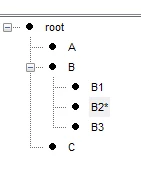
Hi Roger, 

When we first built trees, we noticed that if the glyphs used for notes (and leaves for that matter) are not all exactly the same size in pixels, (ours are all now 17x16) and (I think) number of colours, then uniface would display the glyph of the first node instead of the correct glyph for the node. 

This was true a very long time ago, and the rule is now coded into our internal design rules, so I am only presuming it still holds true. If U7_DOT and the glyph for PERSONBLUE are not the same size, try temporarily redefining PERSONBLUE to a glyph which is the same size as U7_DOT and see if the code works. 

We certainly change glyphs 'live' inside tree widgets, and it is just a matter of changing to point to the correct node. 

As Daniel says, you can change the glyph associated with a particular node definition using the $properties function, although the coding here is (if I recall), somewhat difficult to master, but this is not what I read your problem to be. 

Hope this helps, 

Regards, 

Iain


Iain Sharp
Forum|alt.badge.img+5
  • Inspiring
  • May 8, 2019

Hi Roger, 

When we first built trees, we noticed that if the glyphs used for notes (and leaves for that matter) are not all exactly the same size in pixels, (ours are all now 17x16) and (I think) number of colours, then uniface would display the glyph of the first node instead of the correct glyph for the node. 

This was true a very long time ago, and the rule is now coded into our internal design rules, so I am only presuming it still holds true. If U7_DOT and the glyph for PERSONBLUE are not the same size, try temporarily redefining PERSONBLUE to a glyph which is the same size as U7_DOT and see if the code works. 

We certainly change glyphs 'live' inside tree widgets, and it is just a matter of changing to point to the correct node. 

As Daniel says, you can change the glyph associated with a particular node definition using the $properties function, although the coding here is (if I recall), somewhat difficult to master, but this is not what I read your problem to be. 

Hope this helps, 

Regards, 

Iain

According to the help for Tree-Types, below, it shows the information about ignoring the icons if they do not match the width, height and color-depth. In our experience, anything that does not conform to the first icon of the first defined type will be replaced with the first icon of the first defined type.... So make sure they are all the same width, height and color-depth. 


State Icons

For best results follow the convention used in Microsoft Windows Explorer, which uses the same icon for Normal and Selected (a closed folder, for example) and another icon for Open and OpenSelect (an open folder, for example).

The width, height, and color-depth of all icons are determined by the image specified in the widget’s NORMAL1 property value. Any other icon that does not conform to these three values is discarded and will not be used in the widget.


Roger Wallin
Forum|alt.badge.img
  • Author
  • Participating Frequently
  • May 8, 2019

Hi,

I have struggled with the Uniface tree-widget for the first time and programmatically succeeded to Expand, Collapse and setting a new representation for a node.
However I wonder if it's possible to dynamically set different node glyphs in the same tree. Eg, initializing the tree

$TREEREPR$ = "root=·!·;NODE·!·;root·;A=root·!·;NODE·!·;A·;B=root·!·;NODE·!·;B·;B1=B·!·;NODE·!·;B1·;B2=B·!·;NODE·!·;B2·;B3=B·!·;NODE·!·;B3·;C=root·!·;NODE·!·;C"
$valrep(testtree) = $TREEREPR$
testtree = ""
edit

;Is it above possible to change one of the nodes to PERSONBLUE
$TREEREPR$ = "root=·!·;NODE·!·;root·;A=root·!·;NODE·!·;A·;B=root·!·;NODE·!·;B·;B1=B·!·;NODE·!·;B1·;B2=B·!·;PERSONBLUE·!·;B2·;B3=B·!·;NODE·!·;B3·;C=root·!·;NODE·!·;C"


I can't get this to work. I can change the representation of a node, eg. changing the text B2 to B2*, but is it possible to change some of the Node-glyphs?

I can change the Node glyph of the whole tree by setting PERSONBLUE first in the form "Define Types of Tree Items", but can I mix NODE and PERSONBLUE?


Regards RogerW.
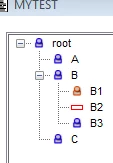
Hi,

$properties(testtree) looks like this

HASROOTLINES=T•;HASLINES=T•;HASBUTTONS=T•;LISTONLY=F•;LISTVIEW=N•;AUTOEXPAND=F•;
TYPE1=NODE•;NODE1=T•;NORMAL1=^U7_DOT•;OPEN1=^U7_DOT•;SELECTED1=^U7_DOT•;OPENSELECT1=^U7_DOT•;
TYPE2=PERSONBLUE•;NODE2=T•;NORMAL2=^PERSONBLUE•;OPEN2=^PERSONBLUE•;SELECTED2=^PERSONBLUE•;OPENSELECT2=^PERSONBLUE"

I don't want to change that, but I want to use he TYPE2=PERSONBLUE for some of the Nodes. The TYPE1=NODE is now used for all the nodes, ie. instead of changing the representation of a node, eg. by putting an asterisk at the end of the representation, I would like to "mark" a node by changing its Type (TYPE1, TYPE2) of Node....
See example below, instead of "B2*", I would like to change the NODE-Node (big DOT) to a PERSONBLUE-Node.

I just saw Iains comment. That could be the solution..... I'll return. Any help meanwhile appreciated.


Regards RogerW.


  • Rocketeer
  • May 8, 2019

Hi,

$properties(testtree) looks like this

HASROOTLINES=T•;HASLINES=T•;HASBUTTONS=T•;LISTONLY=F•;LISTVIEW=N•;AUTOEXPAND=F•;
TYPE1=NODE•;NODE1=T•;NORMAL1=^U7_DOT•;OPEN1=^U7_DOT•;SELECTED1=^U7_DOT•;OPENSELECT1=^U7_DOT•;
TYPE2=PERSONBLUE•;NODE2=T•;NORMAL2=^PERSONBLUE•;OPEN2=^PERSONBLUE•;SELECTED2=^PERSONBLUE•;OPENSELECT2=^PERSONBLUE"

I don't want to change that, but I want to use he TYPE2=PERSONBLUE for some of the Nodes. The TYPE1=NODE is now used for all the nodes, ie. instead of changing the representation of a node, eg. by putting an asterisk at the end of the representation, I would like to "mark" a node by changing its Type (TYPE1, TYPE2) of Node....
See example below, instead of "B2*", I would like to change the NODE-Node (big DOT) to a PERSONBLUE-Node.

I just saw Iains comment. That could be the solution..... I'll return. Any help meanwhile appreciated.


Regards RogerW.


Thanks for the additional explanation. I now better understand what you are trying to achieve here.

In case the glyph is not changed after changing the type of a node then it's likely that you are experiencing the problem Iain's describing. In case the width, height, and color-depth of the glyph used for the type PERSONBLUE is not the same as the one used for NODE then it will not be shown.

Regards,
Daniel


Roger Wallin
Forum|alt.badge.img
  • Author
  • Participating Frequently
  • May 8, 2019

Hi,

I have struggled with the Uniface tree-widget for the first time and programmatically succeeded to Expand, Collapse and setting a new representation for a node.
However I wonder if it's possible to dynamically set different node glyphs in the same tree. Eg, initializing the tree

$TREEREPR$ = "root=·!·;NODE·!·;root·;A=root·!·;NODE·!·;A·;B=root·!·;NODE·!·;B·;B1=B·!·;NODE·!·;B1·;B2=B·!·;NODE·!·;B2·;B3=B·!·;NODE·!·;B3·;C=root·!·;NODE·!·;C"
$valrep(testtree) = $TREEREPR$
testtree = ""
edit

;Is it above possible to change one of the nodes to PERSONBLUE
$TREEREPR$ = "root=·!·;NODE·!·;root·;A=root·!·;NODE·!·;A·;B=root·!·;NODE·!·;B·;B1=B·!·;NODE·!·;B1·;B2=B·!·;PERSONBLUE·!·;B2·;B3=B·!·;NODE·!·;B3·;C=root·!·;NODE·!·;C"


I can't get this to work. I can change the representation of a node, eg. changing the text B2 to B2*, but is it possible to change some of the Node-glyphs?

I can change the Node glyph of the whole tree by setting PERSONBLUE first in the form "Define Types of Tree Items", but can I mix NODE and PERSONBLUE?


Regards RogerW.

Hi,

That solved it. Using only glyphs PERSONBLUE, PERSONORANGE and ATTRIBUTE_RED, there were no problems changing the nodes. These glyphs are found in an Uniface-sample.
PERSONBLUE and PERSONORANGE are 16x16 Colors 256. ATTRIBUTE_RED is 16x16 Colors 16.

Thanks for the help, could have been difficult to find that out.

By the way, how do I find the U7_DOT glyph/picture description?

Regards RogerW


  • Rocketeer
  • May 8, 2019

Hi,

That solved it. Using only glyphs PERSONBLUE, PERSONORANGE and ATTRIBUTE_RED, there were no problems changing the nodes. These glyphs are found in an Uniface-sample.
PERSONBLUE and PERSONORANGE are 16x16 Colors 256. ATTRIBUTE_RED is 16x16 Colors 16.

Thanks for the help, could have been difficult to find that out.

By the way, how do I find the U7_DOT glyph/picture description?

Regards RogerW

Search in the Uniface Library? 😉

> Uniface Reference > Uniface Files, Resources, and Conventions > Uniface Glyphs

Its size is 9x9 and (I guess) 2 colors.


Roger Wallin
Forum|alt.badge.img
  • Author
  • Participating Frequently
  • May 9, 2019

Hi,

That solved it. Using only glyphs PERSONBLUE, PERSONORANGE and ATTRIBUTE_RED, there were no problems changing the nodes. These glyphs are found in an Uniface-sample.
PERSONBLUE and PERSONORANGE are 16x16 Colors 256. ATTRIBUTE_RED is 16x16 Colors 16.

Thanks for the help, could have been difficult to find that out.

By the way, how do I find the U7_DOT glyph/picture description?

Regards RogerW

Everything is good, as long as it isn't 16x16....


Roger Wallin
Forum|alt.badge.img
  • Author
  • Participating Frequently
  • May 9, 2019

Hi,

I have struggled with the Uniface tree-widget for the first time and programmatically succeeded to Expand, Collapse and setting a new representation for a node.
However I wonder if it's possible to dynamically set different node glyphs in the same tree. Eg, initializing the tree

$TREEREPR$ = "root=·!·;NODE·!·;root·;A=root·!·;NODE·!·;A·;B=root·!·;NODE·!·;B·;B1=B·!·;NODE·!·;B1·;B2=B·!·;NODE·!·;B2·;B3=B·!·;NODE·!·;B3·;C=root·!·;NODE·!·;C"
$valrep(testtree) = $TREEREPR$
testtree = ""
edit

;Is it above possible to change one of the nodes to PERSONBLUE
$TREEREPR$ = "root=·!·;NODE·!·;root·;A=root·!·;NODE·!·;A·;B=root·!·;NODE·!·;B·;B1=B·!·;NODE·!·;B1·;B2=B·!·;PERSONBLUE·!·;B2·;B3=B·!·;NODE·!·;B3·;C=root·!·;NODE·!·;C"


I can't get this to work. I can change the representation of a node, eg. changing the text B2 to B2*, but is it possible to change some of the Node-glyphs?

I can change the Node glyph of the whole tree by setting PERSONBLUE first in the form "Define Types of Tree Items", but can I mix NODE and PERSONBLUE?


Regards RogerW.

Hi,

Doesn't seem to be a good idea using PNG pictures. The transparency doesn't work in the tree.

Regards RogerW.


  • Rocketeer
  • May 9, 2019

Hi,

Doesn't seem to be a good idea using PNG pictures. The transparency doesn't work in the tree.

Regards RogerW.

That's correct. This limitation is documented:

> Constructing Components > Controlling the Appearance of an Application > Image Handling > Supported Image Formats

"The following features are not supported:

  • Gamma corrections
  • Textual support
  • Ancillary chunks
  • Transparency in the Tree widget
  • Dimming on disabled controls and widgets"

Sorry. I'm not sure if this is a limitation that is imposed by the Windows Tree that Uniface is using or if there's another reason for this.

Regards,
Daniel


Roger Wallin
Forum|alt.badge.img
  • Author
  • Participating Frequently
  • May 9, 2019

Hi,

Doesn't seem to be a good idea using PNG pictures. The transparency doesn't work in the tree.

Regards RogerW.

But the transparency by a gif does work, or then I have done some false testing....


  • Rocketeer
  • May 9, 2019

Hi,

Doesn't seem to be a good idea using PNG pictures. The transparency doesn't work in the tree.

Regards RogerW.

The mentioned limitation only applies to PNG images. Sorry, I did not copy that part into my comment, but it's clear when you look at the referenced topic in the documentation.

I'm not sure what the difference is between the transparency used by a GIF image and the one used by a PNG image is. But it seems to be an issue for the tree.


Iain Sharp
Forum|alt.badge.img+5
  • Inspiring
  • May 21, 2019

Hi,

That solved it. Using only glyphs PERSONBLUE, PERSONORANGE and ATTRIBUTE_RED, there were no problems changing the nodes. These glyphs are found in an Uniface-sample.
PERSONBLUE and PERSONORANGE are 16x16 Colors 256. ATTRIBUTE_RED is 16x16 Colors 16.

Thanks for the help, could have been difficult to find that out.

By the way, how do I find the U7_DOT glyph/picture description?

Regards RogerW

Hi Roger, 


Do you mind tagging my first reponse as the answer then? I'd love to get some lovely points on the leaderboard...  🙂


Iain


Roger Wallin
Forum|alt.badge.img
  • Author
  • Participating Frequently
  • May 22, 2019

Hi,

That solved it. Using only glyphs PERSONBLUE, PERSONORANGE and ATTRIBUTE_RED, there were no problems changing the nodes. These glyphs are found in an Uniface-sample.
PERSONBLUE and PERSONORANGE are 16x16 Colors 256. ATTRIBUTE_RED is 16x16 Colors 16.

Thanks for the help, could have been difficult to find that out.

By the way, how do I find the U7_DOT glyph/picture description?

Regards RogerW

Absolutely.