
Problem installing Community edition on a Azure VM.

  • July 2, 2020
  • 2 replies
  • 0 views

Hi,

When trying to install the Community edition on a VM running in Azure. It fails at the stage when its creating the UserverUser. I am running as Administrator and the password meets the password requirement. 

I tried different names, and password didn't make a difference. 

I've also tried manually creating the  "UNIFACE Server Users" and adding a UnifaceServer user but it still fails at the same spot.

VM version was fresh clean, Windows 10 Pro, Version 1809.
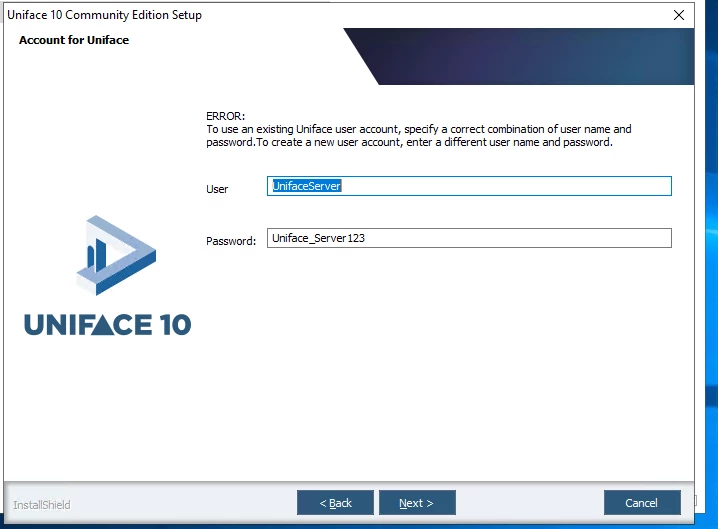


I couldn't see any logs with precise details of what what went wrong.

2 replies

Burak Yuksel

Hi,

When trying to install the Community edition on a VM running in Azure. It fails at the stage when its creating the UserverUser. I am running as Administrator and the password meets the password requirement. 

I tried different names, and password didn't make a difference. 

I've also tried manually creating the  "UNIFACE Server Users" and adding a UnifaceServer user but it still fails at the same spot.

VM version was fresh clean, Windows 10 Pro, Version 1809.


I couldn't see any logs with precise details of what what went wrong.

Hi Jerry

Can you please try to download and install "Visual C++ Redistributable for Visual Studio 2015" before start the installation? 

It is known bug and it will be fixed in the next release. 

Best regards


  • July 3, 2020

Hi,

When trying to install the Community edition on a VM running in Azure. It fails at the stage when its creating the UserverUser. I am running as Administrator and the password meets the password requirement. 

I tried different names, and password didn't make a difference. 

I've also tried manually creating the  "UNIFACE Server Users" and adding a UnifaceServer user but it still fails at the same spot.

VM version was fresh clean, Windows 10 Pro, Version 1809.


I couldn't see any logs with precise details of what what went wrong.

Excellent that worked. Thank you
