
Question

How to launching an Accuterm script from within a basic program

  • August 19, 2026
  • 2 replies
  • 22 views

RICHARD OLDS
Forum|alt.badge.img+1

hello

I am trying to launch an Accuterm script, in my case cosmo.atsc from my basic code (mvBase).


According to the online help I can use the following code, except I replace the myscriptfile with cosmo.  The script is located in C:\Program Files (x86)\Atwin71

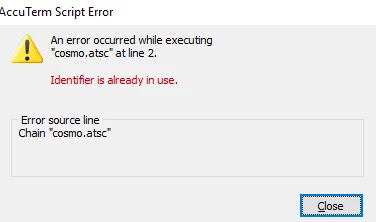
I can run the script from the Accuterm Script Editor with out a problem, and if does what I want.  However when I run it in basic I get the an Accuterm script error, see below.  Can anyone offer any advice as to what I am doing wrong?

Thanks.


EQU ESC TO CHAR(27), STX TO CHAR(2), CR TO CHAR(13)
FILENAME = 'myscriptfile.atsc'
SCRIPT = 'Chain "':FILENAME:'"'
PRINT ESC:STX:'P':SCRIPT:CR:


2 replies

Tyrel Marak
Forum|alt.badge.img+1
  • Participating Frequently
  • August 19, 2026

Do you have a standard set of equates that you use (maybe as part of a COMMON area) that might already define ESC, STX or CR as a constant?


RICHARD OLDS
Forum|alt.badge.img+1
  • Author
  • Participating Frequently
  • August 19, 2026

I have actually sorted the issue. My interpretation of how Accuterm scripts execute was wrong. I thought every time i wanted to execute the script I needed to “relaunch” it, as if it was a BASIC program. This is not the case. Once executed it become resident for the entire session.

To launch the script cosmo.stsc and make it “resident” I executed

    SCRIPT = 'Chain ':QUOTE:'cosmo.atsc':QUOTE
    PRINT ESC:STX:'P':SCRIPT:CR:

As the script is now resident for the remainder of the Accuterm session, all I need to do to execute the “process” is as below.

PRINT ESC:STX:'R':'Main':CR:


Notes:

cosmo.atsc is in the ATWIN71 installation directory in PROGRAM FILES (X86)

QUOTE=CHAR(34) ESC=CHAR(27) STX=CHAR(2) CR=CHAR(13)