Question

How to Open a Popup/Dialog Page Using Client Side JavaScript in 10.6.1 (RocketMXWeb Legasuite)

  • May 13, 2026
  • 1 reply
  • 45 views

Manikandan M

Hi,

I’m using Client Side JavaScript in version 10.6.1.

I created a popup/dialog page with the page name V100_popup.
In my main page V200_main, I have a button. When the button is clicked, I need to open the popup page using Client Side JavaScript.

Could someone please guide me on how to open a popup/dialog page from Client Side JS in 10.6.1?

Thanks

1 reply

Roger Van Valen
Forum|alt.badge.img+2

Hi,

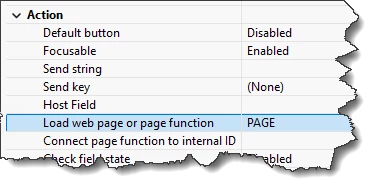
In the button definition in MX Web you can specify a popup page to load on the press of the button, using property 'Load web page or page function’:


This would be the easiest, out-of-the-box solution.
Does this help?

Unfortunately it is not possible to open another page from the project using just client side script. If there is a specific reason to really do this from client side JavaScript, the best way would be to:

  • Open up the hostapi​​​ (and configure the host_api_control settings) to allow API calls form client side script
  • Create a script function to be called, which can do a PanelLoadPanel() 
    This can be done in LegaSuite script or engine side JavaScript
  • Call this script function using the host Api function scriptFunctionCall() to execute the engine side script form the client side scripting

Hope this helps,
Regards,
Roger van Valen.