Question

Cobol Code compilations steps using Windows Rocket Enterprise Developer to create Redhat Linux 9.8 executables

  • July 30, 2026
  • 10 replies
  • 106 views

Reny
  • Participating Frequently

I have windows Enterprise Developer and want to compile linux executable , need clear documentation on how to achive that my server is on Redhart 9.8


Need documentation on how to configure the Windows Developer to compile Linux compatible code

10 replies

  • Rocketeer
  • July 30, 2026

I don't think if we can do that


Michael Bleistein
Forum|alt.badge.img+1

Which version and platform/IDE of Enterprise Developer do you have?

  1. Enterprise Developer/Eclipse for Windows
  1. Enterprise Developer/Visual Studio 2022 
  1. Enterprise Developer/Eclipse for RHEL 9.x
  1. Enterprise Developer for Unix/Linux Components (in your case RHEL 9.x)

You will need either 3 or 4, or combination of 1 and 4

If you have ED/Eclipse on Windows AND ED/Unix/Linux components for RHEL 9.x you can create a remote project in ED/Eclipse on Windows to build an executable on Linux,

If you have #2, then you would also need #4. You could then transfer the source to Linux and build your executable there with ED/Unix/Linux components.


Reny
  • Author
  • Participating Frequently
  • July 31, 2026

@Michael Bleistein  I have :

  1. Enterprise Developer/Eclipse for Windows
  1. Enterprise Developer for Unix/Linux Components (in your case RHEL 9.x)


Yes we  have ED/Eclipse on Windows AND ED/Unix/Linux components for RHEL 9.x


we were able to create a remote project in ED/Eclipse on Windows to build an executable on Linux, however having issues on 


  • Relative paths for copybooks since we are using the GIT to store the project.
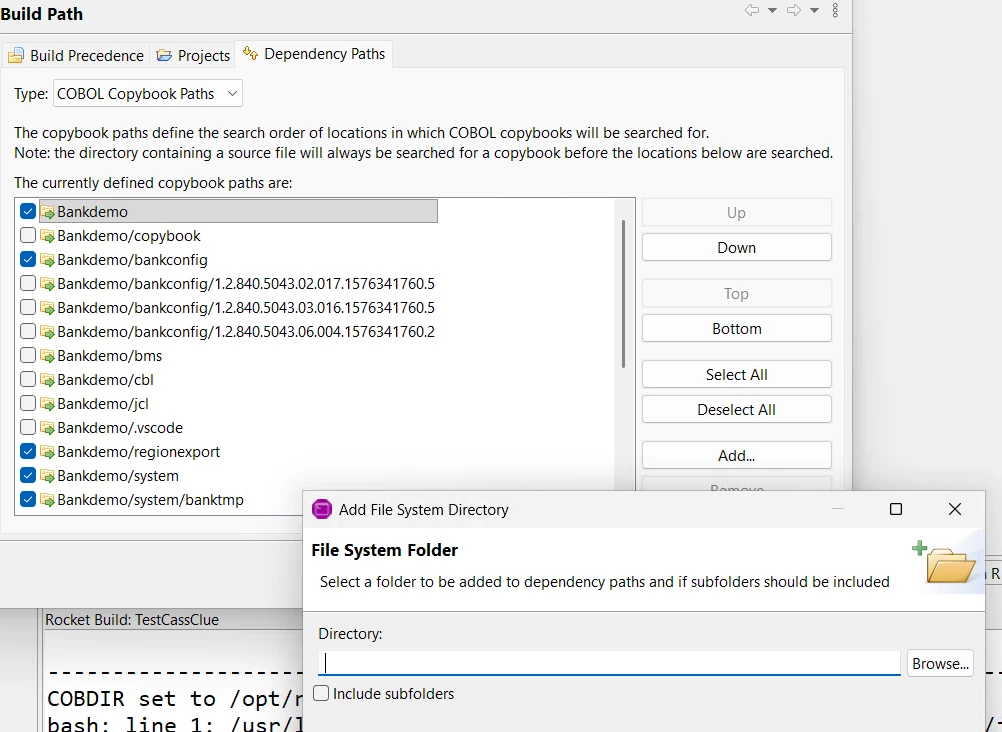
  • In our application project properties we specify that the copybook project is a dependent project, in Build Paths > Projects, add the copybook project.

    Then in your application project properties point to the copybooks in Build Paths > Dependency Paths > COBOL Copybook Paths, add the copybook project. 

    I am not sure how i can  allow everyone to clone the projects to their own directories and maintain the link between them.

    The  limitation is that we can only specify the copybooks project directory to search for copybooks, not sub directories 


is there a detailed guiide or video which showcases step by step what all settings i have to do ??


Kim Hoskin
Forum|alt.badge.img+2
  • Moderator
  • July 31, 2026

Hi,

Compiling to .INT could work across platforms, but that is not optimized (e.g. compared to .dll/.so/GNT). 
Note, if the program uses e.g WINAPI functions then it would not work on Linux, that should be kept in mind.

Alternative is to consider setting up a linux machine with the relevant product installed and compile there, that would ensure full compatibility, or use the remote project development approach.

Regards,
Kim


Reny
  • Author
  • Participating Frequently
  • July 31, 2026

Hi,

Compiling to .INT could work across platforms, but that is not optimized (e.g. compared to .dll/.so/GNT). 
Note, if the program uses e.g WINAPI functions then it would not work on Linux, that should be kept in mind.

Alternative is to consider setting up a linux machine with the relevant product installed and compile there, that would ensure full compatibility, or use the remote project development approach.

Regards,
Kim

@Kim Hoskin as stated in my post


I have :

  1. Enterprise Developer/Eclipse for Windows
  1. Enterprise Developer for Unix/Linux Components (in your case RHEL 9.x)


Yes we  have ED/Eclipse on Windows AND ED/Unix/Linux components for RHEL 9.x


we were able to create a remote project in ED/Eclipse on Windows to build an executable on Linux, however having issues on 


  • Relative paths for copybooks since we are using the GIT to store the project.
  • In our application project properties we specify that the copybook project is a dependent project, in Build Paths > Projects, add the copybook project.

    Then in your application project properties point to the copybooks in Build Paths > Dependency Paths > COBOL Copybook Paths, add the copybook project. 

    I am not sure how i can  allow everyone to clone the projects to their own directories and maintain the link between them.

    The  limitation is that we can only specify the copybooks project directory to search for copybooks, not sub directories 


is there a detailed guiide or video which showcases step by step what all settings i have to do ??


Michael Bleistein
Forum|alt.badge.img+1

@Michael Bleistein  I have :

  1. Enterprise Developer/Eclipse for Windows
  1. Enterprise Developer for Unix/Linux Components (in your case RHEL 9.x)


Yes we  have ED/Eclipse on Windows AND ED/Unix/Linux components for RHEL 9.x


we were able to create a remote project in ED/Eclipse on Windows to build an executable on Linux, however having issues on 


  • Relative paths for copybooks since we are using the GIT to store the project.
  • In our application project properties we specify that the copybook project is a dependent project, in Build Paths > Projects, add the copybook project.

    Then in your application project properties point to the copybooks in Build Paths > Dependency Paths > COBOL Copybook Paths, add the copybook project. 

    I am not sure how i can  allow everyone to clone the projects to their own directories and maintain the link between them.

    The  limitation is that we can only specify the copybooks project directory to search for copybooks, not sub directories 


is there a detailed guiide or video which showcases step by step what all settings i have to do ??


It is somewhat difficult to answer precisely without seeing it up close. However, what you described could possibly be resolved by either adding a remoted folder to the copybook project and then adding a File System Folder to the Build Path for the copybook project and check “Include Subfolders” OR adding a File system folder to the dependency paths in the Build path for the main project...and optionally check “Include Subfolders”


Reny
  • Author
  • Participating Frequently
  • August 4, 2026

@Michael Bleistein  I have :

  1. Enterprise Developer/Eclipse for Windows
  1. Enterprise Developer for Unix/Linux Components (in your case RHEL 9.x)


Yes we  have ED/Eclipse on Windows AND ED/Unix/Linux components for RHEL 9.x


we were able to create a remote project in ED/Eclipse on Windows to build an executable on Linux, however having issues on 


  • Relative paths for copybooks since we are using the GIT to store the project.
  • In our application project properties we specify that the copybook project is a dependent project, in Build Paths > Projects, add the copybook project.

    Then in your application project properties point to the copybooks in Build Paths > Dependency Paths > COBOL Copybook Paths, add the copybook project. 

    I am not sure how i can  allow everyone to clone the projects to their own directories and maintain the link between them.

    The  limitation is that we can only specify the copybooks project directory to search for copybooks, not sub directories 


is there a detailed guiide or video which showcases step by step what all settings i have to do ??


It is somewhat difficult to answer precisely without seeing it up close. However, what you described could possibly be resolved by either adding a remoted folder to the copybook project and then adding a File System Folder to the Build Path for the copybook project and check “Include Subfolders” OR adding a File system folder to the dependency paths in the Build path for the main project...and optionally check “Include Subfolders”


Do you think we will have documented PDF or how to steps for this somwhere i have tried many options and hit and trial but have not got any sucesss. as stated in your screenshot i have exactly tried to configure remote project.


Reny
  • Author
  • Participating Frequently
  • August 5, 2026

@Michael Bleistein  is there away to find a PDF file which details this or video ?


Reny
  • Author
  • Participating Frequently
  • August 6, 2026

@Praveen S Can you view this document


Lance E Osborne

Reny, have you been able to resolve your issue?