Question

Invalid SYSAD User Default Password

  • February 10, 2026
  • 7 replies
  • 54 views

sergi.yague
Forum|alt.badge.img+1

I just installed Rocket Software Enterprise Developer Version 11 and need to obtain the default password for the SYSAD user. Following the suggestion on the ESCWA login screen:
"The SYSAD user has been created with a generated password.
To determine the password, run:
"mfsecretsadmin read microfocus/temp/admin"" I ran the command, but the password it returned is invalid. Does anyone know what I can do?

7 replies

Kim Hoskin
Forum|alt.badge.img+2
  • Moderator
  • February 10, 2026

Hi Sergi,

In this release notes document:
https://docs.rocketsoftware.com/bundle/enterprisedeveloper_rn1_110_pdf/resource/enterprise_developer_mfenterprisedeveloper_vs_110_release_notes_ved110.pdf
There is a section:
Change the Default Password for SYSAD
Rocket Software recommends that you promptly replace this password with one that conforms to your security policy. You can do this from the ESCWA logon page - click Change Password. Alternatively, you can use the esfadmin SETPASSWORD command and specify the "vsam_esm" module file.

Can I you advise if you have tried these options?

Regards,
Kim


sergi.yague
Forum|alt.badge.img+1
  • Author
  • Participating Frequently
  • February 10, 2026

Thank you so much, Kim Hoskin, for your help.

I'm running the command:

C:\Program Files (x86)\Rocket Software\Enterprise Developer\bin>esfadmin SETPASSWORD ????

ESF Auditing enabled for this request
ESM Module username:

But please excuse me, I can't find the "ESM Module username". Could you tell me where I can find it?

Thanks again.


Henry Szabranski

Was this a clean install of 11.0? Was there a previous version of the product on the system? Was security enabled on that version of the product? If that is the case, then the previous security configuration and credentials would still be valid, not the default credentials that are created on a clean product install.


sergi.yague
Forum|alt.badge.img+1
  • Author
  • Participating Frequently
  • February 10, 2026

Hi Henry Szabranski, thank you so much for your help.

That was exactly the problem. I simply used the same password I had for Micro Focus Enterprise Developer 9 and I was able to log in.

Thanks again.


Henry Szabranski

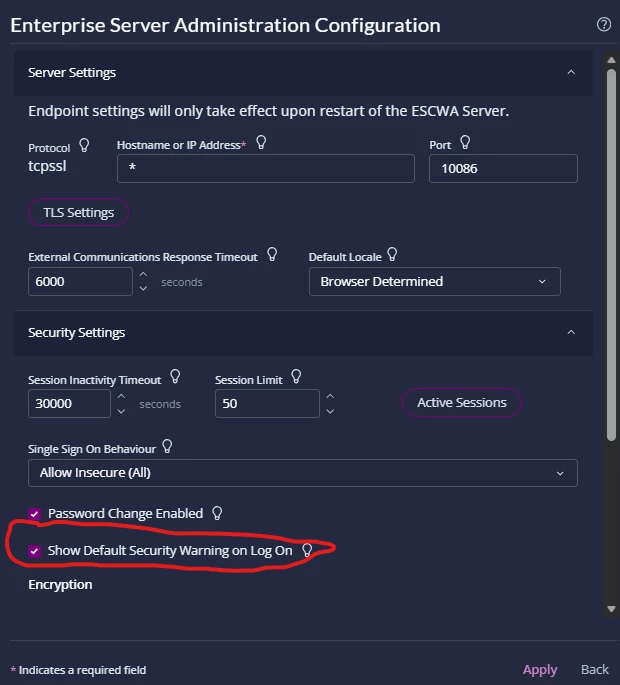
To stop the message displaying on ESCWA login you can set this option:


sergi.yague
Forum|alt.badge.img+1
  • Author
  • Participating Frequently
  • February 10, 2026

Henry Szabranski,

Thank you very much.


Sateesh Racha

I just installed Rocket Software Enterprise Developer Version 11 and need to obtain the default password for the SYSAD user. Following the suggestion on the ESCWA login screen:
"The SYSAD user has been created with a generated password.
To determine the password, run:
"mfsecretsadmin read microfocus/temp/admin"" I ran the command, but the password it returned is invalid. Does anyone know what I can do?

You need to run this command on Enterprise developer command promt either 32bit ot 64bit based on the region configuration- then it will show you a default password. 

Use the password Qv0Wprhs to login with user id SYSAD.