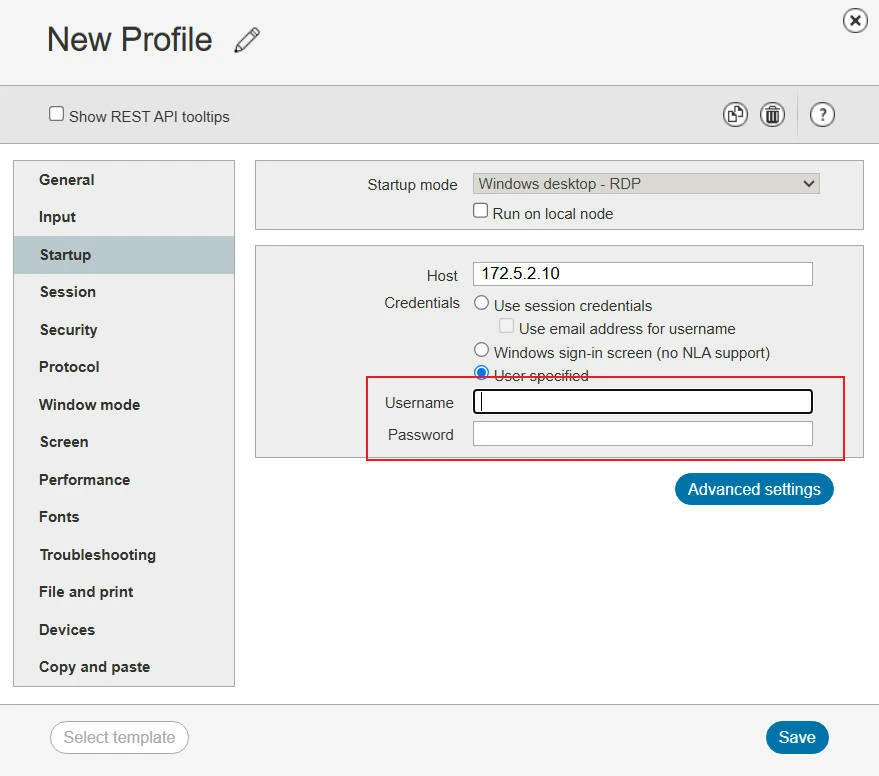

We're currently using a VDI virtual desktop client that's become unstable, and the vendor no longer updates it. Over long-running sessions its memory keeps growing without bound, so we're looking at connecting the Windows 10 machines from our VDI platform into ETX.
Since there are a large number of VMs, mass-installing the `etx-windows-cn` node agent on each one isn't practical, so instead we want to bridge them over RDP using the Windows Desktop - RDP template.
Our VDI VM template uses a single shared account, `user`. After applying a lot of system configuration and installing a large amount of software on it, we distribute the template to end users. Here's the quirk: when a VM is handed out, the Windows 10 login username stays `user`, but the password is changed by the VDI platform to the password that user set on the platform. For example, if a user signs into the VDI platform with username `selina` and password `371425`, the Windows 10 VM's password gets changed to `371425` accordingly.
Because of this, we'd otherwise have to create a separate RDP template for every user. If the login fields in the template support variables, we could keep just one template: a fixed username `user`, and a password field driven by a variable that takes the user's ETX login password.
Sorry if my description of the VDI platform isn't very clear — my actual question comes down to whether variables can be used in the RDP template's login fields. Thanks.