



Sometimes it is desirable to minimize the Ribbon in order to have more space on your desktop. This can be achieved in two ways:
- Double-clicking on one of the tabs (this will minimize or expand the ribbon).
- Selecting “Minimize the Ribbon” from the Quick Access Toolbar. Selecting “Maximize" will expand it again: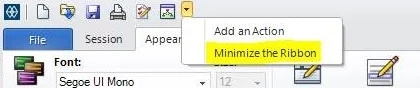
#Reflection
#SupportTips/KnowledgeDocs
#SupportTips/SupportTips/KnowledgeDocs




