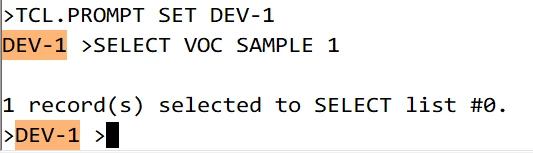
Working with a group of developers, I'd like to modify the system prompt in UniVerse from the standard '>' to include the account in which they are working. The 'WHO' command can give misleading results as it shows the folder in which they are running which may or may not be the UniVerse account. For instance, my developers each have a folder that contains the various accounts that they need for testing and source control. An example might be '/bl1/DEV_ABC/COM' and the 'WHO' command returns 'COM' but the UV.ACCOUNT record for this path is 'COM_ABC'. So, I'd like to modify the system prompt to show 'COM_ABC>'. I would assume that this could be set either in the 'LOGIN' script or in 'UV.LOGIN'. That will provide a visual cue that they are not in a production account. So far, searching the documentation has not produced an answer.
TIA!
------------------------------
Jeff Teter
Woodforest National Bank
The Woodlands, TX
------------------------------