Question

Tracing UCINET-UO errors

  • September 28, 2026
  • 4 replies
  • 83 views

Jonathan Wells

We are having trouble connecting via unirpc (MVQuery) to our Unidata 8.4 (Windows 25) server.  My work PC does not have a problem.  While RDP’d into the server, when I try to connect to an account, I’m getting → 
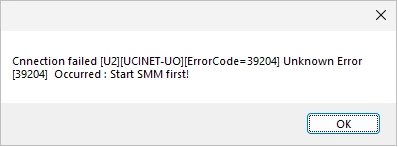
So far, 2 other PC’s get the same message.  I’m trying to setup logging/tracing for this.  I’ve placed ...\include\ud_database into TRACE_LEVEL=2.  If this is producing output, I can not find it.  What else can I do to track this down?


Thank you,

Jonathan Wells

Aptron, Corp.

4 replies

John Jenkins
Forum|alt.badge.img+1
  • Participating Frequently
  • September 28, 2026

I suspect either firewall or user pwrmiss

ions - either on logging in or on the file syste,

See https://my.rocketsoftware.com/RocketCommunity/s/article/What-are-the-possible-error-codes-that-can-be-encountered-when-using-UniObjects-1478610501287 for a full list of error codes. The code you are getting indicates a launch failure for the RPC slave.

The option you want for logging is probably serverdebug rather than TRACE_LEVEL - see https://my.rocketsoftware.com/RocketCommunity/s/article/How-to-turn-on-the-U2-UniObjects-server-log-based-on-a-specific-service-name-1478610682508

Here’s a simpls free-standing JAVA program you can use for test purposes, please run with your ID, a local machine user ID for the UniData server and from both your client system and on the UniData server console at a DOS prompt if you can https://my.rocketsoftware.com/RocketCommunity/s/article/A-simple-UniObjects-for-Java-client-program-running-on-UNIX-or-Windows-is-used-to-test-any-U2-server-connection-issue-1478610323798

Firewalls can be tested from a  DOS command prompt on each individual client shystem  using
telnet <IP address or host name> 31438

If the firewall is an issue it will fail rather than connect (you will not get any other response from this test)

User IDs can be an issue - especially in multiple user types (local machine and domain) or cross-domain is involved. Try using a local machine administrator ID for the UniData server - both short and fully qualified (FQDN) from both your local system and from the UniData server consoie and compare. If a local machine administrator works and your ID does not then it’s permissions..

Hopefully this gets you started

JJ


Derek Hayse
Forum|alt.badge.img+3
  • Participating Frequently
  • September 29, 2026

Hi Jonathan,

The Uniobjects error code 39204 = The slave failed to start correctly.

But the ‘Start SMM First’ error message suggests that Unidata isn’t running?
Can you check smm.log and smm.errlog for clues?
Also try stopping and restarting Unidata and watch what appears in these and any other log files in the Unidata directories.

Rgds Derek


John Jenkins
Forum|alt.badge.img+1
  • Participating Frequently
  • September 29, 2026

Jonathan,

for clarification - are you using ODBC or UniObjexts?

For ODBC you might find this article helpful - though some of the information is now dated:

https://my.rocketsoftware.com/RocketCommunity/s/article/UniData-database-and-RPC-service-will-not-start-with-a-message-Start-SMM-first-1478611868646

There is also some information on debigging RPCC failures ayt both client and server ends = pleasse see:

https://my.rocketsoftware.com/RocketCommunity/s/article/How-to-start-the-Windows-UniRPC-Service-using-the-debug-level-and-timeout-parameters-in-the-Command-mode-1478610314493

and

https://my.rocketsoftware.com/RocketCommunity/s/article/How-to-turn-on-the-U2-UniObjects-server-log-based-on-a-specific-service-name-1478610682508


Other possibilitied include user permissions - especially so in a cross-domain environment - and firewalls.

  • Use a user ID for a local machine administrator - any different? Also try with both the short name and the FQDN. 
  • See if there is a difference run from the server itself or from a client system. 
  • If using ODBC please start in the ‘demo’ account first, using VSG to make the sample data files accessible and READ use GRANTed to PUBLIC - at least at first.


Hopefuly this helps get you started.

JJ


Jonathan Wells

Hi John,

Thank you for the Rocket Community article links.  I’m sure they will come in handy. 

As it turns out, the issue involved 2 things.  [Which I learned about from Brian Leach who said that “Start SMM first means to start the right version of UniData”.]  The connection settings in MVQuery has a setting called “Service Name”.  On my work PC it was set to “Unidata” while the client on the server as well as my laptop had it set to “Default”.  The default setting was no longer working due to what the Unidata upgrade did with  [C:\U2\unishared\unirpc\] unirpcservices. →

udmvservices C:\U2\ud84\bin\mvservices.exe * TCP/IP 0 3600

uddap_server C:\U2\ud84\bin\uddap_server.exe * TCP/IP 0 3600

uddaps C:\U2\ud84\bin\udapi_server.exe * TCP/IP 0 3600

udadmin84 C:\U2\ud84\bin\udadmin_server.exe * TCP/IP 0 3600

unirep84 C:\U2\ud84\bin\udsub.exe * TCP/IP 0 3600

rmconn84 C:\U2\ud84\bin\repconn.exe * TCP/IP 0 3600

udcs C:\U2\ud84\bin\udapi_server.exe * TCP/IP 0 3600

defcs C:\U2\ud82\bin\udapi_server.exe * TCP/IP 0 3600

udserver C:\U2\ud84\bin\udsrvd.exe * TCP/IP 0 3600

udadmin C:\U2\ud82\bin\udadmin_server.exe * TCP/IP 0 3600

udadmin82 C:\U2\ud82\bin\udadmin_server.exe * TCP/IP 0 3600

unirep82 C:\U2\ud82\bin\udsub.exe * TCP/IP 0 3600

rmconn82 C:\U2\ud82\bin\repconn.exe * TCP/IP 0 3600

I edited the ‘defcs’ and ‘udadmin’ lines to point to ud84.  It is all working now.


Thank you,

Jonathan Wells