Question

Cannot Import Existing Vertica Cluster via Management Console

  • February 19, 2018
  • 20 replies
  • 37 views

canartuc
Forum|alt.badge.img

Hello,

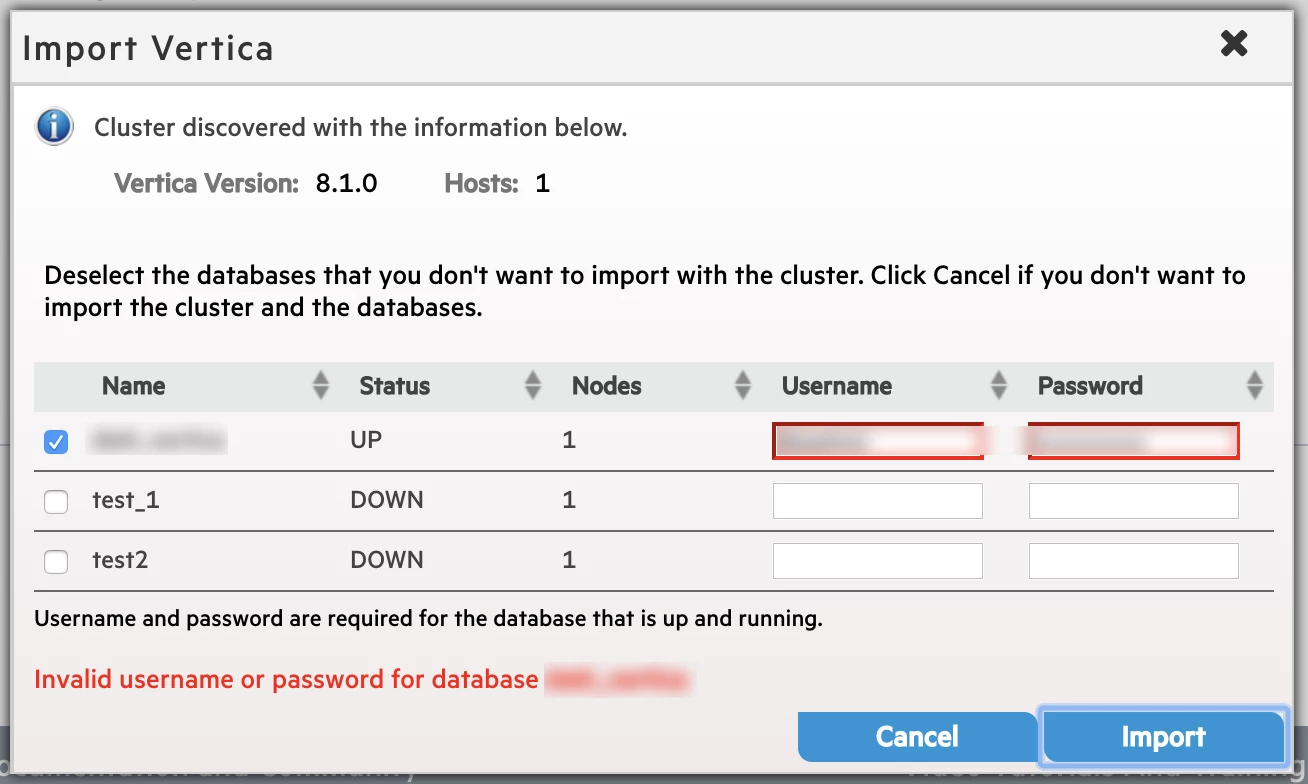
I installed vertica-console_9.0.1-0_amd64.deb, I can reach and can enter. But when I want to import existing vertica cluster, I am getting invalid username or password error. I am pretty sure that username and password is true because I am reaching to database with the same username and password. I even don't try to write it, I do copy-paste extreme carefully (no space etc.) but still getting the same error.

I restarted vertica-agent, vertica-consoled several times but still no luck.

I am sure that getting the right API Key as following:

cat /opt/vertica/config/apikeys.dat

Any help would be appreciated. Thank you!

20 replies

Jim_Knicely
Forum|alt.badge.img+2
  • Participating Frequently
  • February 19, 2018

If you log into the server running MC, can you connect using the command below? (Replace the variables with your values)

/opt/vconsole/bin/vsql -U user_name -w user_password -h db_server_ip -d db_name

Actually, this might give you an error since you are trying to connect to an older database version ...


canartuc
Forum|alt.badge.img
  • Author
  • Participating Frequently
  • February 19, 2018

Hey @Jim_Knicely , thank you for your response... I accepted answer accidentally.

yes, I can do it in vertica server or remote cli with -h command and cli is opening with username. I also can query with this cli w.r.t user grants.


Jim_Knicely
Forum|alt.badge.img+2
  • Participating Frequently
  • February 19, 2018

Hmm. I would try creating a another database user without a password just to see if MC can connect using it:

dbadmin=> CREATE USER mctest;
CREATE USER

dbadmin=> GRANT pseudosuperuser TO mctest;
GRANT ROLE

If you can import the DB as that user, then you have the original user name or password wrong.

Don't forget to drop this user...

dbadmin=> DROP USER  mctest;
DROP USER

canartuc
Forum|alt.badge.img
  • Author
  • Participating Frequently
  • February 19, 2018

Thank you for your fast response @Jim_Knicely . But no luck :/


Jim_Knicely
Forum|alt.badge.img+2
  • Participating Frequently
  • February 19, 2018

Ok. Can you check the LOGIN_FAILURES system table?

SELECT * FROM login_failures WHERE user_name = 'mctest' ORDER BY login_timestamp DESC;


canartuc
Forum|alt.badge.img
  • Author
  • Participating Frequently
  • February 19, 2018

Yeap, I checked it, there is nothing... I guess mc even cannot try to login to db.

Mc installation is on same machine where vertica resides.


Jim_Knicely
Forum|alt.badge.img+2
  • Participating Frequently
  • February 19, 2018

I just verified that using an invalid user name from MC will show up in LOGIN_FAILURES with the REASON "INVALID USER" and that using an invalid password from MC will show up in LOGIN_FAILURES with the REASON "FAILURE".

Seems like you aren't even hitting the DB? Can you look at the Vertica log? Do you see connection attempts as the user you are trying to connect with?


canartuc
Forum|alt.badge.img
  • Author
  • Participating Frequently
  • February 19, 2018

I tried the following commands but nothing happened... I am seeing some lines when I search for dbadmin but not with these at all:

cat dbLog | grep -i "login"
cat dbLog | grep -i "failed"
cat dbLog | grep -i "mctest"

Vertica version is 8.1 and management is 9.0.1. Do you think this is happening because of version numbers?


Jim_Knicely
Forum|alt.badge.img+2
  • Participating Frequently
  • February 19, 2018

Search vertica.log:

cat vertica.log | grep -i "mctest"


canartuc
Forum|alt.badge.img
  • Author
  • Participating Frequently
  • February 19, 2018
2018-02-19 15:41:15.482 Init Session:7fb6d69dd700-a000003460612a [Txn] <INFO> Begin Txn: a000003460612a 'CREATE USER mctest;'
2018-02-19 15:41:23.749 Init Session:7fb6d69dd700 [Session] <INFO> [Query] TX:0(dvertica_node0001-3324:0xb51529) GRANT pseudosuperuser TO mctest;
2018-02-19 15:41:23.750 Init Session:7fb6d69dd700-a000003460612b [Txn] <INFO> Begin Txn: a000003460612b 'GRANT pseudosuperuser TO mctest;'
2018-02-19 15:41:23.752 Init Session:7fb6d69dd700-a000003460612b [Txn] <INFO> Starting Commit: Txn: a000003460612b 'GRANT pseudosuperuser TO mctest;'
2018-02-19 15:42:12.152 Init Session:7fb6cf7d5700 <LOG> @v_dvertica_node0001: 00000/4686: Authentication - sendAuthRequest: user=mctest database=dvertica host=::1 authType=0
2018-02-19 15:42:12.152 Init Session:7fb6cf7d5700 <LOG> @v_dvertica_node0001: 00000/2703: Connection authenticated: user=mctest database=dvertica host=::1
2018-02-19 15:55:21.064 Init Session:7fb7917f9700 [Session] <INFO> [Query] TX:0(dvertica_node0001-3324:0xb5177c) DROP USER  mctest;
2018-02-19 15:55:21.064 Init Session:7fb7917f9700-a00000346061ab [Txn] <INFO> Begin Txn: a00000346061ab 'DROP USER  mctest;'
2018-02-19 15:55:21.066 Init Session:7fb7917f9700-a00000346061ab [Txn] <INFO> Starting Commit: Txn: a00000346061ab 'DROP USER  mctest;'
2018-02-19 15:57:25.573 Init Session:7fbaaeb54700-a0000034605ba8 [Session] <INFO> [PQuery] TX:a0000034605ba8(dvertica_node0001-3324:0xb4f786) SELECT * FROM login_failures WHERE user_name = 'mctest' ORDER BY login_timestamp DESC limit 200 
2018-02-19 15:57:25.615 Init Session:7fbaaeb54700-a0000034605ba8 [Session] <INFO> [Query] TX:a0000034605ba8(dvertica_node0001-3324:0xb4f786) SELECT * FROM login_failures WHERE user_name = 'mctest' ORDER BY login_timestamp DESC limit 200

The only authentication is done by me through cli... Not from mc


Jim_Knicely
Forum|alt.badge.img+2
  • Participating Frequently
  • February 19, 2018

Look at the following lines:

2018-02-19 15:42:12.152 Init Session:7fb6cf7d5700 @v_******node0001: 00000/4686: Authentication - sendAuthRequest: user=mctest database=****** host=::1 authType=0
2018-02-19 15:42:12.152 Init Session:7fb6cf7d5700 @v
******_node0001: 00000/2703: Connection authenticated: user=mctest database=****** host=::1

I assume those are a connection from vsql.

Did you edit the database name in the output? It seems different than the one MC is showing.

Note: I used asterisks.


canartuc
Forum|alt.badge.img
  • Author
  • Participating Frequently
  • February 19, 2018

Yes this is from vsql connection, I tested if it can connect through command line after creating user.

You are right, I changed the names a bit.


Jim_Knicely
Forum|alt.badge.img+2
  • Participating Frequently
  • February 19, 2018

Hmm. Well, MC is obviously trying to connect to some DB as you are getting an invalid user/pw error. However, a failure does not show up in the DB. Either you are hitting a bug (MC 9 reading Vertica 8.1) or MC is going against some other unexpected DB. The fact that you don't see any log entries in the vertica.log means that MC is NOT hitting that DB.


canartuc
Forum|alt.badge.img
  • Author
  • Participating Frequently
  • February 19, 2018

Thank you @Jim_Knicely for all your help. I will try after upgrading vertica db version.


Jim_Knicely
Forum|alt.badge.img+2
  • Participating Frequently
  • February 19, 2018

Ok. Great,

Maybe take a quick look at the /opt/vconsole/log/mc/mconsole.log file.

Look for the mctest user and make sure the info you see is expected. That is, there should be an IP address in the api response entry. Is the IP address correct?


canartuc
Forum|alt.badge.img
  • Author
  • Participating Frequently
  • February 19, 2018
cat /opt/vconsole/log/mc/mconsole.log | grep -i "mctest"
19 Feb 2018 15:44:52,735 [MCThread-1519055092731] AgentCommands INFO  - agentapi=POST, https://*.*.*.*:5444/databases/**_**/users/null?user_id=mctest&passwd=******
19 Feb 2018 15:44:52,764 [MCThread-1519055092731] AgentCommands INFO  - executeCommand>> statusCode: 401, Raw agentResponse: https://*.*.*.*:5444/databases/**_**/users/null?user_id=mctest&passwd=******
19 Feb 2018 15:52:32,341 [MCThread-1519055552338] AgentCommands INFO  - agentapi=POST, https://*.*.*.*:5444/databases/**_**/users/null?user_id=mctest&passwd=******
19 Feb 2018 15:52:32,370 [MCThread-1519055552338] AgentCommands INFO  - executeCommand>> statusCode: 401, Raw agentResponse: https://*.*.*.*:5444/databases/**_**/users/null?user_id=mctest&passwd=******

IP address and /databases/_ are true


Jim_Knicely
Forum|alt.badge.img+2
  • Participating Frequently
  • February 19, 2018

Those entries look correct ... But edit the file and look at the errors that you see immediately following those lines.

For instance, I see these for an invalid password:

    19 Feb 2018 11:18:56,950 [MCThread-1519057136539] AgentCommands WARN  - Agent Response Not OK: 401
    19 Feb 2018 11:18:56,964 [MCThread-1519057136539] ClusterAdminController ERROR - Password Validation failed with error 401

What error do you see?


canartuc
Forum|alt.badge.img
  • Author
  • Participating Frequently
  • February 19, 2018

Yeap you are right but I see nothing other than "invalid username or password" error as I shared 2nd screen shot of my first message.

Agent is working, I restarted with several combinations (restart agent first then mc; restart mc first then agent) but no luck. I know that the agent port is OK because I checked config.py file of agent and settings page of mc.

Agent may not respond to POST request, may be there is a setting, I will check how to make it happen.


canartuc
Forum|alt.badge.img
  • Author
  • Participating Frequently
  • February 20, 2018

I created new api key and made a curl request as following:

curl -H "VerticaApiKey: ***" https://*.*.*.*:5444/licenses --insecure

and got the response:

{"body": [{"status": true, "comment": "Vertica license is valid", "end": "Perpetual", "start": "2011-11-22", "vendor": "Vertica Community Edition", "grace": "0", "size": "1TB CE Nodes 3"}], "href": "/license", "mime-type": "application/vertica.license.json-v2", "links": []}

Then I mimic the mc's POST request as following (I created another user for this test):

curl -H -XPOST "VerticaApiKey: ***" "https://*.*.*.*:5444/databases/***/users/null?user_id=verticamc&passwd=***" --insecure

I got the following response:

{ "http_code":405,
      "name":"Method Not Allowed", 
      "url":"https://*.*.*.*:5444/databases/***/users/null?user_id=verticamc&amp;passwd=***",
      "data":"Method not allowed."
    } 

This API key is following (I created a new one):

{
        "apikey": "***", 
        "app": "vertica", 
        "level": "admin", 
        "requestor": "dbadmin"
    }

Do you have any idea @Jim_Knicely ?


vamshidhar_poralla

We are facing the exact the same issue as described above, did anyone find any solution or a way yo fix this?