


Vertica's EON mode deployment offers seamless integration with leading communal storage platforms, including AWS S3, Google Cloud Storage (GCS), and Azure Blob Storage. It also supports on-premises S3-compatible solutions such as Pure Storage and MinIO.
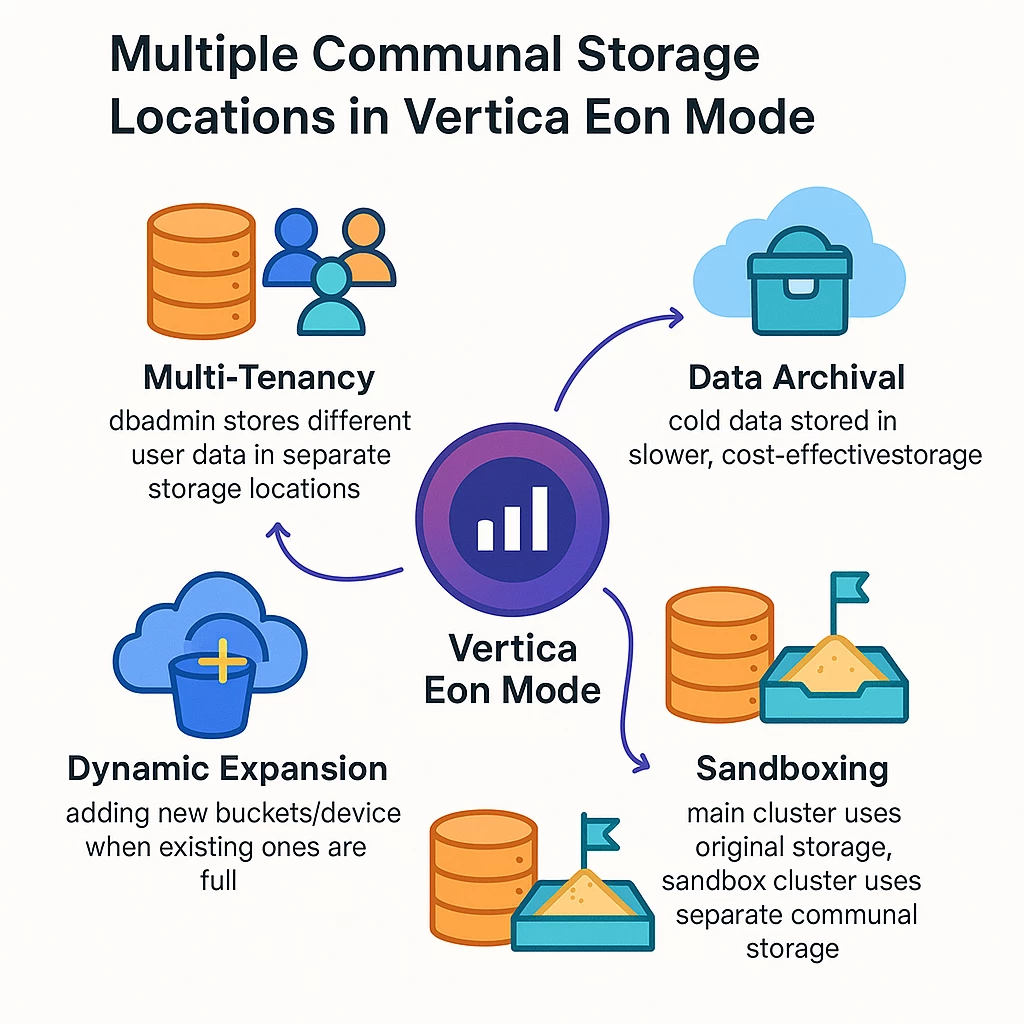
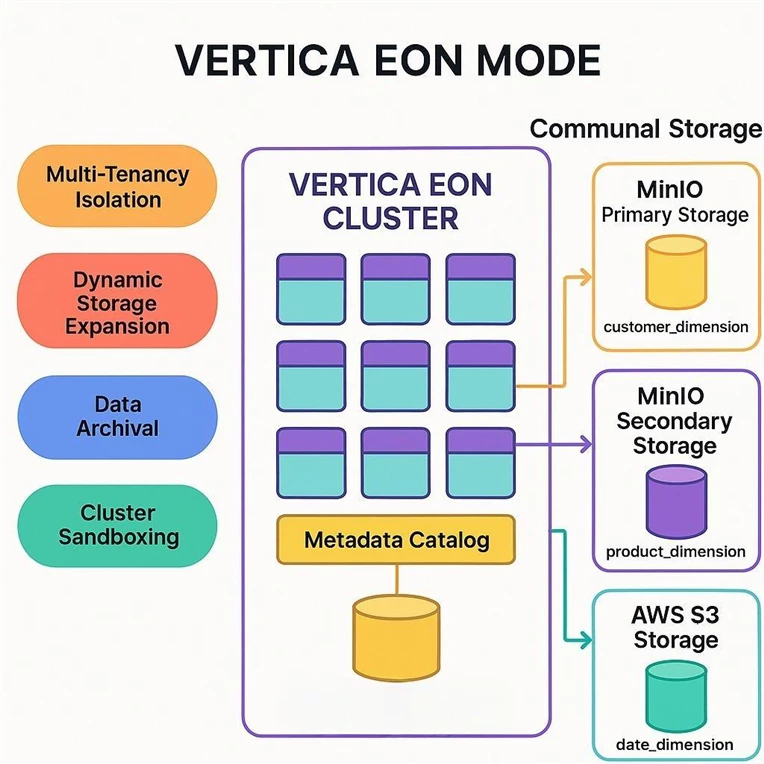
Starting Vertica 25.1, users can now configure multiple communal storage locations within a single database. This powerful enhancement opens the door to a range of advanced use cases that improve scalability, flexibility, and data management across hybrid and multi-cloud environments.
Why Multiple Communal Storage Locations Matter
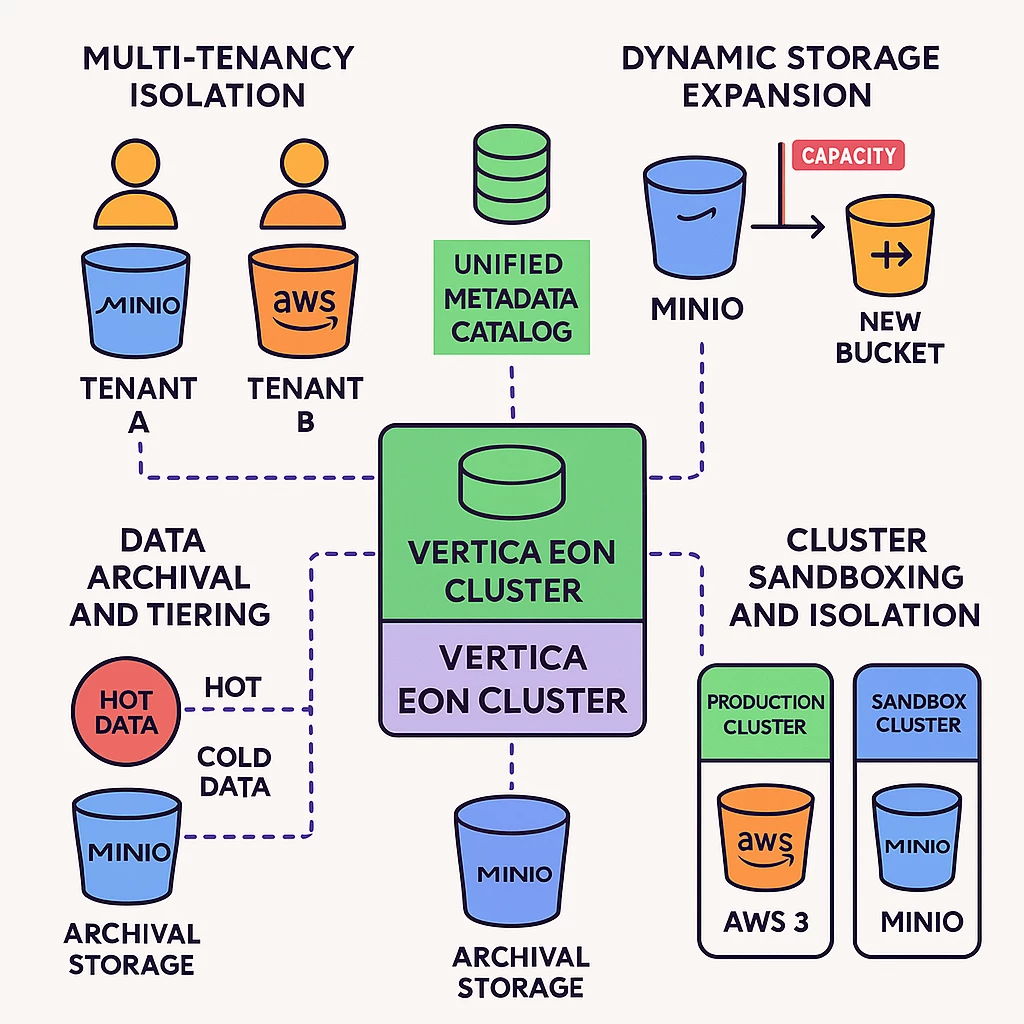
1. Multi-Tenancy Isolation
In multi-tenant applications, it's often critical to isolate data by user or tenant group. With multiple communal storage locations, database administrators can assign distinct storage backends to different tenants thus enhancing data security, simplifying access control, and enabling more granular cost tracking.
2. Dynamic Storage Expansion
As data volumes grow, existing prem storage buckets such as PureStorage Flash Blade may reach capacity. Administrators can now add new storage locations on demand. This allows seamless scaling without downtime or disruption.
3. Data Archival and Tiering
Not all data needs to reside in high-performance storage. Cold or infrequently accessed data can be offloaded to slower, cost-effective storage such as on-prem archival systems. This helps reduce storage costs while keeping the data accessible when needed.
4. Cluster Sandboxing and Isolation
Development and testing environments often require isolation from production data. With this feature, sandbox subclusters can be configured to use separate communal storage locations, allowing safe experimentation without impacting the production environment.
The ability to define multiple communal storage locations adds a new layer of flexibility to Vertica’s EON mode architecture. Whether you're managing multi-tenant workloads, scaling storage dynamically, this feature gives you the tools to do it efficiently and securely.
Storage Locations Overview
Storage locations in Vertica are file system paths on each cluster node where the database stores:
- Data files
- Temporary files
- Catalog files (managed internally by Vertica)
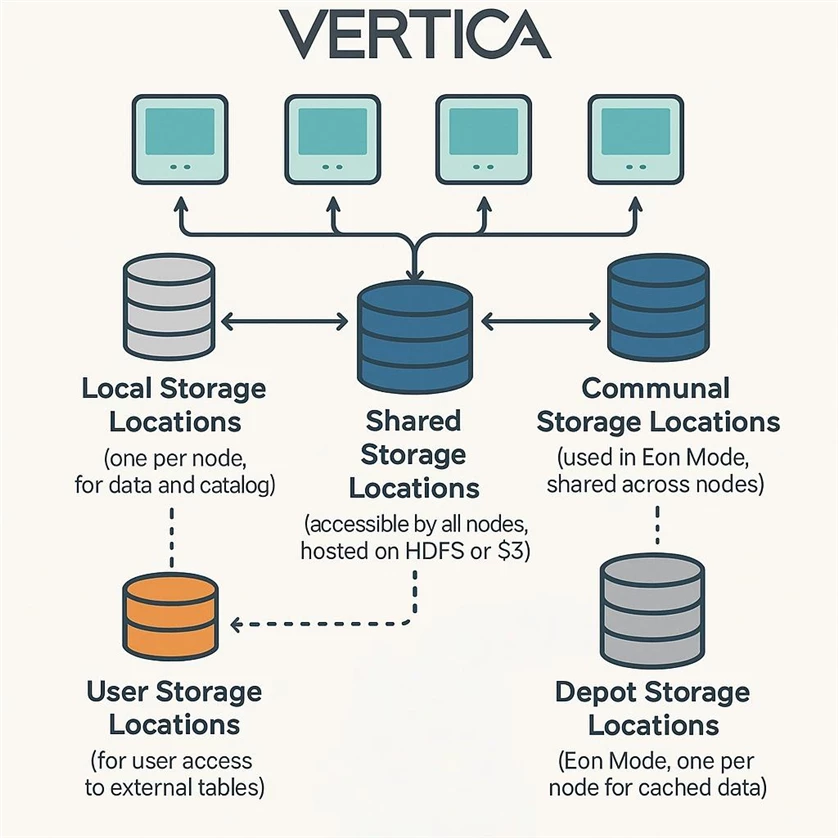
Vertica offers a variety of storage location types to support different architectural needs. As illustrated in the diagram, these include local, shared, user, depot, and communal storage locations. In this post, we’ll focus on communal storage locations, which play a key role in Vertica’s Eon Mode.
🔹 What Are Communal Storage Locations?
Communal storage locations are:
- Exclusive to Eon Mode – Vertica’s cloud-native architecture designed for scalability and flexibility.
- Shared across all nodes – They store data that is accessible by every node in the cluster, enabling efficient resource utilization.
- Cloud-backed – Typically supported by cloud storage platforms such as Amazon S3 or Google Cloud Storage, allowing for elastic compute and persistent storage separation.
SQL Functions for Managing Vertica Storage Locations
|
Function Name |
Description |
Example Syntax |
|
CREATE LOCATION |
Create a new storage location
|
CREATE LOCATION 's3://bucket/s3' COMMUNAL USAGE 'DATA' LABEL 'cold-storage';
|
|
ALTER_LOCATION_LABEL |
Changes the label of a storage location. |
SELECT ALTER_LOCATION_LABEL('path','', 'label'); |
|
CLEAR_OBJECT_STORAGE_POLICY |
Removes storage policy settings from an object. |
SELECT CLEAR_OBJECT_STORAGE_POLICY('schema.table'); |
|
DROP_LOCATION |
Removes a storage location from a node. |
SELECT DROP_LOCATION('/path', ' '); |
|
RETIRE_LOCATION |
Marks a storage location as retired. |
SELECT RETIRE_LOCATION('/path', ' '); |
|
SET_OBJECT_STORAGE_POLICY |
Assigns a storage policy to an object. |
SELECT SET_OBJECT_STORAGE_POLICY('schema.table', 'label'); |
📊 System Tables for Monitoring Storage Policies in Vertica
|
System Table |
Purpose |
|
V_MONITOR.STORAGE_POLICIES |
Displays current storage policies applied to database objects. |
|
V_MONITOR.STORAGE_CONTAINERS |
Shows which projections are stored in which storage locations. |
|
V_MONITOR.STORAGE_LOCATIONS |
Lists all storage locations and their usage types and labels. |
|
V_MONITOR.PARTITIONS |
Displays partitioned projections and their associated storage labels. |
|
V_MONITOR.STORAGE_TIERS |
Summarizes storage tiers by label, node count, and usage. |
🔍 Deep Dive: A Practical Example
Let’s walk through a hands-on example to demonstrate how multiple communal storage locations work in practice.
In this scenario, we use Vertica 25.2 running on on-premises deployment with MinIO as the primary communal storage backend.
Step 1: Create the database with Primary Communal Storage Location (MinIO)
We begin by verifying the communal storage configuration:
multicommunal=> select location_id,location_path,location_usage,sharing_type from storage_locations where sharing_type = 'COMMUNAL';
-[ RECORD 1 ]--+------------------------------
location_id | 45035996273705034
location_path | s3://sanumula/multicommunal
location_usage | DATA
sharing_type | COMMUNAL
multicommunal=> select version();
-[ RECORD 1 ]--------------------------------
version | Vertica Analytic Database v25.2.0-0
Step 2: Load the data
We use the VMart dataset throughout this blog. The customer_dimension table has been created and populated. For more details, refer to the VMart Documentation.
multicommunal=> \dt public.*
List of tables
Schema | Name | Kind | Owner | Comment
--------+--------------------+-------+---------+---------
public | customer_dimension | table | dbadmin |
(1 row)
Step 3: Verify location of table
To confirm where the table data is stored, please run the below query
multicommunal=> SELECT projection_name, location_path, count(*) from STORAGE_CONTAINERS sc, storage_locations s where schema_name = 'public' and sc.location_label = s.location_label and sharing_type = 'COMMUNAL' group by 1,2 ;
projection_name | location_path | count
--------------------------+-------------------------------+-------
customer_dimension_super | s3://sanumula/multicommunal | 6
Scenario 1: Add a Secondary Communal Storage Location on MinIO
Now that our database is set up with primary communal, we configure and add a MinIO S3 bucket as a secondary communal storage location for our on-premises Vertica Eon Mode deployment.
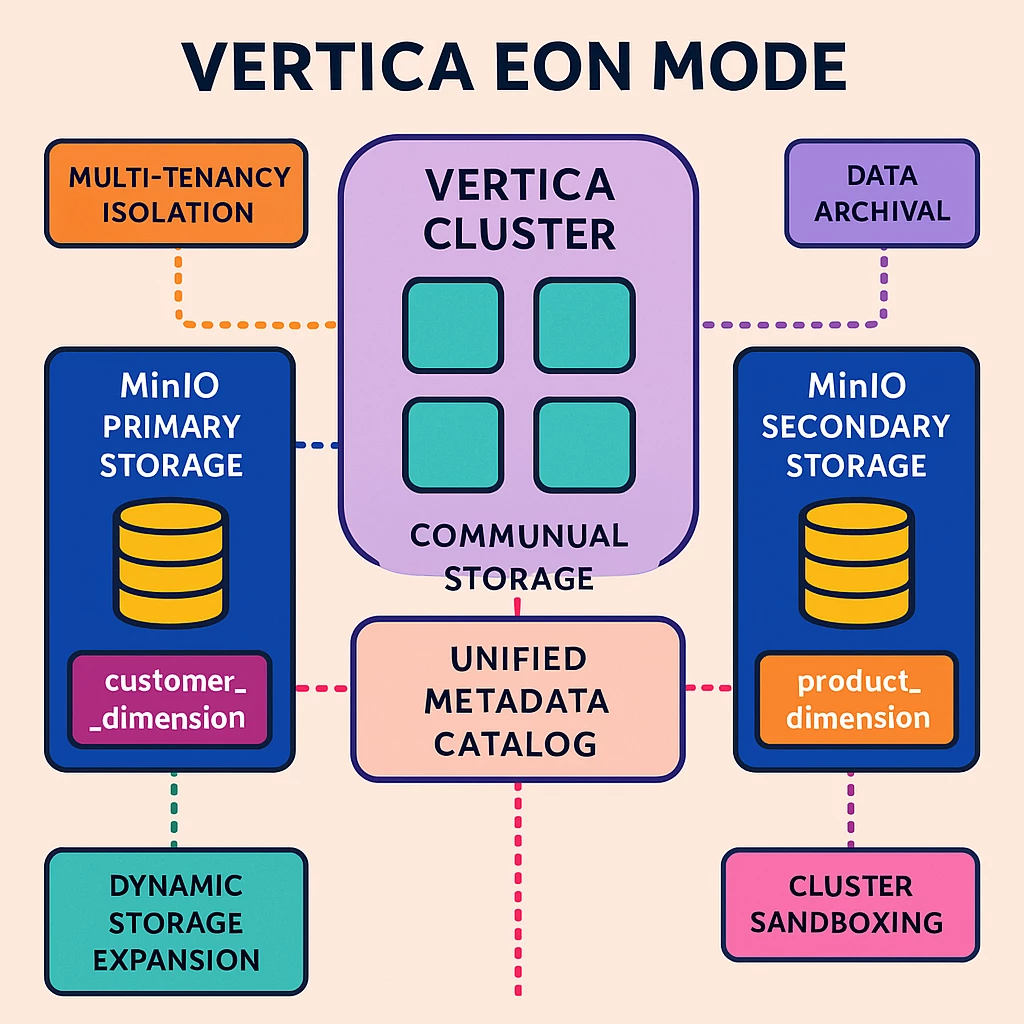
We assign it a location label (secondary-storage) to help identify which objects are associated with this specific storage backend.
|
Tip: Using a location label is highly recommended for clarity and manageability, especially when working with multiple communal storage locations. |
multicommunal=> CREATE LOCATION 's3://sanumula/secondcommunal' COMMUNAL USAGE 'DATA' LABEL 'secondary-storage';
CREATE LOCATION
Step 1: Assign Tables to Secondary Communal Storage
We’ve successfully created and loaded the product_dimension table. Next, we assign it to the newly configured secondary communal storage location using the SET_OBJECT_STORAGE_POLICY function.
The third parameter of the SET_OBJECT_STORAGE_POLICY function—enforce-storage-move—governs the timing of storage container movement relative to Tuple Mover operations. By default, this flag is set to false, which defers container movement until all pending mergeout tasks have completed. When set to true we instruct Vertica to trigger the Tuple Mover immediately, initiating the background task named “Move Storages” that migrates the table data to the specified storage location without delay.
This ensures that the data is physically relocated to the secondary communal backend (secondary-storage) as soon as the policy is applied
multicommunal=> SELECT SET_OBJECT_STORAGE_POLICY('public.product_dimension', 'secondary-storage','true');
SET_OBJECT_STORAGE_POLICY
----------------------------------------------------------------------------------------------------------------------------------------------------------------------
Object storage policy set.
Task: moving storages
(Table: default_namespace.public.product_dimension) (Projection: default_namespace.public.product_dimension_super)
(1 row)
Step 2: Verify Storage Assignment
To confirm which communal storage location a table is using:
multicommunal=> SELECT node_name, location_label,projection_name FROM STORAGE_CONTAINERS where schema_name = 'public' and location_label = 'secondary-storage';
node_name | location_label | projection_name
--------------------------+-------------------+--------------------------
v_multicommunal_node0001 | secondary-storage | product_dimension_super
v_multicommunal_node0001 | secondary-storage | product_dimension_super
v_multicommunal_node0002 | secondary-storage | product_dimension_super
v_multicommunal_node0002 | secondary-storage | product_dimension_super
v_multicommunal_node0003 | secondary-storage | product_dimension_super
v_multicommunal_node0003 | secondary-storage | product_dimension_super
If location_label shows 'secondary-storage', the table is now associated with the secondary communal storage.
Step 3: Validate ROS containers files on MinIO
Let’s fetch the list of ROS containers files associated with product dimension table.
multicommunal=> select projection_name,sal_storage_id,location_label from storage_containers where location_label = 'secondary-storage' order by 1 desc;
projection_name | sal_storage_id | location_label
-------------------------+--------------------------------------------------+-------------------
product_dimension_super | 0218b88103294c19ef37a5132d3d2c9000b000000002458f | secondary-storage
product_dimension_super | 0218b88103294c19ef37a5132d3d2c9000b0000000024591 | secondary-storage
product_dimension_super | 02d04a689f2537e28b181ec0f3f2134300c000000002458f | secondary-storage
product_dimension_super | 02d04a689f2537e28b181ec0f3f2134300c0000000024591 | secondary-storage
product_dimension_super | 02f7e09e28bd50a3be96fa656136608500a0000000024593 | secondary-storage
product_dimension_super | 02f7e09e28bd50a3be96fa656136608500a0000000024591 | secondary-storage
Next, use the aws s3 ls command to verify the physical presence of these container files in the MinIO bucket. Replace the sal_storage_id in the command below with one from the query result:
[dbadmin@sanumula01 VMart_Schema]$ aws s3 ls --recursive s3://sanumula/secondcommunal/ --endpoint=http://10.xx.yy.zzz:9000|grep 0218b88103294c19ef37a5132d3d2c9000b000000002458f
2025-07-25 18:18:19 397190 secondcommunal/79e/0218b88103294c19ef37a5132d3d2c9000b000000002458f_0.gt
This confirms that the ROS container file (.gt) is present in the second communal storage location.
Scenario 2: Creating third communal storage location on AWS
We'll configure an additional communal storage location using Amazon S3. As part of this setup, we'll create a new table named date_dimension. Once the data is loaded, we will assign it to AWS communal.
Step 1: Configure S3 bucket Config
Since this deployment is running on-premises, we need to explicitly configure AWS S3 credentials to enable access to communal storage. This typically involves setting the following database parameters:
- S3BucketConfig: Defines the bucket, region, and endpoint.
- S3BucketCredentials: Provides access and secret keys for authentication.
|
Note: In cloud-hosted Eon deployments, authentication is usually handled via IAM roles, so manual credential setup is often unnecessary. However, if you're using MinIO or Pure Storage as an additional communal storage backend, credentials must be configured manually—regardless of the deployment environment. Ensure that the credentials provided have the necessary permissions to read from and write to the specified S3 buckets or compatible storage endpoints. |
ALTER DATABASE DEFAULT SET S3BucketConfig='
[
{
"bucket": "veritca-fleeting-multi",
"region": "us-east-1",
"endpoint": "s3.amazonaws.com"
}
]';
ALTER DATABASE DEFAULT SET S3BucketCredentials='
[
{
"bucket": "veritca-fleeting-multi",
"accessKey": "AK0",
"secretAccessKey": "SAK0"
}
]';
Step 2: Create a secondary communal storage location.
Now that the credentials are configured, we can create a third communal storage location. We assign it a location label (AWS-storage) to help identify which objects are associated with this specific storage backend.
Tip: Using a location label is highly recommended for clarity and manageability, especially when working with multiple communal storage locations.
multicommunal=> CREATE LOCATION 's3://veritca-fleeting-multi/AWScommunal' COMMUNAL USAGE 'DATA' LABEL 'AWS-storage';
CREATE LOCATION
Step 3: Assign Tables to AWS Communal Storage
I have created date_dimension table and loaded it to the database. Now, let us assign to AWS Communal Storage.
multicommunal=> SELECT SET_OBJECT_STORAGE_POLICY('public.date_dimension', 'AWS-storage','true');
SET_OBJECT_STORAGE_POLICY
----------------------------------------------------------------------------------------------------------------------------------------------------------------
Object storage policy set.
Task: moving storages
(Table: default_namespace.public.date_dimension) (Projection: default_namespace.public.date_dimension_super)
(1 row)
Step 4: Verify Storage Assignment
To confirm which communal storage location a table is using:
multicommunal=> SELECT node_name, location_label,projection_name FROM STORAGE_CONTAINERS where schema_name = 'public' and location_label = 'AWS-storage';;
node_name | location_label | projection_name
--------------------------+-------------------+--------------------------
v_multicommunal_node0003 | AWS-storage | date_dimension_super
v_multicommunal_node0003 | AWS-storage | date_dimension_super
v_multicommunal_node0002 | AWS-storage | date_dimension_super
v_multicommunal_node0002 | AWS-storage | date_dimension_super
v_multicommunal_node0001 | AWS-storage | date_dimension_super
v_multicommunal_node0001 | AWS-storage | date_dimension_super
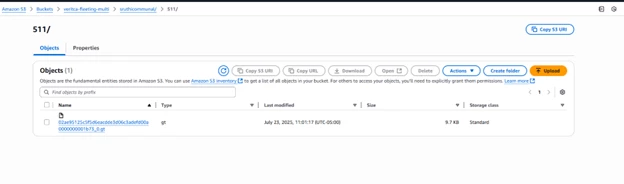
Step 5: Verify ROS container files on AWS
The screenshot below demonstrates that ROS containers are on S3.
🗃️ Decommissioning Communal Storage
As part of our recent deep dive, we introduced two additional communal storage locations to support scalability and flexibility. While these additions can be beneficial, there are scenarios where removing them becomes necessary such as
- Reducing complexity in your storage architecture
- Once testing of the new Vertica version is completed using the sandbox subcluster.
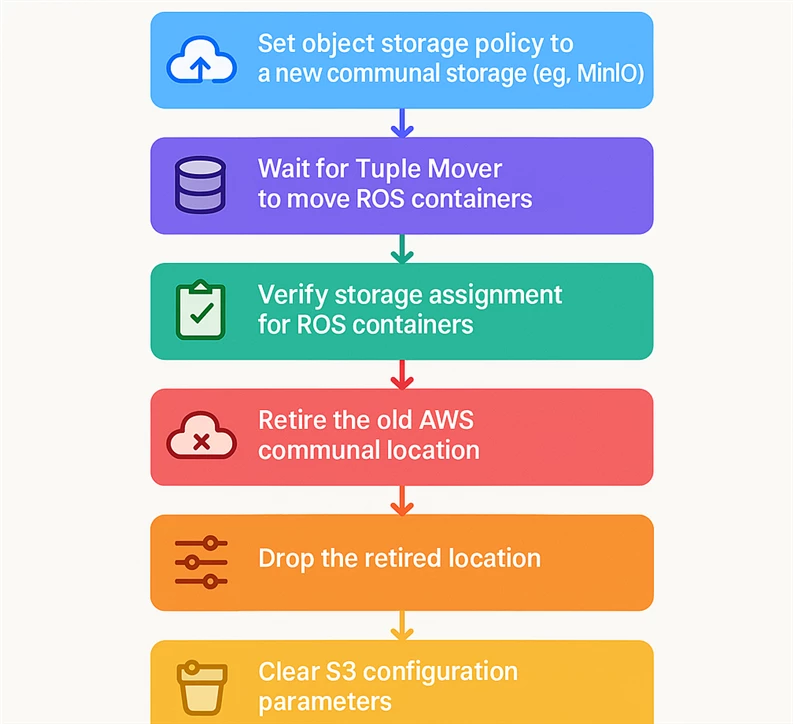
We’ll walk through the process of decommissioning one communal storage location. For this example, we focus on retiring an AWS-based communal storage in a Vertica environment.
Step 1: Verify Current Storage Policies
Before proceeding, it’s important to review the storage policies currently defined in the database. Storage policies in Vertica determine how data is tiered across different storage locations. To inspect existing policies and their configurations, please run the below SQL query.
multicommunal=> select * from storage_policies;
namespace_name | schema_name | object_name | policy_details | location_label
-------------------+-------------+----------------------+----------------+-------------------
default_namespace | public | product_dimension | Table | secondary-storage
default_namespace | public | date_dimension | Table | AWS-storage
default_namespace | public | date_dimension_super | Projection | AWS-storage
(3 rows)
Step 2: we’re changing the object storage policy of date_dimension to secondary storage on MinIO.
multicommunal=> SELECT SET_OBJECT_STORAGE_POLICY('public.date_dimension', 'secondary-storage','true');
SET_OBJECT_STORAGE_POLICY
----------------------------------------------------------------------------------------------------------------------------------------------------------------
Object storage policy set.
Task: moving storages
(Table: default_namespace.public.date_dimension) (Projection: default_namespace.public.date_dimension_super)
(1 row)
multicommunal=> SELECT node_name, location_label,projection_name FROM STORAGE_CONTAINERS where schema_name = 'public' and location_label = 'secondary-storage';
node_name | location_label | projection_name
--------------------------+-------------------+--------------------------
v_multicommunal_node0003 | secondary-storage | date_dimension_super
v_multicommunal_node0003 | secondary-storage | date_dimension_super
v_multicommunal_node0003 | secondary-storage | product_dimension_super
v_multicommunal_node0003 | secondary-storage | product_dimension_super
v_multicommunal_node0002 | secondary-storage | date_dimension_super
v_multicommunal_node0002 | secondary-storage | date_dimension_super
v_multicommunal_node0002 | secondary-storage | product_dimension_super
v_multicommunal_node0002 | secondary-storage | product_dimension_super
v_multicommunal_node0001 | secondary-storage | date_dimension_super
v_multicommunal_node0001 | secondary-storage | date_dimension_super
v_multicommunal_node0001 | secondary-storage | product_dimension_super
v_multicommunal_node0001 | secondary-storage | product_dimension_super
Step 3: Wait for Tuple Mover to Complete
The Tuple Mover background process will handle moving the ROS containers. Monitor its progress with:
select * from tuple_mover_operations where operation_name = 'Move Storages' and is_executing;
Once the Tuple Mover has successfully moved the ROS container files, the query should return zero rows
Step 4: Confirm Storage Assignment
multicommunal=> select projection_name,sal_storage_id,location_label from storage_containers where projection_name = 'date_dimension_super';
projection_name | sal_storage_id | location_label
----------------------+--------------------------------------------------+-------------------
date_dimension_super | 02d04a689f2537e28b181ec0f3f2134300c0000000001f55 | secondary-storage
date_dimension_super | 02d04a689f2537e28b181ec0f3f2134300c0000000001f59 | secondary-storage
date_dimension_super | 02ae95125c5f5d6eacdde3d06c3adefd00a0000000001f55 | secondary-storage
date_dimension_super | 02ae95125c5f5d6eacdde3d06c3adefd00a0000000001f59 | secondary-storage
date_dimension_super | 0218b88103294c19ef37a5132d3d2c9000b0000000001f55 | secondary-storage
date_dimension_super | 0218b88103294c19ef37a5132d3d2c9000b0000000001f5b | secondary-storage
(6 rows)
Step 5: Retire the Communal Location
Once data has been moved, retire the AWS communal location:
multicommunal=> SELECT RETIRE_LOCATION('s3://veritca-fleeting-multi/AWScommunal/' , '');
RETIRE_LOCATION
------------------------------------------------------
s3://veritca-fleeting-multi/AWScommunal/ retired.
(1 row)
Step 6: Drop the Communal Location
Now, drop the retired location:
multicommunal=> SELECT DROP_LOCATION('s3://veritca-fleeting-multi/AWScommunal/' , '');
DROP_LOCATION
------------------------------------------------------
s3://veritca-fleeting-multi/AWScommunal/ dropped.
(1 row)
Step 7: Clear the S3 per bucket Configuration Parameters
Remove any lingering S3 configuration from the database:
multicommunal=> ALTER DATABASE DEFAULT CLEAR S3BucketCredentials,S3BucketConfig;
ALTER DATABASE
multicommunal=>
Step 8: Manually Clean Up AWS Storage
Vertica does not automatically delete the contents of the communal storage. You must manually clean up the S3 bucket to complete the decommissioning process.
This step-by-step guide ensures a clean and safe removal of unused communal storage, helping you maintain an optimized and secure Vertica environment.
❓ Frequently Asked Questions (FAQ)
🔹 What is a communal storage location in Vertica Eon Mode?
A communal storage location is a shared object store (e.g., AWS S3, GCS, Azure blog storage, PureStorage, MinIO) where Vertica stores database data in Eon Mode. All nodes in the cluster access this shared storage for reading and writing data.
🔹 Which version of Vertica supports Multiple communal storage locations Feature?
It is supported starting Vertica 25.1.
🔹 Can I use different cloud providers for communal storage locations within a single EON database?
No. You cannot use different cloud providers for a single EON Mode database.
🔹 How do I assign specific tables or schemas to a particular storage location?
You can use the SET_OBJECT_STORAGE_POLICY function to assign individual database objects (such as tables or schemas) to a specific communal storage location by its label
SELECT SET_OBJECT_STORAGE_POLICY('public.my_table', 'cold_archive');
🔹 What happens if one of the storage locations becomes unavailable?
Vertica will continue to operate using the available storage locations. However, any data stored exclusively in an unavailable location may be temporarily inaccessible. It’s recommended to design your storage strategy with redundancy and availability in mind.
🔹 Is there a limit to how many communal storage locations I can define?
There is no hard-coded limit, but practical limits may depend on your infrastructure, network performance, and operational complexity. Vertica recommends keeping the number of locations manageable and aligned with your data architecture strategy.
🔹 Can I remove a communal storage location after it's been added?
Yes, but only if no database objects are currently assigned to it. You must first reassign using SET_OBJECT_STORAGE_POLICY or drop those objects before removing the location using DROP LOCATION.
🔹 Can I prioritize one storage location over another?
Vertica does not currently support prioritization or weighing communal storage locations. However, you can control where data is stored by explicitly assigning objects to specific locations using SET_OBJECT_STORAGE_POLICY.
🔹 Are there performance implications when using multiple storage locations?
Yes, performance can vary depending on the latency, throughput, and reliability of each storage backend. For optimal performance, ensure that storage endpoints are geographically close to your compute nodes and that network bandwidth is sufficient.
🔹 How does Vertica handle metadata across multiple storage locations?
Vertica maintains a unified metadata catalog regardless of how many communal storage locations are configured. This ensures consistent query planning and execution across all storage backends.
🔹 Can I use different authentication methods for each storage location?
Yes. Each communal storage location can be configured with its own authentication method, such as IAM roles for AWS S3, service account keys for GCS, or access/secret keys for MinIO. This allows secure integration with diverse storage systems.
🔹 Is data automatically rebalanced across storage locations?
No. Vertica does not automatically redistribute data between communal storage locations. You must explicitly assign or migrate data using object storage policies or manual ETL processes.
🔹 Can I monitor usage or performance of each storage location?
While Vertica does not provide per-location performance dashboards out of the box, you can monitor I/O patterns using system tables, logs, and external tools like cloud provider metrics (e.g., AWS CloudWatch, MinIO Console).
🔹 Can I use this feature in Vertica on Kubernetes?
No. Vertica Eon Mode on Kubernetes doesn’t support multiple communal storage locations.
🔹 Where does the data get loaded by default for multi-communal database?
Data is always loaded in primary communal storage location by default.
🔹 How to monitor the data movement to another communal?
Use the following query to monitor it
select * from tuple_mover_operations where operation_name = 'Move Storages' and is_executing;
Additional Information




