



In Vertica’s Eon Mode, the depot plays a critical role in optimizing query performance by caching frequently accessed data locally on each node. With the release of Vertica 25.2 and 25.3, the Fetcher service and its integration with the Execution Engine (EE) have undergone a major transformation—bringing significant improvements in responsiveness, scalability, and query efficiency.
1.What Is the Depot?
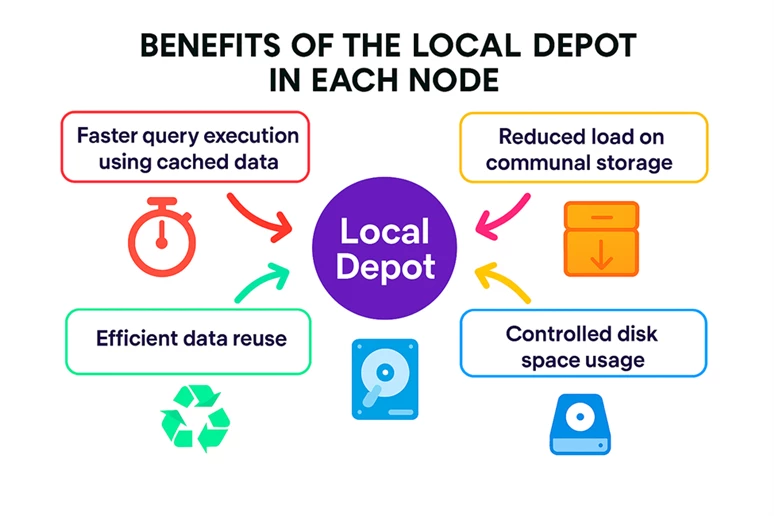
The depot is a local disk cache on each node in an Eon Mode database. Since Eon Mode uses communal storage (shared across all nodes), accessing data directly from this storage can be slower, especially in cloud environments. To mitigate this, Vertica caches frequently accessed data locally in the depot.
1.1. Key Functions of the Depot
1.1.1. Query Optimization
- When a query is run, Vertica first checks the local depot for the required data.
- If the data is present, it uses the cached version, which is faster.
- If not, it fetches the data from communal storage and stores a copy in the depot for future use.
1.1.2. Load Operations:
- Newly loaded data is first cached in the depot.
- Then, it is uploaded to communal storage, ensuring efficient data ingestion.
1.1.3. Subcluster-Based Caching:
- Each subcluster in an Eon Mode database has its own depot, composed of the cached data across its nodes.
- This design allows for scalable and isolated query processing, as each subcluster can operate independently using its own cached data.
1.1.4. Cost Efficiency in Communal Read Access
- Accessing data from the local depot is free of charge, making it the most cost-effective option for query execution.
- In contrast, reading data from communal storage—such as via AWS GET requests—incurs a small per-request cost.
- While each individual request may seem negligible, frequent queries against communal storage can lead to significant cumulative costs over time.
- This reinforces the importance of efficient depot caching, especially for cloud instances, where leveraging local disk access can result in substantial cost savings.
2. Depot Management
Vertica provides tools and configuration options to manage depot behavior:
- Depot Caching Management:
- Administrators can control how data is cached, evicted, and prioritized.
- This includes setting policies for which data should remain in the depot based on usage patterns.
- Resizing Depot Capacity:
- You can resize the depot using the ALTER_LOCATION_SIZE function
- Larger depots can hold more cached data, potentially improving performance for data-intensive queries.
2.1. Depot Caching Management
Let us review depot caching in detail. Vertica's Eon Mode depot caching policies allow fine-grained control over how data is cached locally on each node to optimize performance. Here is a breakdown of the key policies and configuration options:
2.1.1. Types of Cached Data
Vertica depots can cache two main types of data:
- Queried Data: Data fetched during query execution.
- Loaded Data: Data ingested during load operations (e.g., COPY statements).
By default, depots cache both types.
2.1.2. Gateway Parameters
These parameters control whether the depot is used for reads and writes:
- UseDepotForReads
- 1 (default): Check the depot for queried data; if not found, fetch from communal storage and cache it.
- 0: Bypass the depot and always fetch queried data directly from communal storage.
- UseDepotForWrites
- 1 (default): Cache loaded data in the depot before uploading to communal storage.
- 0: Bypass the depot and write directly to communal storage.
These can be set at the session, user, or database level, allowing for flexible control across subclusters or users.
Example:
- User Joe: UseDepotForReads = 1, UseDepotForWrites = 0 → depot used only for queries.
- User Rhonda: UseDepotForReads = 0, UseDepotForWrites = 1 → depot used only for loads.
2.1.3. Depot Fetching Policy
Controlled by the parameter DepotOperationsForQuery, which determines how data is fetched from communal storage:
- ALL (default): Fetch data and evict older files if needed to make space.
- FETCHES: Fetch only if space is available; otherwise, read directly from communal storage.
- NONE: Do not fetch; read directly from communal storage without caching.
2.1.4 Depot Eviction
In Vertica’s Eon Mode, the depot acts as a local cache on each node, storing frequently accessed data to improve query performance. To maintain optimal performance and space efficiency, Vertica uses eviction policies to manage what data stays in the depot and what gets removed.
2.1.4.1. How Depot Eviction Works
Depot eviction is triggered when new data needs to be cached, and space must be freed. The eviction process depends on the source of the incoming data:
- From Communal Storage: Vertica estimates the size of the incoming data and evicts existing depot data accordingly.
- From DML Operations (e.g., COPY): Since the total size of the upload is not known upfront, Vertica evicts data based on buffer sizes during the operation.
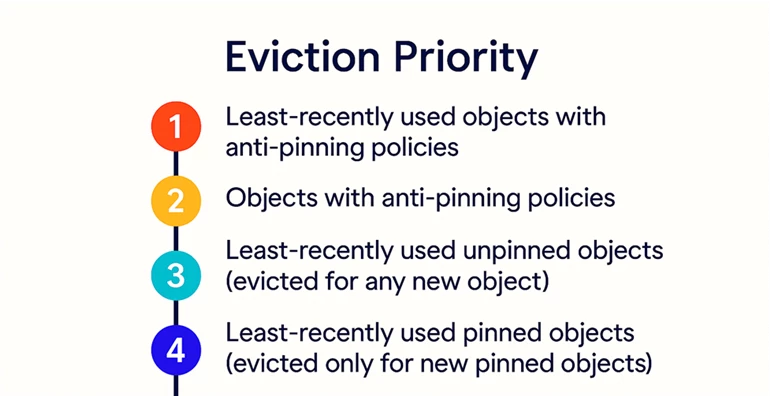
2.1.4.2. Eviction Priority Order
Vertica evicts objects from the depot based on the following priority (from highest to lowest):
- Least recently used objects with anti-pinning policies
- Objects with anti-pinning policies
- Least recently used unpinned objects (evicted for any new object)
- Least recently used pinned objects (evicted only for new pinned objects)
2.1.5. Depot Eviction Policies
Vertica supports two types of policies to control the behavior of eviction:
- Pinning Policies: Reduce the likelihood of eviction for important objects.
- Anti-Pinning Policies: Increase the likelihood of eviction for less critical objects.
These policies can be applied at various levels:
- Database-wide
- Subcluster-specific
- Object-level: Tables, projections, and partitions
2.1.5.1. Setting Pinning Policies
Use the following functions to apply pinning policies:
- SET_DEPOT_PIN_POLICY_TABLE
- SET_DEPOT_PIN_POLICY_PROJECTION
- SET_DEPOT_PIN_POLICY_PARTITION
To immediately queue pinned objects for download from communal storage to the depot, set the last argument of the function to true. Example:
SELECT SET_DEPOT_PIN_POLICY_TABLE('store.store_orders_fact', 'default_subcluster', true);
2.1.5.2. Setting Anti-Pinning Policies
Use these functions to apply anti-pinning policies:
- SET_DEPOT_ANTI_PIN_POLICY_TABLE
- SET_DEPOT_ANTI_PIN_POLICY_PROJECTION
- SET_DEPOT_ANTI_PIN_POLICY_PARTITION
Anti-pinning is useful for deprioritizing infrequently accessed data, ensuring that high-demand data remains cached.
2.1.5.3. Handling Overlapping Policies
When multiple policies are applied to the same object:
- Same type (e.g., multiple anti-pinning policies): Vertica merges overlapping key ranges.
- Different types (e.g., pinning, and anti-pinning): The most recent policy takes precedence. Older policies may be truncated or split.
2.1.5.4. Best Practices for Eviction Policies
To optimize depot usage:
- Pin only frequently accessed data.
- Apply policies at the most granular level (e.g., specific partitions).
- Regularly review and update policies across subclusters.
- Use configuration parameters like UseDepotForReads and UseDepotForWrites to fine-tune depot behavior.
2.1.5.5. Clearing Eviction Policies
To remove existing policies, use:
- Tables: CLEAR_DEPOT_PIN_POLICY_TABLE, CLEAR_DEPOT_ANTI_PIN_POLICY_TABLE
- Projections: CLEAR_DEPOT_PIN_POLICY_PROJECTION, CLEAR_DEPOT_ANTI_PIN_POLICY_PROJECTION
- Partitions: CLEAR_DEPOT_PIN_POLICY_PARTITION, CLEAR_DEPOT_ANTI_PIN_POLICY_PARTITION
2.1.6. Depot Warming
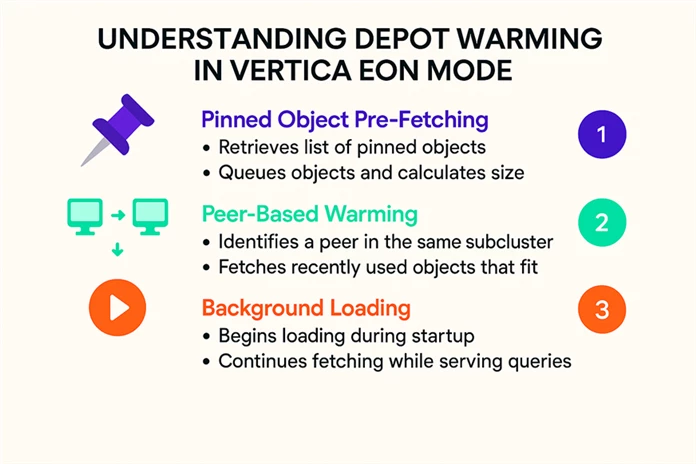
One can enable depot warming on new or restarted nodes to pre-load frequently accessed data, improving performance after node restarts. By default, depot warming -the process of preloading data into the depot- is disabled (EnableDepotWarmingFromPeers = 0). When enabled, depot warming follows a structured process:
2.1.6.1. Pinned Object Pre-Fetching
If PreFetchPinnedObjectsToDepotAtStartup is enabled:
- The node retrieves a list of pinned objects from the database catalog.
- These objects are queued for fetching, and their total size is calculated.
2.1.6.2. Peer-Based Warming
If EnableDepotWarmingFromPeers is enabled:
- The node identifies a peer within the same subcluster to copy depot contents from.
- After accounting for pinned objects, it calculates remaining depot space.
- It then fetches recently used objects from the peer that fit within the available space.
2.1.6.3. Background Loading
If BackgroundDepotWarming is enabled (default setting):
- The node begins loading queued objects during startup and continues in the background while serving queries.
- If disabled, the node waits until all queued objects are loaded before becoming active.
2.1.6.4. Completing Fetch Operations with FINISH_FETCHING_FILES()
Sometimes, even after depot warming steps, files remain in the fetch queue. This is where FINISH_FETCHING_FILES() becomes useful.
We typically use it in two cases:
- After a node restart when background depot warming was not enabled, but you want to finish warming immediately.
- After running a query on data not yet in the depot, you can complete the fetch before re-running the query for better performance.
SELECT FINISH_FETCHING_FILES();
This ensures all queued files are fetched from communal storage into the depot, making it a perfect addition to the Depot Warming process.
2.1.7. Clearing the Depot
Vertica provides the CLEAR_DATA_DEPOT function to delete cached data from depots. This is useful for freeing up space or resetting the cache.
Note: This can significantly impact performance if you are actively querying data in the database.
|
Scenario |
Syntax |
|
Clear all depot data from the entire cluster |
SELECT CLEAR_DATA_DEPOT(); |
|
Clear specific table from all depots |
SELECT CLEAR_DATA_DEPOT('t1'); |
|
Clear specific table from a subcluster |
SELECT CLEAR_DATA_DEPOT('t1', 'subcluster_1'); |
|
Clear all tables from a subcluster |
SELECT CLEAR_DATA_DEPOT('', 'subcluster_1'); |
|
Clear all tables from a specific node |
SELECT CLEAR_DATA_DEPOT('', 'v_vmart_node0001'); |
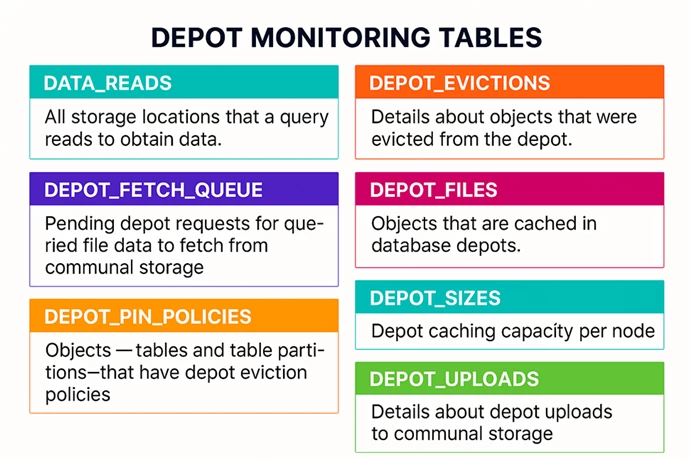
2.1.8. Monitoring the Depot
Depot activity can be monitored using the system tables listed in the infographic. For more information, please visit Monitoring the Depot section
Now that we have a broad picture of Depot and its internals, let us dive deep into the fetcher service, which fetches the files into depot.
Revamping Vertica’s Fetcher Service in 25.2: A Leap in Performance and Flexibility
In Vertica 25.2, we introduced a major upgrade to the Fetcher service, the component responsible for downloading files from communal storage to the local depot. This was not just a tune-up; we rebuilt Fetcher from the ground-up to deliver greater responsiveness, scalability, and control.
1. Why the overhaul?
Before 25.2, the Fetcher service had several architectural and operational limitations that impacted performance and flexibility:
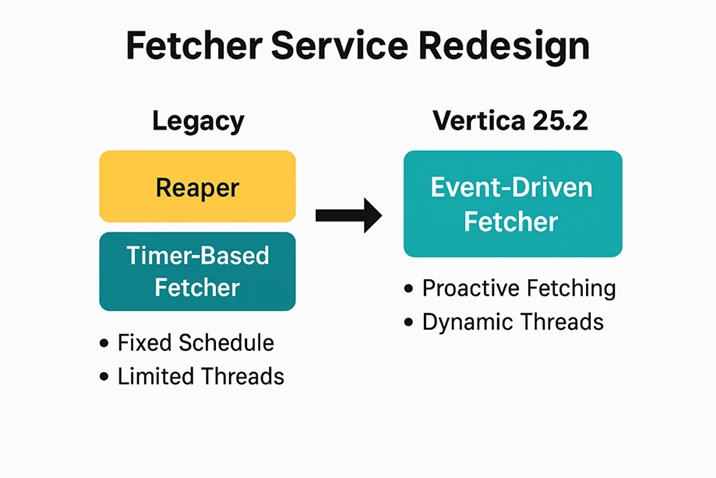
- Tied to the Reaper Sub-Service: Fetcher was implemented as a sub-service of the Reaper, which introduced unnecessary overhead and limited its independence.
- Rigid Scheduling: It operated as a timer-based service, running at a fixed interval of 60 seconds by default. Unless users manually reduced this interval, Fetcher would not proactively download files to the depot, potentially delaying data availability for queries.
- Threading Constraints: The number of Fetcher threads was hard capped at 64. Adjusting this required modifying a configuration knob and restarting the database posed as an operational inconvenience, especially in dynamic environments.
2. Laying the Groundwork for Vertica’s New Fetcher Service
As part of the major redesign of the Fetcher service in Vertica 25.2, we also made foundational improvements to supporting components. These changes were essential to ensure the new Fetcher could deliver on its promise of responsiveness and scalability.
2.1 ActiveQueue: A Smarter Threading Backbone
Vertica uses ActiveQueue internally for on-demand threading in components like Parquet and ORC readers. In preparation for the new Fetcher, we re-architected ActiveQueue to provide more robust and flexible task handling. The redesigned service now includes:
- Thread Management: Handles operations such as fork/join, enabling more efficient parallelism.
- Queue Management: Manages task queues based on specific requirements like queue type or task grouping.
- Task Management: Encapsulates tasks for individual components, such as Fetcher-related operations, allowing for better isolation and control.
This modular design ensures that threading and task execution are optimized for performance and scalability across Vertica’s architecture.
2.2 Fetcher Performance Metrics: Visibility into Thread Behavior
To monitor and fine-tune the new Fetcher, we introduced several performance counters that provide deep visibility into thread activity and potential bottlenecks.
New and enhanced metrics include:
- dc_depot_fetches: Tracks submission time, arrival time, fetch start/end time, and completion time. (Note: fetch start/end time existed previously.)
- v_monitor.depot_fetches: Adds counters for wait time, response time, fetch time, processing time, and turnaround time—critical for identifying delays at the queue, node, or thread level.
- depot_fetch_queue: Includes submission and arrival time counters to help pinpoint which Fetcher threads are actively executing.
These metrics empower users to diagnose performance issues and optimize Fetcher behavior in real time.
3. Building the New Fetcher: From Legacy to Standalone Efficiency
With the groundwork in place, Vertica 25.2 introduced a major architectural shift: the Fetcher service was decoupled from the Reaper and reimplemented as a standalone service. This transformation was more than just a refactor—it laid the foundation for a more responsive, scalable, and efficient data-fetching mechanism.
3.1. From Timer to ActiveQueue
One of the most impactful changes was replacing the legacy timer-based model with the ActiveQueue system. Instead of waiting for a fixed interval to poll for tasks, the new Fetcher now signals its queue manager as tasks arrive, dramatically improving turnaround time and responsiveness.
3.2. Key Improvements in the New Fetcher
- Responsiveness
- The legacy Fetcher relied on a pull-based timer service, introducing delays in task execution. The new Fetcher is push-based, proactively managing its queue and responding to incoming tasks without waiting.
- Scalability:
- Users can now configure thread limits dynamically using two knobs.This allows Fetcher to scale up or down based on workload, ensuring optimal resource usage.
- FetcherWorkerThreads: Minimum number of threads
- MaxFetcherWorkerThreads: Maximum number of threads
- Users can now configure thread limits dynamically using two knobs.This allows Fetcher to scale up or down based on workload, ensuring optimal resource usage.
- Ease of Use:
- Threads are now forked on-demand, eliminating the need for database restarts when adjusting thread counts. The previous hard limit of 64 threads has been expanded to 2048, offering significantly more headroom for high-throughput environments.
- Simplified Implementation:
- As a standalone service, Fetcher benefits from a cleaner architecture with reduced execution overhead, especially in thread management. This makes it easier to maintain and extend in future releases.
 4. Depot EE Integrations: Smarter Reads and Optimized Fetching in Vertica 25.2 & 25.3
As Vertica continues to evolve, the integration between the Execution Engine (EE) and the Depot has become more intelligent and performance aware. With versions 25.2 and 25.3, two major enhancements, Read Location Switching and Eager Fetching were introduced to improve query efficiency, especially for large datasets.
4.1. Smarter Read Location Switching (Introduced in 25.2)
In earlier versions (25.1 and prior), Vertica determined the read location during query planning. If the required file was already in the Depot, the query would be answered using the depot. Otherwise, it defaulted to reading from the communal storage, even if the file was fetched to the Depot during query execution.
This approach had limitations: for cold depot queries, the Execution Engine (EE) would continue reading from communal storage, even if the Fetcher managed to download the file (in the background) to the Depot before the query was completed.
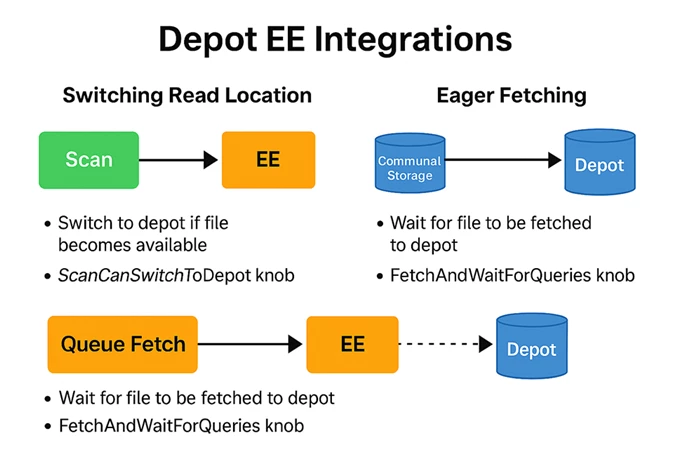
Vertica now allows dynamic switching of read locations during query execution. If the EE detects that a file has arrived in the Depot mid-query, it can switch to reading from the Depot, improving performance, and reducing latency.
Key Conditions for Switching:
- A valid Depot location must exist.
- UseDepotForReads knob is set to 1.
- The query plan type is QUERY.
New Configuration Knob:
- ScanCanSwitchToDepot (enabled by default): Enables the EE to switch read locations dynamically during query execution.
User Benefit:
This feature is especially beneficial for large file queries, where the Fetcher can complete the download before the query finishes. By switching to the Depot mid-query, Vertica can leverage faster local reads, improving overall query performance by efficiently using the depot.
4.2. Eager Fetching (Introduced in 25.3)
Eager Fetching is a new optimization that takes Depot integration a step further. Instead of reading from communal storage while the Fetcher works in the background, the EE can now queue a fetch, wait for the file to arrive in the Depot, and then read from the Depot directly.
Why Eager Fetching?
This approach is ideal for operations involving:
- Large numbers of bundled files
- Queries that read most or all columns from a file
By fetching files to the Depot first, Vertica ensures efficient local reads, reducing I/O overhead and improving performance.
Configuration Knob:
- FetchAndWaitForQueries — Controls when the EE should fetch and wait for files before reading.
Modes Available:
- ALWAYS: Always fetch and wait before reading.
- ONLY_TM: Applies to Mergeout plans only.
- AUTO: Fetches based on column read percentage and file size.
- NEVER (default): Disables eager fetching.
AUTO Mode Parameters:
- FetchAndWaitColPercentage (default: 75%) — Minimum percentage of columns read to trigger eager fetching.
- FetchAndWaitMinColCount (default: 10) — Minimum number of columns in a file to qualify.
Important Note: Eager Fetching depends on ScanCanSwitchToDepot being enabled to allow the EE to read from the Depot once the file arrives.
New Metric Added:
- Fetcher Wait Time (us) — Tracks the time spent waiting for files to arrive at the Depot during eager fetching.
User Benefit:
This feature shifts the performance bottleneck from reading from communal storage to waiting for Depot availability, which is significantly faster and more efficient for certain workloads.
5.Conclusion: A Smarter, Faster Fetcher for Eon Customers
With Vertica 25.2, the Fetcher service has undergone a complete transformation merging as a standalone, event-driven, and highly scalable component. It delivers significant improvements in performance, responsiveness, and ease of use, making it a powerful upgrade for Eon Mode deployments.
If you are an Eon customer looking to accelerate query processing and reduce fetch turnaround times, the new Fetcher will not disappoint. It is built to handle modern workloads with agility and precision.
Additional Information




