


I recently upgraded my Vertica cluster to version 11.1.1-0.x86_64.RHEL6 including the Management Console.
The process was successful but when I log into the MC, go to the Activity > Table Utilization section and select any table I get the following error:
Unable to retrieve chart data
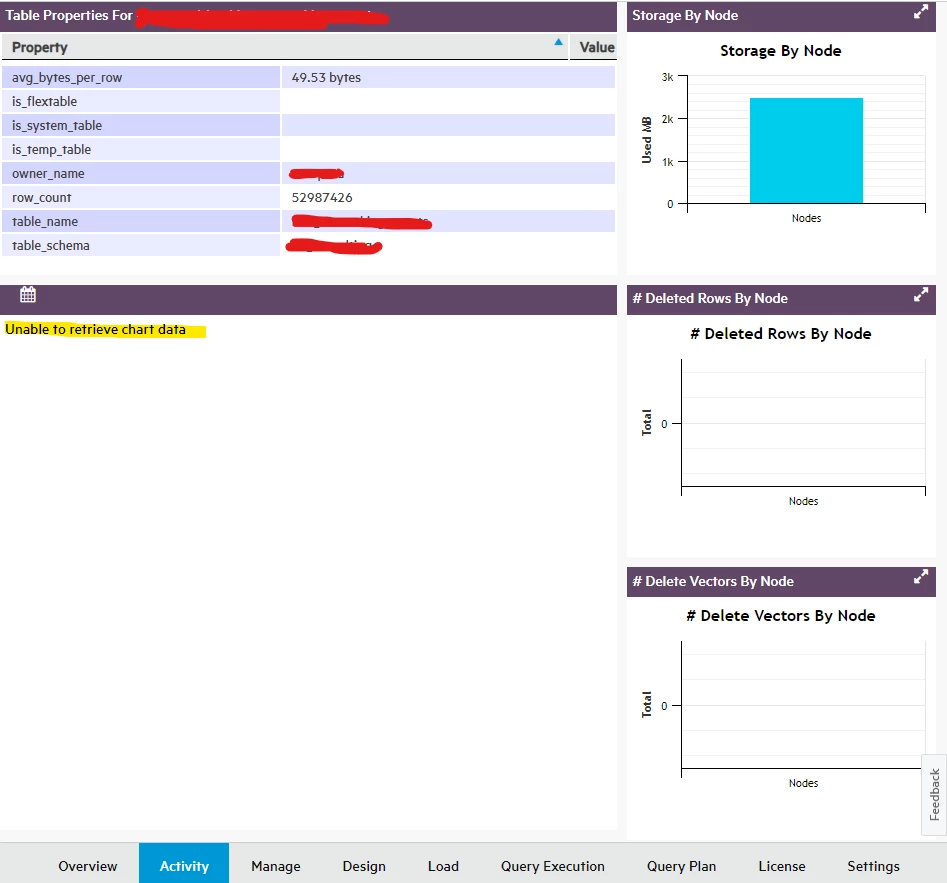
When checking the end-point that failed it shows me the following:
/webui/databases/.../chartdata/projections-all
{
    "mappingStatus":
    {
        "mappingStatus": "none",
        "missedSchemas": [],
        "force-local-access": true,
        "Loaded from cache": false,
        "Datasource enabled": false,
        "missedTables": []
    },
    "status": "failed",
    "failureReason": "[Vertica][VJDBC](2624) ERROR: Column \"ros_used_bytes\" does not exist"
}
In the vertica.log file I get the following:
<ERROR> @v_gsi3_node0001: 42703/2624: Column "ros_used_bytes" does not exist
<ERROR> @v_gsi3_node0001: 42703/2624: Column "storage_type" does not exist
The SQL query it is trying to execute is the following:
SELECT ps.projection_name                 as 'Projection Name',
       CAST(ps.projection_id as varchar)  as 'Projection Id',
       ps.node_name                       as Node,
       ros_used_bytes                     as 'Ros Bytes',
       CASE
           WHEN SUM(ros_used_bytes) OVER (partition by ps.projection_id) = 0 THEN 0
           ELSE CAST(ROUND(ros_used_bytes / SUM(ros_used_bytes) OVER (partition by ps.projection_id) * 100,
                           0) as int) END AS 'Distribution %',
       verified_fault_tolerance           as 'K-safety',
       projections.create_type            as 'Create Type',
       projections.is_segmented           as 'Segmented'
from v_monitor.projection_storage ps
         INNER JOIN v_catalog.projections as projections USING (projection_id)
         INNER JOIN v_internal.vs_projection_columns as vs_projection_columns
                    on (ps.projection_id = vs_projection_columns.proj) AND ps.anchor_table_id = 45035996283042932
group by ps.node_name, ps.projection_name, ps.projection_id, ros_used_bytes, ps.anchor_table_name, ps.projection_schema,
         verified_fault_tolerance, is_segmented, create_type
order by 2, 1;
As far as I could see the "ros_used_bytes" column of the "v_monitor.projection_storage" view the correct name is "used_bytes".
Did I make some mistakes while updating the MC?, is it a bug in the MC?
I hope you can help me.




