Question

HELP HELP!!!,Database with 1 or 2 nodes cannot be k-safe and it may lose data if it crashes

  • June 4, 2020
  • 6 replies
  • 15 views

shang

in centos 6.9 install Vertica 10.0
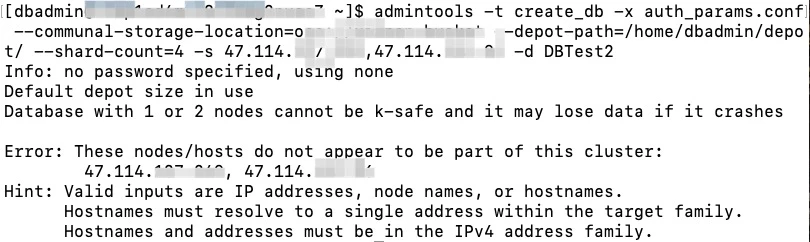
I appreciate it if anyone can resolve it!

6 replies

Sankarmn
Forum|alt.badge.img+1
  • Participating Frequently
  • June 4, 2020

Nimmi_gupta
Forum|alt.badge.img
  • Participating Frequently
  • June 4, 2020

@shang would it be possible to share the admintools.conf from /opt/vertica/conf and admintools.log from /opt/vertica/log.
Once we have both the log we can check and provide more information about the create db failure.


shang
  • Author
  • New Participant
  • June 5, 2020

@Sankarmn thanks for your replay.
However, I try to install a cluster with three nodes that have the same problem~.
and the install log as bellow~
47.114.142.96,47.114.137.249,47.114.48.164 , this is my three Aliyun ECS server address,

[root@iZbp1hduhk14uh847bf7ncZ ~]# rpm -Uvh vertica-10.0.0-0.x86_64.RHEL6.rpm
Preparing... ########################################### [100%]
1:vertica ########################################### [100%]

Vertica Analytic Database v10.0.0-0 successfully installed on host iZbp1hduhk14uh847bf7ncZ

To complete your NEW installation and configure the cluster, run:
/opt/vertica/sbin/install_vertica

To complete your Vertica UPGRADE, run:
/opt/vertica/sbin/update_vertica


Important

Before upgrading Vertica, you must backup your database. After you restart your

database after upgrading, you cannot revert to a previous Vertica software version.

View the latest Vertica documentation at https://www.vertica.com/documentation/vertica/

[root@iZbp1hduhk14uh847bf7ncZ ~]# /opt/vertica/sbin/install_vertica --hosts 47.114.142.96,47.114.137.249,47.114.48.164 --rpm vertica-10.0.0-0.x86_64.RHEL6.rpm
Vertica Analytic Database 10.0.0-0 Installation Tool

Validating options...

Mapping hostnames in --hosts (-s) to addresses...
Error: A cluster exists but does not match the provided --hosts
47.114.48.164 in --hosts but not in cluster.
47.114.137.249 in --hosts but not in cluster.
47.114.142.96 in --hosts but not in cluster.
127.0.0.1 in cluster but not in --hosts.
Hint: omit --hosts for existing clusters. To change a cluster use --add-hosts or --remove-hosts.
Installation FAILED with errors.

Installation stopped before any changes were made.
[root@iZbp1hduhk14uh847bf7ncZ ~]# cat /opt/vertica/config/admintools.conf
[Configuration]
format = 3
install_opts = --hosts '127.0.0.1' --clean
default_base = /home/dbadmin
controlmode = broadcast
controlsubnet = default
spreadlog = False
last_port = 5433
tmp_dir = /tmp
ipv6 = False
atdebug = False
atgui_default_license = False
unreachable_host_caching = True
aws_metadata_conn_timeout = 2
rebalance_shards_timeout = 36000
database_state_change_poll_timeout = 21600
wait_for_shutdown_timeout = 3600
pexpect_verbose_logging = False
sync_catalog_retries = 2000
admintools_config_version = 109

[Cluster]
hosts = 127.0.0.1

[Nodes]
node0001 = 127.0.0.1,/home/dbadmin,/home/dbadmin
v_test1_node0001 = 127.0.0.1,/home/dbadmin,/home/dbadmin

[SSHConfig]
ssh_user =
ssh_ident =
ssh_options = -oConnectTimeout=30 -o TCPKeepAlive=no -o ServerAliveInterval=15 -o ServerAliveCountMax=2 -o StrictHostKeyChecking=no -o BatchMode=yes

[BootstrapParameters]
awsendpoint = null
awsregion = null

[Database:test1]
restartpolicy = ksafe
port = 5433
path = /home/dbadmin/test1
nodes = v_test1_node0001
is_eon_mode = False
depot_base_dir = None
depot_size = None
communal_storage_url = None
num_shards = None
is_first_start_after_revive = False
branch_name =

thanks again!


Bryan_H
Forum|alt.badge.img+2
  • Participating Frequently
  • June 5, 2020

It looks like you have already created a single-node cluster with "test1" database.
I think this is the quickest solution:
Add new hosts with -A / --add-hosts option (replace -s with -A) then create the new database with admintools -t create_db


Bryan_H
Forum|alt.badge.img+2
  • Participating Frequently
  • June 5, 2020

Alternately, you may need to remove the test1 database so you can remove the 127.0.0.1 node definition attached to test1 by running "admintools -t drop_db"
Then you can reset the nodes with install_vertica -s --clean where --clean will remove the old node list including 127.0.0.1 and replace with new list from -s option.


Bryan_H
Forum|alt.badge.img+2
  • Participating Frequently
  • June 5, 2020

Does Alicloud OSS offer a connection using S3 protocol? If so, then you may be able to connect using equivalent s3:// URL.
Please see Alicloud documentation for S3 compatibility information: https://www.alibabacloud.com/help/doc-detail/64919.html?spm=a2c5t.11065259.1996646101.searchclickresult.2c434c0d8ByRNe
Unfortunately, we don't officially support other protocols.

