Question

How come password_reuse_max is not enforced?

  • December 11, 2018
  • 9 replies
  • 30 views

choowenbin

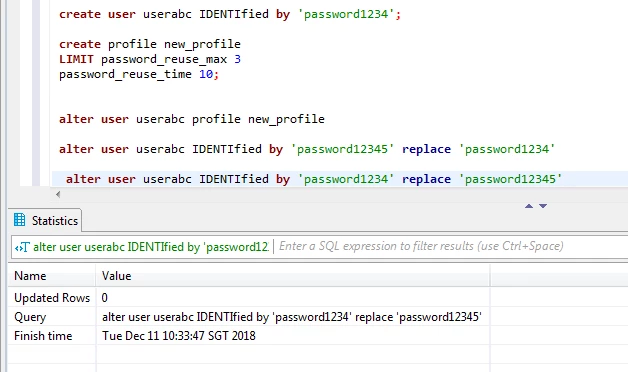
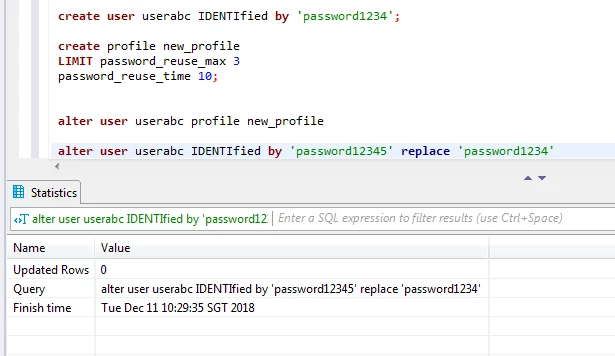
Hi I have created a profile and a user userabc with that profile

username: userabc
password: password1234

CREATE PROFILE new_profile
LIMIT PASSWORD_REUSE_MAX 3
PASSWORD_REUSE_TIME 10;

when I change the password to "password12345" and change the password again back to "password1234", I'm excepting the password change to be rejected since PASSWORD_REUSE_MAX is set to 3. I shouldn't be able to use back the old password.

I changed the password with the following command

ALTER USER userabc IDENTIFIED BY 'password12345' REPLACE 'password1234';
ALTER USER userabc IDENTIFIED BY 'password1234' REPLACE 'password12345';

Did I miss out some setting?

Thanks a lot for your help vertica community.

9 replies

Jim_Knicely
Forum|alt.badge.img+2
  • Participating Frequently
  • December 11, 2018

Did you assign the profile to the user?

Example:

dbadmin=> CREATE USER userabc IDENTIFIED BY 'password1234';
CREATE USER

dbadmin=> CREATE PROFILE new_profile
dbadmin->   LIMIT PASSWORD_REUSE_MAX 3
dbadmin->   PASSWORD_REUSE_TIME 10;
CREATE PROFILE

This step is very important:

dbadmin=> ALTER USER userabc PROFILE new_profile;
ALTER USER

Now try it:

dbadmin=> ALTER USER userabc IDENTIFIED BY 'password12345' REPLACE 'password1234';
ALTER USER

dbadmin=>  ALTER USER userabc IDENTIFIED BY 'password1234' REPLACE 'password12345';
ROLLBACK 2302:  Can not reuse the previous 3 passwords
HINT:  Please check PASSWORD_REUSE_MAX in user's profile

choowenbin
  • Author
  • Participating Frequently
  • December 11, 2018

Hi Jim yes I did


choowenbin
  • Author
  • Participating Frequently
  • December 11, 2018

Hi Jim I ran it in sequence and I'm able to change the password to old password


choowenbin
  • Author
  • Participating Frequently
  • December 11, 2018

We are using vertica version 8.0 jdbc driver 7.2.3


Jim_Knicely
Forum|alt.badge.img+2
  • Participating Frequently
  • December 11, 2018

What SQL tool are you using? I tried the script in VSQL first where it worked, then I tried DbVisualizer which uses JDBC. Works fine there too (see attachment). Although, I am using Vertica 9.2 and matching JDBC driver.

Make sure the user actually has the profile set:

dbadmin=> SELECT profile_name, password_reuse_max FROM passwords WHERE user_name = 'userabc' AND is_current_password;
 profile_name | password_reuse_max
--------------+--------------------
 new_profile  | 3

I did a cursory search for bugs in Vertica 8 for what you are seeing but could not find anything obvious. Are you using a password security algorithm other than MD5?

Run this:

    SELECT security_algorithm, system_security_algorithm, effective_security_algorithm, current_security_algorithm
      FROM password_auditor
     WHERE user_name = 'userabc';

choowenbin
  • Author
  • Participating Frequently
  • December 11, 2018

I'm using DBeaver 5.1.1

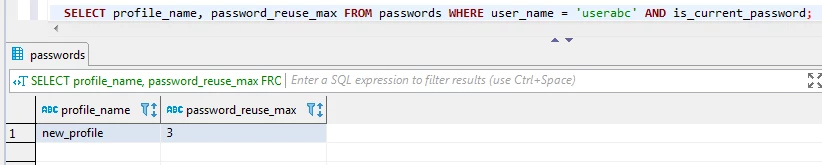
results for

SELECT profile_name, password_reuse_max 
FROM passwords WHERE user_name = 'userabc' 
AND is_current_password;

We are using SHA512 for password security algorithm


Jim_Knicely
Forum|alt.badge.img+2
  • Participating Frequently
  • December 11, 2018

Ok. That's this issue.

dbadmin=> DROP USER userabc;
DROP USER

dbadmin=> DROP PROFILE new_profile;
DROP PROFILE

dbadmin=> CREATE USER userabc;
CREATE USER

dbadmin=> CREATE PROFILE new_profile
dbadmin->   LIMIT PASSWORD_REUSE_MAX 3
dbadmin->   PASSWORD_REUSE_TIME 10;
CREATE PROFILE

dbadmin=> ALTER USER userabc SECURITY_ALGORITHM 'SHA512' IDENTIFIED BY 'password1234' PROFILE new_profile;
ALTER USER

dbadmin=> ALTER USER userabc IDENTIFIED BY 'password12345' REPLACE 'password1234';
ALTER USER

dbadmin=> ALTER USER userabc IDENTIFIED BY 'password1234' REPLACE 'password12345';
ALTER USER

Let me check on an old JIRA that discusses this and I will get back to you,


choowenbin
  • Author
  • Participating Frequently
  • December 11, 2018

Thanks for your awesome support!


choowenbin
  • Author
  • Participating Frequently
  • December 12, 2018