Question

How to read array data into one column

  • September 10, 2019
  • 5 replies
  • 15 views

AnuskaWR
Forum|alt.badge.img+1

I have a table (tbl1) where a column is used as array data:
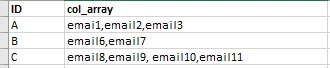
I would like to read this data so it shows ID|email as columns:
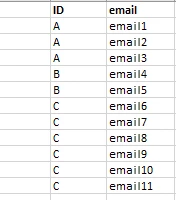
Also, I would like to know how to read it back from a list (pic2) to an array (pic1).

5 replies

SruthiA
Forum|alt.badge.img+1
  • Participating Frequently
  • September 10, 2019

LenoyJ
Forum|alt.badge.img+1
  • Participating Frequently
  • September 10, 2019

For the first request, you can also use the StringTokenizerDelim function:

dbadmin=> create table tbl1 (id varchar, col_array varchar);
CREATE TABLE

.

dbadmin=> copy tbl1 from stdin;
Enter data to be copied followed by a newline.
End with a backslash and a period on a line by itself.

A|email1,email2,email3
B|email6,email7
C|email8,email9,email10,email11
.

.

dbadmin=> select * from tbl1;
 id |           col_array
----+-------------------------------
 A  | email1,email2,email3
 C  | email8,email9,email10,email11
 B  | email6,email7
(3 rows)

.

dbadmin=> SELECT ID, v_txtindex.StringTokenizerDelim(col_array, ',') over (partition by ID) from tbl1;
 ID |  words  |             input
----+---------+-------------------------------
 A  | email1  | email1,email2,email3
 A  | email2  | email1,email2,email3
 A  | email3  | email1,email2,email3
 B  | email6  | email6,email7
 B  | email7  | email6,email7
 C  | email8  | email8,email9,email10,email11
 C  | email9  | email8,email9,email10,email11
 C  | email10 | email8,email9,email10,email11
 C  | email11 | email8,email9,email10,email11
(9 rows)


For the second request, you can use the ListAgg function:

dbadmin=> create table tbl2 as SELECT ID, v_txtindex.StringTokenizerDelim(col_array, ',') over (partition by ID) from tbl1;
CREATE TABLE

.

dbadmin=> select * from tbl2;
 ID |  words  |             input
----+---------+-------------------------------
 B  | email6  | email6,email7
 B  | email7  | email6,email7
 A  | email1  | email1,email2,email3
 A  | email2  | email1,email2,email3
 A  | email3  | email1,email2,email3
 C  | email8  | email8,email9,email10,email11
 C  | email9  | email8,email9,email10,email11
 C  | email10 | email8,email9,email10,email11
 C  | email11 | email8,email9,email10,email11
(9 rows)

.

dbadmin=> select id, listagg(words) from tbl2 group by id;
 id |            listagg
----+-------------------------------
 C  | email8,email9,email10,email11
 B  | email6,email7
 A  | email1,email2,email3
(3 rows)

AnuskaWR
Forum|alt.badge.img+1
  • Author
  • Participating Frequently
  • September 10, 2019

Thank you SruthiA and LenoyJ! The first part worked great using both your ideas. I have issue with second part - combining list structure back into array: ERROR: Function listagg(varchar) does not exist, or permission is denied for listagg(varchar)
Are those user created functions?


LenoyJ
Forum|alt.badge.img+1
  • Participating Frequently
  • September 10, 2019

Whoops, I should've mentioned that ListAgg was introduced in 9.1.1-4.
 
If you can't upgrade - you can try using Group_Concat function instead from the Strings package on our github. You'll have to build it from source for your platform though. Instructions here:
https://github.com/vertica/Vertica-Extension-Packages/tree/master/strings_package
 
Example on how to use:
https://github.com/vertica/Vertica-Extension-Packages/blob/master/strings_package/examples/group_concat.sql


AnuskaWR
Forum|alt.badge.img+1
  • Author
  • Participating Frequently
  • September 10, 2019

Thanks for the tip! We will be upgrading most likely next year, but I will try with Group_Concat.

