Question

How to set socket timeout in Dbeaver?

  • Jan 6, 2021 5:14 AM UTC
  • 5 replies
  • 27 views

HyeontaeJu
Forum|alt.badge.img+2

i use dbeaver and testing query,,
but, the query time is over than 30000ms so the sql is rollbacked..
how to fix the timeout more than 30000ms in dbeaver??

5 replies

Jim_Knicely
Forum|alt.badge.img+2
  • Participating Frequently
  • Jan 7, 2021 2:41 PM UTC

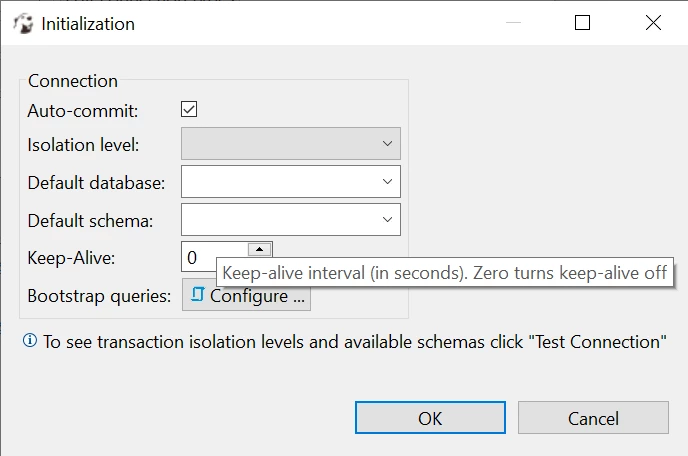
Maybe the "Keep-Alive" option is what you are lookiong for?


s_crossman
Forum|alt.badge.img
  • Participating Frequently
  • Jan 7, 2021 7:06 PM UTC

If you are using the latest DBeaver EE there are multiple keep-alive settings:
Right click on the connection in the nav pane and select Edit Connection
In that dialog there are various keep-alive and timeout settings as follows:

  • Errors and Timeouts has the timeouts for connection open, connection close, and connection validation. It's in milliseconds.
  • Connection Settings, SSH tab for SSH tunnel keep-alive interval and tunnel timeout. It is in milliseconds.
  • Driver Manager Connection Properties allows adding a Vertica driver user property (connection property as listed in the Vertica docs). The only timeout one we have there is LoginTimeout. No keep alive property.

Spark
  • New Participant
  • Jan 30, 2023 11:58 PM UTC

hi, could you please help on how to set connection timeout and query timeout in dbeaver for mysql?


s_crossman
Forum|alt.badge.img
  • Participating Frequently
  • Jan 31, 2023 4:22 PM UTC

@Spark Hi. We only support the DBeaver/Vertica integration. I took a quick look and in DBeaver under Database menu, Driver Manager, MY SQL, Edit, Driver Properties tab it shows "connectionTimeout=20000" so that seems to be exposed in the driver. I do not see a similar one for the query timeout. You may have to Google search or reach out to Microsoft for info. They do have a similar jdbc url to ours, so possibly they also accept parameters passed that way. I hope it helps


Spark
  • New Participant
  • Jan 31, 2023 6:50 PM UTC

hi @s_crossman thank you, will check it out!