LDAP authentication method sends user password in plaintext fromat

  • May 13, 2021
  • 15 replies
  • 6 views

raulk89
Forum|alt.badge.img+2

Hi
Vertica 10.1
I previously had used HASH authentication methods for local users. And I have tested, it does not send password in plaintext format during authentication. So all good.

But now I need to configure LDAP authentication method also. I have done so. So LDAP authentication indeed works.
But now I was just making sure, that passwords were not sent in plaintext format.
For that I did start packet capturing on ethernet interface:

tshark -i eth0 host 10.51.2.66 and port 5433 -w /tmp/outfile.log -c 12

In another session from another host, I tried authentication:

[dbadmin@someotherhost ~]$ vsql -h 10.51.2.66 -U ldap_user -w 'wrongSecretPass'
vsql: FATAL 3846: LDAP authentication failed for user "ldap_user"

I deliberately used wrong password, but regarding testing, it does not matter is it correct pass or not. The problem is that I was able to read this password in plaintext format by capturing network packets.
After I got this error, the packets were captured from the first session:

Capturing on 'eth0'
12

For the next step, I read this outfile with tcpdump command:

tcpdump -qns 0 -A -r /tmp/outfile.log | grep "wrongSecretPass"
reading from file /tmp/outfile.log, link-type EN10MB (Ethernet)
U`Ap"X..p....wrongSecretPass.

What must be done to make sure, that passwords are not sent in plaintext format..?

Regards
Raul

15 replies

An_kir
Forum|alt.badge.img+2
  • Participating Frequently
  • May 13, 2021

raulk89
Forum|alt.badge.img+2
  • Author
  • Participating Frequently
  • May 13, 2021

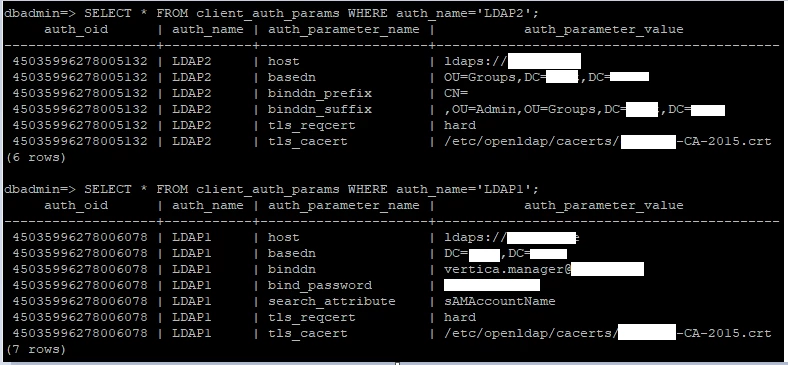
I forgot to mention. But I am using ldaps already, these are the two LDAP authentication methods:

  • LDAP1 - search and bind
  • LDAP2 - bind

So these are parameters for both (this should mean I am already using LDAP over TLS):

With both (LDAP1 and LDAP2) authentication methods, I can clearly capture password in plaintext format.

Regards
Raul


SergeB
Forum|alt.badge.img
  • Participating Frequently
  • May 13, 2021

Did you enable TLS on your Vertica cluster?


raulk89
Forum|alt.badge.img+2
  • Author
  • Participating Frequently
  • May 13, 2021

Hmm, not yet, I guess.

dbadmin=> SELECT SECURITY_CONFIG_CHECK('NETWORK');
Spread security details:

  • EncryptSpreadComm = [vertica]
    Spread encryption is enabled
    It is now safe to set/change other security knobs

Data Channel security details:

  • DataSSLParams is unset
    SSL on the data channel is disabled
    Please set EncryptSpreadComm and DataSSLParams to enable SSL on the data channel

Client-Server network security details:

  • EnableSSL is unset
  • SSLCertificate is unset
  • SSLPrivateKey is unset
    Client-Server SSL is disabled
    Please set EnableSSL, SSLCertificate and SSLPrivateKey to enable Client-Server SSL

I only did change this to "vertica" and restarted database.

ALTER DATABASE jaakdb SET PARAMETER EncryptSpreadComm = 'vertica';

But what this LDAP over TLS do differently to LDAP without TLS, if not encrypt passwords..?

In addition to that, hash authentication works fine (regarding password hash-ing) without TLS on vertica cluster.

Thanks
Raul


SergeB
Forum|alt.badge.img
  • Participating Frequently
  • May 13, 2021

Let me try to explain the differences between the two types of authentication.
With HASH authentication , the Vertica client (in this case vsql) does the authentication and knows how to hash the clear text password before sending it to Vertica. In addition, if you enabled TLS on Vertica cluster, the whole communication with Vertica could be encrypted.
With LDAP(S) authentication, the Vertica client doesn't do the authentication per se -the Server does- and the client doesn't know anything about hashing requirements for LDAP(S). If you enabled TLS on the Vertica cluster, the whole communication with Vertica could be encrypted; and that's probably the best way to address your security concerns.


An_kir
Forum|alt.badge.img+2
  • Participating Frequently
  • May 14, 2021

some more info:

the password shd be sent un-transformed on to LDAP.

https://tldp.org/HOWTO/LDAP-HOWTO/authentication.html
Authentication using LDAP - Linux Documentation Project
6.2. Authentication using LDAP. To access the LDAP service, the LDAP client first must authenticate itself to the service. That is, it must tell the LDAP server who is going to be accessing the data so that the server can decide what the client is allowed to see and do.
tldp.org


raulk89
Forum|alt.badge.img+2
  • Author
  • Participating Frequently
  • May 14, 2021

Ok, I did set SSLCertificate and SSLPrivateKey parameters:

$ admintools -t set_ssl_params -d mydb -k ./client.key -c ./client.crt

And also I set:

$ vsql -c 'ALTER DATABASE mydb SET EnableSSL = 1;'

Now it looks like this:

Spread security details:

  • EncryptSpreadComm = [vertica]
    Spread encryption is enabled
    It is now safe to set/change other security knobs

Data Channel security details:

  • DataSSLParams is unset
    SSL on the data channel is disabled
    Please set EncryptSpreadComm and DataSSLParams to enable SSL on the data channel

Client-Server network security details:

  • EnableSSL is set
  • SSLCertificate is set
  • SSLPrivateKey is set
    Client-Server SSL is enabled

And when I authenticate with LDAPS, then I don't see plaintext password when I capture network packets. So this is solved.

But few more question arises.
This client.crt is probably going to expire at some time in future. How do I monitor these expiry date-s..? Is there some system views where these dates are shown etc..?

Regards
Raul


SruthiA
Forum|alt.badge.img+1
  • Participating Frequently
  • May 14, 2021

@raulk89 In vertica, there is a system table which stores the expiry date of the certificates. Please use the query

select * from certificates;
https://www.vertica.com/docs/10.1.x/HTML/Content/Authoring/SQLReferenceManual/SystemTables/CATALOG/CERTIFICATES.htm


raulk89
Forum|alt.badge.img+2
  • Author
  • Participating Frequently
  • May 17, 2021

Hi
I have configured TLS in my cluster

  • SSLCertificate is set
  • SSLPrivateKey is set

But this certificates view is empty:

dbadmin=> select * from certificates;
oid | name | owner | signed_by | private_key | start_date | expiration_date | issuer | subject | serial | x509v3_extensions | certificate_text
-----+------+-------+-----------+-------------+------------+-----------------+--------+---------+--------+-------------------+------------------
(0 rows)

Regards
Raul


raulk89
Forum|alt.badge.img+2
  • Author
  • Participating Frequently
  • May 17, 2021

Oh, ok, I need to CREATE these certs to vertica before.

In production I understood, it is preferred that I use our corporate CA in contrast to generating self signed CA, as it is stated here:
https://www.vertica.com/docs/10.1.x/HTML/Content/Authoring/Security/TLS/GeneratingCertificatesAndKeys.htm

So I did:

-- Imported our corporate CA
$ echo "CREATE CA CERTIFICATE imported_ca AS '$(cat ./corporate_ca.crt)';" | vsql

>

-- Generated new key
vsql> CREATE KEY server_key TYPE 'RSA' LENGTH 2048;

>

-- Created new server certificate
CREATE CERTIFICATE server_cert
SUBJECT '........'
SIGNED BY imported_ca
VALID FOR 365
EXTENSIONS 'authorityKeyIdentifier' = 'keyid,issuer:always', 'nsCertType' = 'server', 'extendedKeyUsage' = 'serverAuth', 'subjectAltName' = 'DNS.1:......,IP:.......'
KEY server_key;

This last command gives me error:

ROLLBACK 9556: CA Certificate "imported_ca" cannot be used to sign certificates

Any hint, why is that happening..?

Regards
Raul


SergeB
Forum|alt.badge.img
  • Participating Frequently
  • May 17, 2021

This sounds like a limitation of the corporate CA which is not set to allow signing certificates. Maybe your IT/Security team can create a certificate for you to import in Vertica?


raulk89
Forum|alt.badge.img+2
  • Author
  • Participating Frequently
  • May 17, 2021

corporate CA which is not set to allow signing certificates

What CA parameter you are referring for that ..?

Seems to me Certificate signing is enabled or not..?

vsql> select name, x509v3_extensions from v_catalog.certificates where name = 'imported_ca';
....
X509v3 Key Usage:
Digital Signature, Certificate Sign, CRL Sign
...

Regards
Raul


SergeB
Forum|alt.badge.img
  • Participating Frequently
  • May 17, 2021

Your IT/Security Team can probably troubleshoot this further but the Basic Constraints settings also control wether a CA can be used for signing cetificates.


raulk89
Forum|alt.badge.img+2
  • Author
  • Participating Frequently
  • May 18, 2021

It should be fine for signing.

X509v3 Key Usage:
Digital Signature, Certificate Sign, CRL Sign
X509v3 Basic Constraints: critical
CA:TRUE

How is vertica going to execute this request, does it uses some OS utility (openssl perhaps) for that or not..?
If so, is there an option to log this OS command, so I can see what is actually executed with this command

CREATE CERTIFICATE server_cert ... SUBJECT .. SIGNED BY .......;

Regards
Raul


SergeB
Forum|alt.badge.img
  • Participating Frequently
  • May 18, 2021

If you want to troubleshoot further, can you open a support ticket?