Question

Loading data Vertica to Vertica

  • February 25, 2019
  • 6 replies
  • 28 views

mpedroso
Forum|alt.badge.img+1

Hello guys

I need to load data from a SELECT from Vertica to VERTICE itself.

If I use an ETL tool to capture the data and later save the data in Vertica I will face a network process that I do not want. The alternative to this was to create an "INSERT INTO TABLE SELECT" script, however, so the load information in the "load_streams" table is not written. Is there any way to write data from a SELECT from within Vertica and that the loader generates information in the "load_streams" table?

Something like:

COPY FROM VERTICA SELECT
6 replies

scottpedersoli
Forum|alt.badge.img+1
  • Participating Frequently
  • February 27, 2019

You can use COPY with a view, I use it to limit the data we copy to another cluster to one year. The view contains the logic. You can put your select in a view and then use it in the COPY. I have also used the COPY on the same database to build a table rather than doing "insert into table select" (was faster in our case)
CONNECT info here;
COPY TargetSchema.TargetTable from VERTICA database.schema.viewname DIRECT STREAM NAME 'StreamName';
DISCONNECT database;


mpedroso
Forum|alt.badge.img+1
  • Author
  • Participating Frequently
  • February 27, 2019

Show!
Thank you very much.


mpedroso
Forum|alt.badge.img+1
  • Author
  • Participating Frequently
  • February 28, 2019

@scottpedersoli

I am trying to run the following command as per its orientation:

COPY schemaDestination.tableDestination FROM VERTICA databaseName.schemaName.viewName DIRECT;

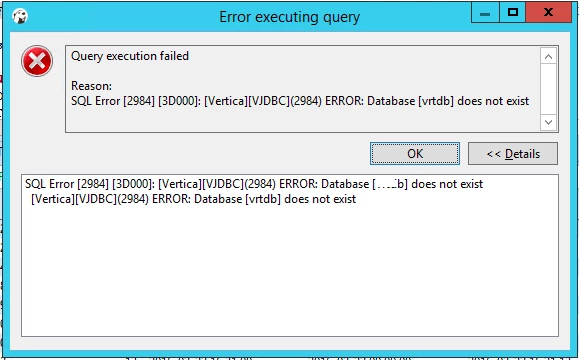
Except that it returns the following error:

That is, it says that my database does not exist. Would you help me?


mpedroso
Forum|alt.badge.img+1
  • Author
  • Participating Frequently
  • February 28, 2019

I'm not connected using vsql or vertica admin tools. Can I run this command using DBeaver, without having to use "connect" and don't set my user and password?


Jim_Knicely
Forum|alt.badge.img+2
  • Participating Frequently
  • February 28, 2019

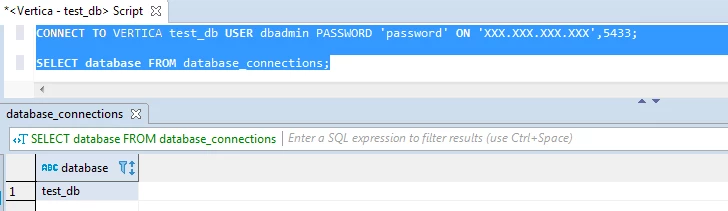
Are you trying to COPY data from a remote Vertica DB? If so, you have to connect to the remote Vertica DB first, then you run the COPY FROM VERTICA command!

And you can run it from dBeaver:

If you are just copy DATA in the same database, then use an INSERT:

INSERT /*+ DIRECT */ INTO schemaDestination.tableDestination SELECT * FROM schemaName.viewName;


scottpedersoli
Forum|alt.badge.img+1
  • Participating Frequently
  • March 1, 2019

Yes, you can run in dbbeaver. You have to use CONNECT to enable data import (using the COPY FROM VERTICA statement) or export (using the EXPORT statement). Have to do this it this way because you indicated you wanted to use COPY to see in load streams.