Projection Permission and Ownership

  • July 4, 2019
  • 12 replies
  • 6 views

abtsantosbenten
Forum|alt.badge.img+1

version: 9.0.x
How come there is no ALTER PROJECTION... OWNER TO... statement available, but I get a permission denied when trying to read directly from a projection even if I have proper read access to the anchor table?

12 replies

abtsantosbenten
Forum|alt.badge.img+1
  • Author
  • Participating Frequently
  • July 4, 2019

"Instead, the privileges to create, access, or alter a projection are based on the anchor tables that the projection references, as well as the schemas that contain them."

from:
https://www.vertica.com/docs/9.0.x/HTML/index.htm#Authoring/AdministratorsGuide/Security/DBUsersAndPrivileges/ProjectionPrivileges.htm

Sounds like this is a bug.


Jim_Knicely
Forum|alt.badge.img+2
  • Participating Frequently
  • July 4, 2019

Make sure the projection you are attempting to query is actually anchored to the table you think it is.

dbadmin=> SELECT DISTINCT table_schema, table_name, t.owner_name table_owner_name, projection_schema, projection_name, p.owner_name projection_owner_name, anchor_table_name
dbadmin->   FROM tables t
dbadmin->   JOIN projections p
dbadmin->     ON anchor_table_id = table_id
dbadmin->  WHERE table_name = 'test'
dbadmin->    AND table_schema = 'public';
 table_schema | table_name | table_owner_name | projection_schema | projection_name | projection_owner_name | anchor_table_name
--------------+------------+------------------+-------------------+-----------------+-----------------------+-------------------
 public       | test       | dbadmin          | public            | test_rep_pr     | dbadmin               | test
 public       | test       | dbadmin          | public            | test_p_b1       | dbadmin               | test
 public       | test       | dbadmin          | public            | test_p_b0       | dbadmin               | test
(3 rows)

If it is, do you actually see different owners/schemas between in the above query?


abtsantosbenten
Forum|alt.badge.img+1
  • Author
  • Participating Frequently
  • July 4, 2019

yes, I do see different owners.

how do you fix an anchor table with projections from multiple owners?


Jim_Knicely
Forum|alt.badge.img+2
  • Participating Frequently
  • July 4, 2019

Can you run the above query and show the results? Replace the table name and schema name of the table in question.


abtsantosbenten
Forum|alt.badge.img+1
  • Author
  • Participating Frequently
  • July 4, 2019

oh you're right. the projection's schema and the anchor table's schema can be different


Jim_Knicely
Forum|alt.badge.img+2
  • Participating Frequently
  • July 4, 2019

No. The projection and its anchor table must be in the same schema.

See:
https://www.vertica.com/docs/9.0.x/HTML/index.htm#Authoring/SQLReferenceManual/Statements/CREATEPROJECTION.htm

If you are seeing otherwise, then yeah, you are hitting a bug. That's why you need to run the query I posted to check.


abtsantosbenten
Forum|alt.badge.img+1
  • Author
  • Participating Frequently
  • July 4, 2019

Yes, I'm able to create a projection where the projection schema <> anchor table schema. In the query you posted, I didn't see the projection I was looking for


abtsantosbenten
Forum|alt.badge.img+1
  • Author
  • Participating Frequently
  • July 5, 2019

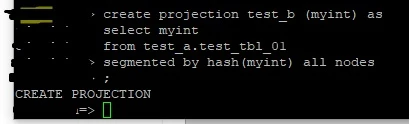
This will actually run:

CREATE PROJECTION my_schema_01.projection_name
(columnlist) as
SELECT
columnlist
FROM my_schema_02.table_name
;

version: 9.0.x


Jim_Knicely
Forum|alt.badge.img+2
  • Participating Frequently
  • July 5, 2019

What is the exact version of Vertica you are using? That is, what is the x? the requirement for a projection schema to match anchor table schema has been around since 8.1.1.

Example:

dbadmin=> create schema a;
CREATE SCHEMA

dbadmin=> create schema b;
CREATE SCHEMA

dbadmin=> create table a.a (c INT);
CREATE TABLE

dbadmin=> create projection b.a_pr as select * from a.a;
ROLLBACK 8139:  Projection must be created in the same schema as its anchor table

abtsantosbenten
Forum|alt.badge.img+1
  • Author
  • Participating Frequently
  • July 8, 2019

Vertica Analytic Database v9.0.1-5


Bryan_H
Forum|alt.badge.img+2
  • Participating Frequently
  • July 8, 2019

This works because Vertica silently assigns "test_b" to schema "test_a". If you run:

SELECT EXPORT_OBJECTS('','test_a.test_tbl_01');

you'll find the projection is in the correct schema 'test_a'. I tried to assign a projection to an explicit schema and got:

dbadmin=> create projection test_b.test_ba (myint) as select myint from test_a.test_a segmented by hash(myint) all nodes;
ROLLBACK 8139: Projection must be created in the same schema as its anchor table

using Vertica 9.2.1-1 here. For the permission issue, you must also have GRANT USAGE on the schema to access a table and presumably a projection - do you have access to both schema? See GRANT (Table) documentation for schema USAGE requirement: https://www.vertica.com/docs/9.2.x/HTML/Content/Authoring/SQLReferenceManual/Statements/GRANT/GRANTTable.htm


abtsantosbenten
Forum|alt.badge.img+1
  • Author
  • Participating Frequently
  • July 10, 2019

I see what happened:
The table was copied using the COPY_TABLE function where table owner ( User A ) and user ( User B ) who performed the copy were different. When this was done, the projections were copied as well but the ownership of the projections did not change.
User B created additional projections for the table resulting to multiple owners of the projections.

As an improvement, maybe the COPY_TABLE process should also update the owners of the projections.