Question

Query to generate rows dynamically

  • May 1, 2019
  • 6 replies
  • 25 views

aniruddha20

Hi

I have one table named "Employee" like first snap. I want to write a query so it can give me the output like snap2. In snap2, I am showing up 1 for day other than Friday and Saturday. If day is Friday or Saturday then 0.
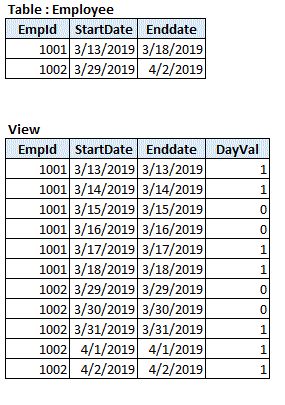

https://imgur.com/UP6lreH

6 replies

aniruddha20
  • Author
  • New Participant
  • May 1, 2019

Hi

Actually being a Microsoft experience, I tried using WITH clause to generate but I am getting following error

_SQL Error [4566] [42V01]: [Vertica]VJDBC ERROR: Relation "cteCalendar" does not exist
_

My query is

with cteCalendar
AS (
SELECT employee_number,
date_start ,
date_end,
case when DATE_PART ( 'ISODOW', date_start ) in (5,6) then 0 else 1 end dayval
FROM PA_ODS.ods_pro_fct_emp_leave
where date_start < date_end

union all

select employee_number,
TIMESTAMPADD (DD, 1, date_start) as date_start,
date_end,
case when DATE_PART ( 'ISODOW', TIMESTAMPADD (DD, 1, date_start)) in (5,6) then 0 else 1 end dayval
from cteCalendar
WHERE date_start < date_end and cteCalendar.employee_number=employee_number

)
SELECT employee_number, date_start as startdate,date_start as enddate,dayval
FROM cteCalendar ORDER BY employee_number


aniruddha20
  • Author
  • New Participant
  • May 5, 2019

Is there support available for Vertica ?


Jim_Knicely
Forum|alt.badge.img+2
  • Participating Frequently
  • May 7, 2019

Here's one way:

dbadmin=> SELECT * FROM employee ORDER BY 1;
 EmpID | StartDate  |  EndDate
-------+------------+------------
  1001 | 2019-03-13 | 2019-03-18
  1002 | 2019-03-29 | 2019-04-02
(2 rows)

dbadmin=> SELECT EmpID,
dbadmin->        StartDate,
dbadmin->        EndDate,
dbadmin->        the_date DayBetween,
dbadmin->        TO_CHAR(the_date, 'Day') DayOfTheWeek,
dbadmin->        (CASE WHEN DAYOFWEEK(the_date) IN (1, 7) THEN 1 ELSE 0 END) DayVal
dbadmin->   FROM employee
dbadmin->  CROSS JOIN (SELECT ts::date the_date
dbadmin(>                 FROM (SELECT '2019-01-31 00:00:00'::TIMESTAMP as tm UNION ALL SELECT '2100-12-31 00:00:00'::TIMESTAMP) as t
dbadmin(>           TIMESERIES ts as '1 DAY' OVER (ORDER BY t.tm)) foo
dbadmin->  WHERE the_date BETWEEN StartDate AND EndDate
dbadmin->  ORDER BY EmpID, the_date;
 EmpID | StartDate  |  EndDate   | DayBetween | DayOfTheWeek | DayVal
-------+------------+------------+------------+--------------+--------
  1001 | 2019-03-13 | 2019-03-18 | 2019-03-13 | Wednesday    |      0
  1001 | 2019-03-13 | 2019-03-18 | 2019-03-14 | Thursday     |      0
  1001 | 2019-03-13 | 2019-03-18 | 2019-03-15 | Friday       |      0
  1001 | 2019-03-13 | 2019-03-18 | 2019-03-16 | Saturday     |      1
  1001 | 2019-03-13 | 2019-03-18 | 2019-03-17 | Sunday       |      1
  1001 | 2019-03-13 | 2019-03-18 | 2019-03-18 | Monday       |      0
  1002 | 2019-03-29 | 2019-04-02 | 2019-03-29 | Friday       |      0
  1002 | 2019-03-29 | 2019-04-02 | 2019-03-30 | Saturday     |      1
  1002 | 2019-03-29 | 2019-04-02 | 2019-03-31 | Sunday       |      1
  1002 | 2019-03-29 | 2019-04-02 | 2019-04-01 | Monday       |      0
  1002 | 2019-03-29 | 2019-04-02 | 2019-04-02 | Tuesday      |      0
(11 rows)

aniruddha20
  • Author
  • New Participant
  • May 7, 2019

Thanks for your response !!

In your query, you have supplied hard coded date '2019-01-31 00:00:00' but I do not want to set that as hard coded, instead I want that to pick Start date, how to make change for that ?


aniruddha20
  • Author
  • New Participant
  • May 7, 2019

I modified my query like this and it worked now. Kindly let me know if this is correct.

SELECT EmpID,
StartDate,
EndDate,
the_date DayBetween,
TO_CHAR(the_date, 'Day') DayOfTheWeek,
(CASE WHEN DAYOFWEEK(the_date) IN (1, 7) THEN 1 ELSE 0 END) DayVal
FROM employee
CROSS JOIN (SELECT ts::date the_date
FROM (SELECT StartDate::TIMESTAMP as tm from employee UNION ALL SELECT '2100-12-31 00:00:00'::TIMESTAMP) as t
TIMESERIES ts as '1 DAY' OVER (ORDER BY t.tm)) foo
WHERE the_date BETWEEN StartDate AND EndDate
ORDER BY EmpID, the_date;


Jim_Knicely
Forum|alt.badge.img+2
  • Participating Frequently
  • May 7, 2019

Maybe modify the query to pull the min start date and max end date? That'll give you the full range of dates.

SELECT EmpID,
StartDate,
EndDate,
the_date DayBetween,
TO_CHAR(the_date, 'Day') DayOfTheWeek,
(CASE WHEN DAYOFWEEK(the_date) IN (1, 7) THEN 1 ELSE 0 END) DayVal
FROM employee
CROSS JOIN (SELECT ts::date the_date
FROM (SELECT MIN(StartDate::TIMESTAMP) AS tm FROM employee UNION ALL SELECT MAX(EndDate::TIMESTAMP) AS tm FROM employee) as t
TIMESERIES ts as '1 DAY' OVER (ORDER BY t.tm)) foo
WHERE the_date BETWEEN StartDate AND EndDate
ORDER BY EmpID, the_date;

Example:

dbadmin=> SELECT * FROM employee ORDER BY EmpID;
 EmpID | StartDate  |  EndDate
-------+------------+------------
  1001 | 2019-03-13 | 2019-03-18
  1002 | 2019-03-29 | 2019-04-02
  1003 | 1918-09-05 | 1918-09-08
(3 rows)

dbadmin=> SELECT EmpID,
dbadmin-> StartDate,
dbadmin-> EndDate,
dbadmin-> the_date DayBetween,
dbadmin-> TO_CHAR(the_date, 'Day') DayOfTheWeek,
dbadmin-> (CASE WHEN DAYOFWEEK(the_date) IN (1, 7) THEN 1 ELSE 0 END) DayVal
dbadmin-> FROM employee
dbadmin-> CROSS JOIN (SELECT ts::date the_date
dbadmin(> FROM (SELECT MIN(StartDate::TIMESTAMP) AS tm FROM employee UNION ALL SELECT MAX(EndDate::TIMESTAMP) AS tm FROM employee) as t
dbadmin(> TIMESERIES ts as '1 DAY' OVER (ORDER BY t.tm)) foo
dbadmin-> WHERE the_date BETWEEN StartDate AND EndDate
dbadmin-> ORDER BY EmpID, the_date;
 EmpID | StartDate  |  EndDate   | DayBetween | DayOfTheWeek | DayVal
-------+------------+------------+------------+--------------+--------
  1001 | 2019-03-13 | 2019-03-18 | 2019-03-13 | Wednesday    |      0
  1001 | 2019-03-13 | 2019-03-18 | 2019-03-14 | Thursday     |      0
  1001 | 2019-03-13 | 2019-03-18 | 2019-03-15 | Friday       |      0
  1001 | 2019-03-13 | 2019-03-18 | 2019-03-16 | Saturday     |      1
  1001 | 2019-03-13 | 2019-03-18 | 2019-03-17 | Sunday       |      1
  1001 | 2019-03-13 | 2019-03-18 | 2019-03-18 | Monday       |      0
  1002 | 2019-03-29 | 2019-04-02 | 2019-03-29 | Friday       |      0
  1002 | 2019-03-29 | 2019-04-02 | 2019-03-30 | Saturday     |      1
  1002 | 2019-03-29 | 2019-04-02 | 2019-03-31 | Sunday       |      1
  1002 | 2019-03-29 | 2019-04-02 | 2019-04-01 | Monday       |      0
  1002 | 2019-03-29 | 2019-04-02 | 2019-04-02 | Tuesday      |      0
  1003 | 1918-09-05 | 1918-09-08 | 1918-09-05 | Thursday     |      0
  1003 | 1918-09-05 | 1918-09-08 | 1918-09-06 | Friday       |      0
  1003 | 1918-09-05 | 1918-09-08 | 1918-09-07 | Saturday     |      1
  1003 | 1918-09-05 | 1918-09-08 | 1918-09-08 | Sunday       |      1
(15 rows)

