



Automating Vertica EON Deployment
On AWS with CloudFormation and Ansible
Avi Haim - DB Tech Lead, Product Analytics at EMERSON

Abstract
Managing modern analytical workloads at scale demands high-performance, distributed databases that are easy to deploy, configure, and maintain. Vertica in Eon Mode offers a powerful solution for elastic, scalable analytics using cloud-native communal storage, but its setup across multiple AWS services can be complex. This blog introduces a robust and fully automated approach to provisioning and configuring a Vertica EON cluster on AWS using CloudFormation and Ansible. Leveraging an open-source automation project, users can deploy a production-ready cluster in minutes, ensuring repeatability, reliability, and best practices compliance. This guide walks through the prerequisites, architecture, step-by-step automation workflow, and key files involved—empowering data engineers and DevOps teams to accelerate their Vertica deployments with confidence.
Overview
The rise of cloud-native analytics and the growing demand for scalable, cost-effective data platforms have led organizations to seek automation-first strategies. As enterprises move more workloads to the cloud, automating infrastructure and database deployment becomes essential for minimizing errors, reducing manual effort, and speeding up time to value. Technologies like AWS CloudFormation and Ansible are key enablers in this space.
Vertica is a high-performance, distributed SQL analytics database optimized for massive-scale data processing. In Eon Mode, Vertica separates compute from storage using Amazon S3 as communal storage, enabling elasticity, rapid scaling, and efficient resource management.
AWS CloudFormation is an infrastructure-as-code (IaC) service that automates the provisioning of AWS resources. By defining resources in a template file, users can deploy consistent environments repeatedly and reliably.
Ansible is an agentless automation tool that allows administrators to configure systems, install software, and orchestrate workflows using declarative YAML playbooks. Its simplicity and modularity make it ideal for post-provisioning tasks and application-level automation.
In this blog, we demonstrate how to use these technologies together to deploy a 3-node Vertica EON cluster in AWS using open-source scripts, ensuring that best practices are followed throughout the infrastructure and database lifecycle. This solution offers a production-grade, repeatable method to deploy Vertica EON on AWS using industry’s best practices. With CloudFormation provisioning and Ansible configuration, you get a full deployment pipeline for your analytic database needs.
Architecture
The architecture includes:
- 3 EC2 instances deployed via CloudFormation
- An S3 bucket as communal storage for Eon Mode
- IAM roles allowing EC2 to access the S3 bucket
- Custom Security Groups allowing SSH and intra-cluster traffic
Prerequisites
Before using the automation:
- Create a /CloudFormation directory on your remote Linux machine.
- Install and configure the AWS CLI with permissions to manage CloudFormation, EC2, IAM, and S3.
- Ensure Python 3 and Ansible are installed.
- Place your PEM key under /CloudFormation/EON.pem.
- Download and place the Vertica RPM and license under /CloudFormation/VerticaRPMs/ and /CloudFormation/license.key, respectively.
- Manually prepare the VPC, subnets, and key pair.
Workflow
Step 1: Run the Interactive Menu
Launch the menu with:chmod +x vertica_menu.sh./vertica_menu.sh
Menu Options
1. Delete CloudFormation stack
2. Create CloudFormation stack
3. Generate inventory file
4. Run CreateVertica playbook5.
5. Exit
Step 2: Create the CloudFormation Stack
Select option 2. You'll be prompted to:
- Enter stack name and template file (yaml)
- Fill in required parameters (e.g., subnet, VPC, key pair ID)
This triggers creation of EC2 instances and an S3 bucket with the correct IAM policies.
Step 3: Generate Inventory for Ansible
Select option 3. This executes generate_inventory.py, which queries AWS to extract instance private/public IPs and writes them to inventory.ini.
Step 4: Run the Ansible Playbook
Select option 4 to execute the installVerticaPlayBook.yaml playbook.
This playbook:
- Installs required RPMs and system tweaks
- Installs Vertica RPM
- Creates the /data and /depot directories
- Uploads the license file
- Installs the Vertica database in Eon Mode
Step 5: Validate the Cluster
Use admintools to list nodes:admintools -t list_allnodes
You should see 3 nodes up and part of the same DB.
File Highlights
CloudFormation Template (VerticaTemplate.yaml)
- Deploys 3 EC2 instances with attached EBS volumes
- Assigns IAM role for S3 access
- Creates a new S3 bucket
- Configures Security Groups based on user CIDR inputs
Ansible Playbook (installVerticaPlayBook.yaml)
- Configures SWAP, disables THP, installs dependencies
- Uses install_vertica to deploy EON database across 3 nodes
- Accepts license terms and sets up communal storage
Python Inventory Generator (generate_inventory.py)
- Queries CloudFormation for EC2 instance IDs
- Resolves public and private IPs for inventory groups
Screenshots
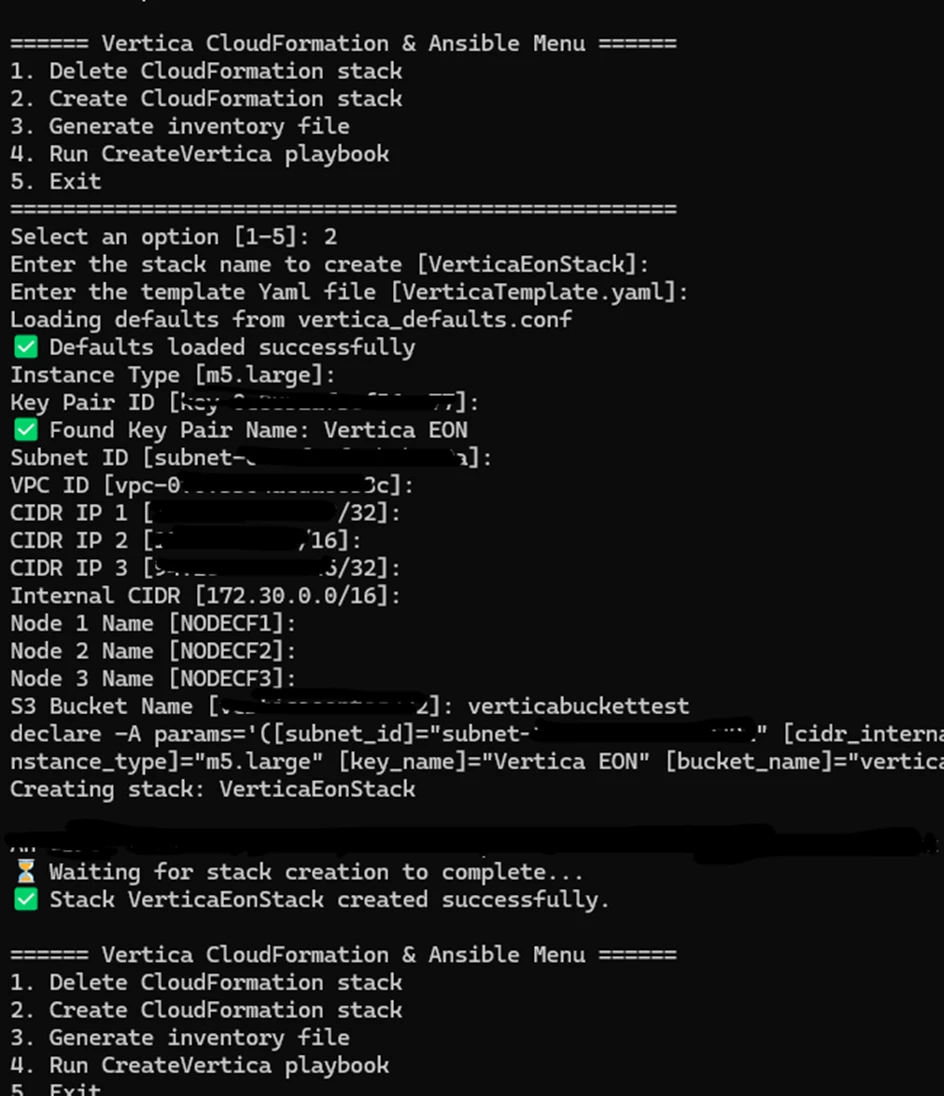
Screenshot #1: CloudFormation Stack Creation via Automation Script
This screenshot shows the interactive process of creating a Vertica EON cluster on AWS using the vertica_menu.sh automation script. After selecting option 2 from the menu, the user is prompted to input key parameters such as instance type, key pair ID, VPC/subnet, CIDR rules, and S3 bucket name. The script then validates the key pair, loads defaults from vertica_defaults.conf, and triggers a CloudFormation stack creation using the VerticaTemplate.yaml. Once provisioning completes, the stack VerticaEonStack is created successfully, confirming the automated deployment of the required EC2 instances and supporting AWS resources.
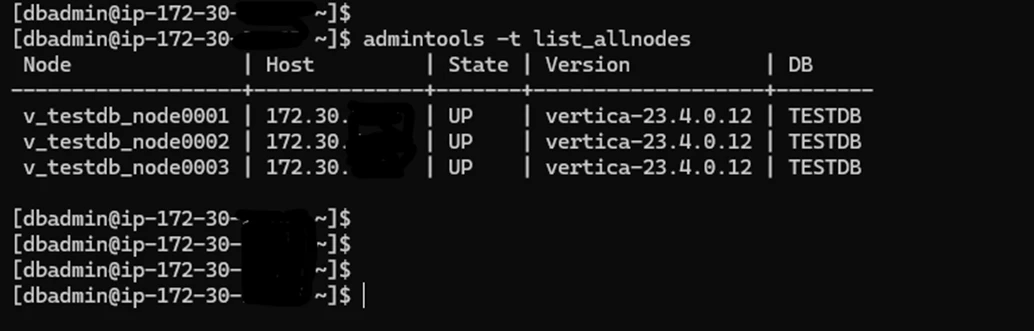
Screenshot #2: Cluster Status Outcome Verification Using admintools
This screenshot displays the output of the admintools -t list_allnodes command executed on one of the deployed EC2 instances. It confirms that all three Vertica nodes are up, running version 23.4.0.12, and successfully joined to the same database (TESTDB). This step verifies that the Ansible-driven installation and database creation completed successfully.
Tips
- All values entered during stack creation are saved in conf for reuse.
- Modify the CloudFormation YAML to suit different EC2 instance types or OS images.
- The solution assumes default ec2-user for Ansible. Adjust if your AMI uses another user.
License
Vertica license is required. The project supports both CE and BYOL licensing models.
References




