Question

unable to establish secure connection between ADO.net and the Database using SSL/TLS

  • November 3, 2020
  • 11 replies
  • 11 views

lop2lop
Forum|alt.badge.img

Hello.
We use Vertica v.9.2.1-0 and recently, our IT security team tried to enable SSL/TLS and based on following tests and results it seems to be working well.

  1. The vsql logs shows it connected using SSL:

SSL connection (cipher: DHE-RSA-AES256-GCM-SHA384, bits: 256, protocol: TLSv1.2)

  1. We tried ODBC and it works great:

SELECT user_name,client_label,ssl_state FROM sessions;
dbadmin | ODBC using SSL | Server

But in ADO.net, I can't establish connection when SSL is set to true.
It always gives me this exception : "The remote certificate is invalid according to the validation procedure"

What i've tried:

  1. Install certificates (Client.crt, server.crt and even serverca.crt) on Windows Key Store (both Current User and Local Machine , both "Automatically select the certificate store based on the type of certificate" and "Trusted Root Certification Authorities")

  2. Override dotnet TLS defaults by including below line in the Runtime section of config file of my application :
    <AppContextSwitchOverrides value="Switch.System.Net.DontEnableSystemDefaultTlsVersions=false"/>

  3. Using hostname instead of IP address (Placed in windows HOST file)

Did we missed something or should we do anything else ?

I know the default TLS version in .NET Framework lower than .NET 4.7 is TLS 1.1 (or maybe older!) and Vertica ADO.net dll (Vertica.Data.dll v.10.0.1.0) target framework is .NET 3.5 ! Could this be the cause of the problem ?

Our SSL activation instructions:

openssl genrsa -out servercakey.pem
openssl req -new -x509 -key servercakey.pem -out serverca.crt

openssl genrsa -out server.key
openssl req -new -key server.key -out server_reqout.txt
openssl x509 -req -in server_reqout.txt -days 3650 -sha256 -CAcreateserial -CA serverca.crt -CAkey servercakey.pem -out server.crt

openssl genrsa -out client.key
openssl req -new -key client.key -out client_reqout.txt
openssl x509 -req -in client_reqout.txt -days 3650 -sha256 -CAcreateserial -CA serverca.crt -CAkey servercakey.pem -out client.crt

chmod 700 server.crt server.key
chmod 700 client.crt client.key

[optional] sudo chown -R dbadmin:verticadba /opt/vertica/
[optional] sudo chown -R dbadmin:verticadba /home/dbadmin/server.key
[optional] sudo chown -R dbadmin:verticadba /home/dbadmin/server.crt
[optional] sudo chown -R dbadmin:verticadba /home/dbadmin/serverca.crt
[optional] sudo chown -R dbadmin:verticadba /home/dbadmin/serverca.crt

admintools -t set_ssl_params -d DBNAME -p PASSWORD -k /home/dbadmin/server.key -c /home/dbadmin/server.crt

SELECT set_config_parameter('EnableSSL', '1');

admintools -t stop_db -d DBNAME -p PASSWORD
admintools -t start_db -d DBNAME -p PASSWORD

My ConnectionStringBuilder:

var verticaConnectionStringBuilder = new VerticaConnectionStringBuilder
            {
                Host = "192.168.33.34",
                Database = "DBName",
                User = "dbadmin",
                Password = "password",
                Label = "ADO.net using SSL",
                SSL = true,
                PreferredAddressFamily = AddressFamilyPreference.Ipv4
            };

11 replies

verban
Forum|alt.badge.img+1
  • Participating Frequently
  • November 25, 2020

I’m facing with the same problem as you, did you find any solution for it?


lop2lop
Forum|alt.badge.img
  • Author
  • Participating Frequently
  • November 27, 2020
> @verban said:
> I’m facing with the same problem as you, did you find any solution for it?

Not yet ...
But if I find the solution, I will surely comment about it.

verban
Forum|alt.badge.img+1
  • Participating Frequently
  • November 29, 2020

Any comment?
@Jim_Knicely


Jim_Knicely
Forum|alt.badge.img+2
  • Participating Frequently
  • November 30, 2020

@verban - Did you try the host name in your verticaConnectionStringBuilder?
The message "The remote certificate is invalid according to the validation procedure" is an indcator of an incorrect host name.
Can you post the lines from vertica.log file when you try to make the connection?


SergeB
Forum|alt.badge.img
  • Participating Frequently
  • November 30, 2020

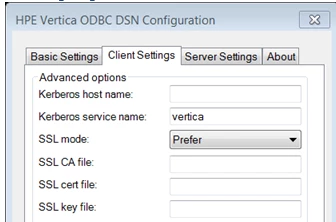
+1 to @Jim_Knicely 's suggestion, Also, what was your ODBC setting for SSL Mode ?


lop2lop
Forum|alt.badge.img
  • Author
  • Participating Frequently
  • November 30, 2020

We used IP address in ODBC setting and it worked fine and as I mentioned in OP, querying sessions tables shows that the connection uses SSL (Server mode)

SELECT user_name,client_label,ssl_state FROM sessions;
dbadmin | ODBC using SSL | Server

I will try host name and I will comment the result.


SergeB
Forum|alt.badge.img
  • Participating Frequently
  • November 30, 2020

I was wondering about the SSL Mode setting below:


SruthiA
Forum|alt.badge.img+1
  • Participating Frequently
  • November 30, 2020

@lop2lop I think the error message "The remote certificate is invalid according to the validation procedure" is generic message you get when you use a self signed certificate. Please visit the below links which has possible workarounds to help your scenario.
https://stackoverflow.com/questions/2675133/c-sharp-ignore-certificate-errors
https://www.limilabs.com/blog/the-remote-certificate-is-invalid-according-to-the-validation-procedure#:~:text=If you get “The remote,example imap.example.com and
https://stackoverflow.com/questions/9983265/the-remote-certificate-is-invalid-according-to-the-validation-procedure


verban
Forum|alt.badge.img+1
  • Participating Frequently
  • December 1, 2020

@Jim_Knicely said:
@verban - Did you try the host name in your verticaConnectionStringBuilder?
The message "The remote certificate is invalid according to the validation procedure" is an indcator of an incorrect host name.
Can you post the lines from vertica.log file when you try to make the connection?

No, I used ip address same as @lop2lop,
Good point, let me check the vertica.log


lop2lop
Forum|alt.badge.img
  • Author
  • Participating Frequently
  • December 13, 2020
Thanks everybody
@Jim_Knicely
I tested hostname instead of IP address (either using DNS or set in the windows hosts file) but nothing has changed.
Here's the vertica.log file using VSQL, ODBC and ADO:
vsql:
> 2020-12-13 18:05:02.241 Init Session:0x7fe25d7fa700 <LOG> @v_database_node0001: 00000/2705: Connection received: host=::1 port=49660 (connCnt 4)
> 2020-12-13 18:05:02.242 Init Session:0x7fe25d7fa700 <LOG> @v_database_node0001: 00000/4540: Received SSL negotiation startup packet
> 2020-12-13 18:05:02.242 Init Session:0x7fe25d7fa700 <LOG> @v_database_node0001: 00000/4691: Sending SSL negotiation response 'S'
> 2020-12-13 18:05:02.267 Init Session:0x7fe25d7fa700 <LOG> @v_database_node0001: 00000/4774: SSL connection from "(anonymous)"
> 2020-12-13 18:05:02.267 Init Session:0x7fe25d7fa700 <LOG> @v_database_node0001: 00000/4778: SSL initialization success
> 2020-12-13 18:05:02.267 Init Session:0x7fe25d7fa700 <LOG> @v_database_node0001: 00000/4686: Authentication - sendAuthRequest: user=dbadmin database=dbadmin host=::1 authType=3
> 2020-12-13 18:05:03.365 Init Session:0x7fe282ffd700 <LOG> @v_database_node0001: 00000/2705: Connection received: host=::1 port=49661 (connCnt 4)
> 2020-12-13 18:05:03.366 Init Session:0x7fe282ffd700 <LOG> @v_database_node0001: 00000/4540: Received SSL negotiation startup packet
> 2020-12-13 18:05:03.366 Init Session:0x7fe282ffd700 <LOG> @v_database_node0001: 00000/4691: Sending SSL negotiation response 'S'
> 2020-12-13 18:05:03.387 Init Session:0x7fe282ffd700 <LOG> @v_database_node0001: 00000/4774: SSL connection from "(anonymous)"
> 2020-12-13 18:05:03.387 Init Session:0x7fe282ffd700 <LOG> @v_database_node0001: 00000/4778: SSL initialization success
> 2020-12-13 18:05:03.387 Init Session:0x7fe282ffd700 <LOG> @v_database_node0001: 00000/4686: Authentication - sendAuthRequest: user=dbadmin database=dbadmin host=::1 authType=3
> 2020-12-13 18:05:03.388 Init Session:0x7fe282ffd700-a000000000036d [Txn] <INFO> Begin Txn: a000000000036d 'check_login_history'
> 2020-12-13 18:05:03.388 Init Session:0x7fe282ffd700-a000000000036d [Txn] <INFO> Rollback Txn: a000000000036d 'check_login_history'
> 2020-12-13 18:05:03.388 Init Session:0x7fe282ffd700 <LOG> @v_database_node0001: 00000/4686: Authentication - sendAuthRequest: user=dbadmin database=dbadmin host=::1 authType=0
> 2020-12-13 18:05:03.388 Init Session:0x7fe282ffd700 <LOG> @v_database_node0001: 00000/2703: Connection authenticated: user=dbadmin database=dbadmin host=::1
> 2020-12-13 18:05:03.388 Init Session:0x7fe282ffd700 <LOG> @v_database_node0001: 00000/2609: Client pid: 3765
> 2020-12-13 18:05:03.388 Init Session:0x7fe282ffd700 <LOG> @v_database_node0001: 00000/7400: Current idle session timeout = UNLIMITED
> 2020-12-13 18:05:03.388 Init Session:0x7fe282ffd700 <LOG> @v_database_node0001: 00000/8081: Current session grace period: UNLIMITED
> 2020-12-13 18:05:04.776 Init Session:0x7fe282ffd700 <LOG> @v_database_node0001: 00000/4719: Session v_database_node0001-1362:0x1e3 ended; closing connection (connCnt 4)


ODBC:
> 2020-12-13 18:32:29.337 Init Session:0x7fe2833ff700 <LOG> @v_database_node0001: 00000/2705: Connection received: host=192.168.33.249 port=52233 (connCnt 1)
> 2020-12-13 18:32:29.337 Init Session:0x7fe2833ff700 <LOG> @v_database_node0001: 00000/4540: Received SSL negotiation startup packet
> 2020-12-13 18:32:29.337 Init Session:0x7fe2833ff700 <LOG> @v_database_node0001: 00000/4691: Sending SSL negotiation response 'S'
> 2020-12-13 18:32:29.349 Init Session:0x7fe2833ff700 <LOG> @v_database_node0001: 00000/4774: SSL connection from "(anonymous)"
> 2020-12-13 18:32:29.349 Init Session:0x7fe2833ff700 <LOG> @v_database_node0001: 00000/4778: SSL initialization success
> 2020-12-13 18:32:29.350 Init Session:0x7fe2833ff700 <LOG> @v_database_node0001: 00000/4686: Authentication - sendAuthRequest: user=dbadmin database=database host=192.168.33.249 authType=3
> 2020-12-13 18:32:29.352 Init Session:0x7fe2833ff700-a00000000015b0 [Txn] <INFO> Begin Txn: a00000000015b0 'check_login_history'
> 2020-12-13 18:32:29.352 Init Session:0x7fe2833ff700-a00000000015b0 [Txn] <INFO> Rollback Txn: a00000000015b0 'check_login_history'
> 2020-12-13 18:32:29.352 Init Session:0x7fe2833ff700 <LOG> @v_database_node0001: 00000/4686: Authentication - sendAuthRequest: user=dbadmin database=database host=192.168.33.249 authType=0
> 2020-12-13 18:32:29.352 Init Session:0x7fe2833ff700 <LOG> @v_database_node0001: 00000/2703: Connection authenticated: user=dbadmin database=database host=192.168.33.249
> 2020-12-13 18:32:29.352 Init Session:0x7fe2833ff700 <LOG> @v_database_node0001: 00000/2609: Client pid: 17972
> 2020-12-13 18:32:29.352 Init Session:0x7fe2833ff700 <LOG> @v_database_node0001: 00000/2608: Client label: ODBC
> 2020-12-13 18:32:29.352 Init Session:0x7fe2833ff700 <LOG> @v_database_node0001: 00000/7400: Current idle session timeout = UNLIMITED
> 2020-12-13 18:32:29.352 Init Session:0x7fe2833ff700 <LOG> @v_database_node0001: 00000/8081: Current session grace period: UNLIMITED
> 2020-12-13 18:32:29.353 Init Session:0x7fe2833ff700 [Session] <INFO> [Query] TX:0(v_database_node0001-1362:0x685) set session autocommit to on
> 2020-12-13 18:32:29.355 Init Session:0x7fe2833ff700 [Session] <INFO> [Query] TX:0(v_database_node0001-1362:0x685) set session characteristics as transaction read write
> 2020-12-13 18:32:29.355 Init Session:0x7fe2833ff700 [Command] <INFO> Setting SESSION CHARACTERISTICS to: mode 1, isolation 1
> 2020-12-13 18:32:29.356 Init Session:0x7fe2833ff700 <LOG> @v_database_node0001: 00000/4719: Session v_database_node0001-1362:0x685 ended; closing connection (connCnt 1)


ADO:
> 2020-12-13 18:33:50.174 Init Session:0x7fe272ffe700 <LOG> @v_database_node0001: 00000/2705: Connection received: host=192.168.33.249 port=52235 (connCnt 1)
> 2020-12-13 18:33:50.175 Init Session:0x7fe272ffe700 <LOG> @v_database_node0001: 00000/4540: Received SSL negotiation startup packet
> 2020-12-13 18:33:50.175 Init Session:0x7fe272ffe700 <LOG> @v_database_node0001: 00000/4691: Sending SSL negotiation response 'S'
> 2020-12-13 18:33:50.191 Init Session:0x7fe272ffe700 <LOG> @v_database_node0001: 00000/4774: SSL connection from "(anonymous)"
> 2020-12-13 18:33:50.191 Init Session:0x7fe272ffe700 <LOG> @v_database_node0001: 00000/4778: SSL initialization success
SSL initialization success is the last line of the vertica.log file. And according to this line, SSL seems to be OK.
.
.
@SergeB
ODBC If you're curious maybe the connection which made using ODBC is not SSL, i've already tested it by querying sessions table, ssl_state is Server.
BTW, ODBC settings:
Server: IP Address
username: dbadmin
password: password
SSL Mode: require
SSL Cert File: client.crt file address
SSL Key File: client.key file address
.
.
@SruthiA
I think the same. It is the self-signed certificate which causes the exception.
I've already tested those workarounds.
I even made a simple https request using HttpWebRequest to a self-signed local website and I faced the same error. By using those workarounds I could bypass certificate error and get the response.
I can see how it ignores the certification (When I request the response, it calls a method which I can put a break-point and see what happens)
But when I use Vertica, it doesn't calls this method.
It seems Vertica connects using a different method !
I even tried to decompile vertica.dll file ( :lol: ) to see what's going on inside it and make changes if it's possible! It's kinda impossible to understand and rebuild it again !


lop2lop
Forum|alt.badge.img
  • Author
  • Participating Frequently
  • December 13, 2020

Thank you everybody.

@Jim_Knicely
I tested hostname instead of IP address (either using DNS or set in the windows hosts file) but nothing has changed.
Here's the vertica.log file using VSQL, ODBC and ADO:
vsql:

2020-12-13 18:05:02.241 Init Session:0x7fe25d7fa700 @v_database_node0001: 00000/2705: Connection received: host=::1 port=49660 (connCnt 4)
2020-12-13 18:05:02.242 Init Session:0x7fe25d7fa700 @v_database_node0001: 00000/4540: Received SSL negotiation startup packet
2020-12-13 18:05:02.242 Init Session:0x7fe25d7fa700 @v_database_node0001: 00000/4691: Sending SSL negotiation response 'S'
2020-12-13 18:05:02.267 Init Session:0x7fe25d7fa700 @v_database_node0001: 00000/4774: SSL connection from "(anonymous)"
2020-12-13 18:05:02.267 Init Session:0x7fe25d7fa700 @v_database_node0001: 00000/4778: SSL initialization success
2020-12-13 18:05:02.267 Init Session:0x7fe25d7fa700 @v_database_node0001: 00000/4686: Authentication - sendAuthRequest: user=dbadmin database=dbadmin host=::1 authType=3
2020-12-13 18:05:03.365 Init Session:0x7fe282ffd700 @v_database_node0001: 00000/2705: Connection received: host=::1 port=49661 (connCnt 4)
2020-12-13 18:05:03.366 Init Session:0x7fe282ffd700 @v_database_node0001: 00000/4540: Received SSL negotiation startup packet
2020-12-13 18:05:03.366 Init Session:0x7fe282ffd700 @v_database_node0001: 00000/4691: Sending SSL negotiation response 'S'
2020-12-13 18:05:03.387 Init Session:0x7fe282ffd700 @v_database_node0001: 00000/4774: SSL connection from "(anonymous)"
2020-12-13 18:05:03.387 Init Session:0x7fe282ffd700 @v_database_node0001: 00000/4778: SSL initialization success
2020-12-13 18:05:03.387 Init Session:0x7fe282ffd700 @v_database_node0001: 00000/4686: Authentication - sendAuthRequest: user=dbadmin database=dbadmin host=::1 authType=3
2020-12-13 18:05:03.388 Init Session:0x7fe282ffd700-a000000000036d [Txn] Begin Txn: a000000000036d 'check_login_history'
2020-12-13 18:05:03.388 Init Session:0x7fe282ffd700-a000000000036d [Txn] Rollback Txn: a000000000036d 'check_login_history'
2020-12-13 18:05:03.388 Init Session:0x7fe282ffd700 @v_database_node0001: 00000/4686: Authentication - sendAuthRequest: user=dbadmin database=dbadmin host=::1 authType=0
2020-12-13 18:05:03.388 Init Session:0x7fe282ffd700 @v_database_node0001: 00000/2703: Connection authenticated: user=dbadmin database=dbadmin host=::1
2020-12-13 18:05:03.388 Init Session:0x7fe282ffd700 @v_database_node0001: 00000/2609: Client pid: 3765
2020-12-13 18:05:03.388 Init Session:0x7fe282ffd700 @v_database_node0001: 00000/7400: Current idle session timeout = UNLIMITED
2020-12-13 18:05:03.388 Init Session:0x7fe282ffd700 @v_database_node0001: 00000/8081: Current session grace period: UNLIMITED
2020-12-13 18:05:04.776 Init Session:0x7fe282ffd700 @v_database_node0001: 00000/4719: Session v_database_node0001-1362:0x1e3 ended; closing connection (connCnt 4)

ODBC:

2020-12-13 18:32:29.337 Init Session:0x7fe2833ff700 @v_database_node0001: 00000/2705: Connection received: host=192.168.33.249 port=52233 (connCnt 1)
2020-12-13 18:32:29.337 Init Session:0x7fe2833ff700 @v_database_node0001: 00000/4540: Received SSL negotiation startup packet
2020-12-13 18:32:29.337 Init Session:0x7fe2833ff700 @v_database_node0001: 00000/4691: Sending SSL negotiation response 'S'
2020-12-13 18:32:29.349 Init Session:0x7fe2833ff700 @v_database_node0001: 00000/4774: SSL connection from "(anonymous)"
2020-12-13 18:32:29.349 Init Session:0x7fe2833ff700 @v_database_node0001: 00000/4778: SSL initialization success
2020-12-13 18:32:29.350 Init Session:0x7fe2833ff700 @v_database_node0001: 00000/4686: Authentication - sendAuthRequest: user=dbadmin database=database host=192.168.33.249 authType=3
2020-12-13 18:32:29.352 Init Session:0x7fe2833ff700-a00000000015b0 [Txn] Begin Txn: a00000000015b0 'check_login_history'
2020-12-13 18:32:29.352 Init Session:0x7fe2833ff700-a00000000015b0 [Txn] Rollback Txn: a00000000015b0 'check_login_history'
2020-12-13 18:32:29.352 Init Session:0x7fe2833ff700 @v_database_node0001: 00000/4686: Authentication - sendAuthRequest: user=dbadmin database=database host=192.168.33.249 authType=0
2020-12-13 18:32:29.352 Init Session:0x7fe2833ff700 @v_database_node0001: 00000/2703: Connection authenticated: user=dbadmin database=database host=192.168.33.249
2020-12-13 18:32:29.352 Init Session:0x7fe2833ff700 @v_database_node0001: 00000/2609: Client pid: 17972
2020-12-13 18:32:29.352 Init Session:0x7fe2833ff700 @v_database_node0001: 00000/2608: Client label: ODBC
2020-12-13 18:32:29.352 Init Session:0x7fe2833ff700 @v_database_node0001: 00000/7400: Current idle session timeout = UNLIMITED
2020-12-13 18:32:29.352 Init Session:0x7fe2833ff700 @v_database_node0001: 00000/8081: Current session grace period: UNLIMITED
2020-12-13 18:32:29.353 Init Session:0x7fe2833ff700 [Session] [Query] TX:0(v_database_node0001-1362:0x685) set session autocommit to on
2020-12-13 18:32:29.355 Init Session:0x7fe2833ff700 [Session] [Query] TX:0(v_database_node0001-1362:0x685) set session characteristics as transaction read write
2020-12-13 18:32:29.355 Init Session:0x7fe2833ff700 [Command] Setting SESSION CHARACTERISTICS to: mode 1, isolation 1
2020-12-13 18:32:29.356 Init Session:0x7fe2833ff700 @v_database_node0001: 00000/4719: Session v_database_node0001-1362:0x685 ended; closing connection (connCnt 1)

ADO:

2020-12-13 18:33:50.174 Init Session:0x7fe272ffe700 @v_database_node0001: 00000/2705: Connection received: host=192.168.33.249 port=52235 (connCnt 1)
2020-12-13 18:33:50.175 Init Session:0x7fe272ffe700 @v_database_node0001: 00000/4540: Received SSL negotiation startup packet
2020-12-13 18:33:50.175 Init Session:0x7fe272ffe700 @v_database_node0001: 00000/4691: Sending SSL negotiation response 'S'
2020-12-13 18:33:50.191 Init Session:0x7fe272ffe700 @v_database_node0001: 00000/4774: SSL connection from "(anonymous)"
2020-12-13 18:33:50.191 Init Session:0x7fe272ffe700 @v_database_node0001: 00000/4778: SSL initialization success

SSL initialization success is the last line of the vertica.log file. And according to this line, SSL seems to be OK.
.
.
@SergeB
If you're curious maybe the connection which made using ODBC is not SSL, i've already tested it by querying sessions table, ssl_state is Server.
BTW, ODBC settings:
Server: IP Address
username: dbadmin
password: password
SSL Mode: require
SSL Cert File: client.crt file address
SSL Key File: client.key file address
.
.
@SruthiA
I think the same. It is the self-signed certificate which causes the exception.
I've already tested those workarounds.
I even made a simple https request using HttpWebRequest to a self-signed local website and I faced the same error. By using those workarounds I could bypass certificate error and get the response.
I can see how it ignores the certification (When I request the response, it calls a method which I can put a break-point and see what happens)
But when I use Vertica, it doesn't calls this method.
It seems Vertica connects using a different method !
I even tried to decompile vertica.dll file ( :lol: ) to see what's going on inside it and make changes if it's possible! It's kinda impossible to understand and rebuild it again !