Unable to Import Existing Vertica Cluster via Management Console

  • May 20, 2019
  • 31 replies
  • 6 views

verban
Forum|alt.badge.img+1
  • Participating Frequently

This issue is same as i found in this questions:

But both posts doen't help me.
I did all commands that @Jim_Knicely said in above link.
Also i get same error that got here:

https://forum.vertica.com/discussion/comment/240610/#Comment_240610

curl -H "VerticaApiKey: ***********" https://********:5444/licenses --insecure
{ "body": [{"status": true, "comment": "Vertica license is valid", "end": "Perpetual", "start": > "2011-11-22", "vendor": "Vertica Community Edition", "grace": "0", "size": "1TB CE Nodes 3"}],
"href": "/license",
"mime-type": "application/vertica.license.json-v2",
"links": []
}

curl -H "VerticaApiKey: ***********" https://********:5444/databases/**/users/null?user_id=dbadmin&passwd=***" --insecure

{ "http_code":405,
  "name":"Method Not Allowed",
  "url":"https://********:5444/databases/**/users/null?user_id=dbadmin&passwd=***",
  "data":"Method not allowed."
}

MC version is 9.2.1 and vertica version is 9.0.1

31 replies

verban
Forum|alt.badge.img+1
  • Author
  • Participating Frequently
  • May 20, 2019

This is what a have in MC log file after schecking password on MC web gui (/opt/vconsole/log/mc/mconsole.log):

[MCThread-1558333690403] AgentCommands INFO - agentapi=POST, https://...:5444/databases//users/null?user_id=dbadmin&passwd=******
[MCThread-1558333690403] AgentCommands INFO - executeCommand>> statusCode: 500, Raw agentResponse: https://
...:5444/databases/
/users/null?user_id=dbadmin&passwd=******
[MCThread-1558333690403] AgentCommands WARN - Agent Response Not OK: 500
[MCThread-1558333690403] AgentCommands WARN - Exception while parsing agent response: Expected a ',' or '}' at character 182 of { "http_code":500,
"name":"Internal Server Error",
"url":"https://...:5444/databases/***/users/null",
"data":" ERROR: Error get user details: Column "user_name" does not exist"
}
[MCThread-1558333690403] ClusterAdminController ERROR - Password Validation failed with error, code: 500 , Error message: Error parsing the response from database server

It seems this is a bug....


verban
Forum|alt.badge.img+1
  • Author
  • Participating Frequently
  • May 23, 2019

any comment?


verban
Forum|alt.badge.img+1
  • Author
  • Participating Frequently
  • May 23, 2019

Finally i upgrade my vertica to 9.2.0
And also the version of my MC is 9.2.1
But i cannot connect MC to my db again.
same error in mconsole log....
:'( :'( :'(
Also i created a new user but not changed...


verban
Forum|alt.badge.img+1
  • Author
  • Participating Frequently
  • June 3, 2019

any comment?
@Jim_Knicely


Jim_Knicely
Forum|alt.badge.img+2
  • Participating Frequently
  • June 3, 2019

Hmm. I have not seen this. Do you have any settings in MC you need to retain? If not, I'd completlty uninstall it, remove the /opt/vertica/mc directory and reinstall. Seems like a password issue. Don't include any weird characters in your MC password. Just a guess If you have weird characters, let me know, might be a bug we can fix.


verban
Forum|alt.badge.img+1
  • Author
  • Participating Frequently
  • June 12, 2019

Thanks @Jim_Knicely,
I installed it again but same error!
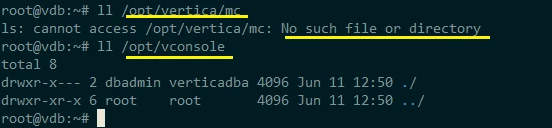
the /opt/vertica/mc/ wasn't valid and doesn't exists:

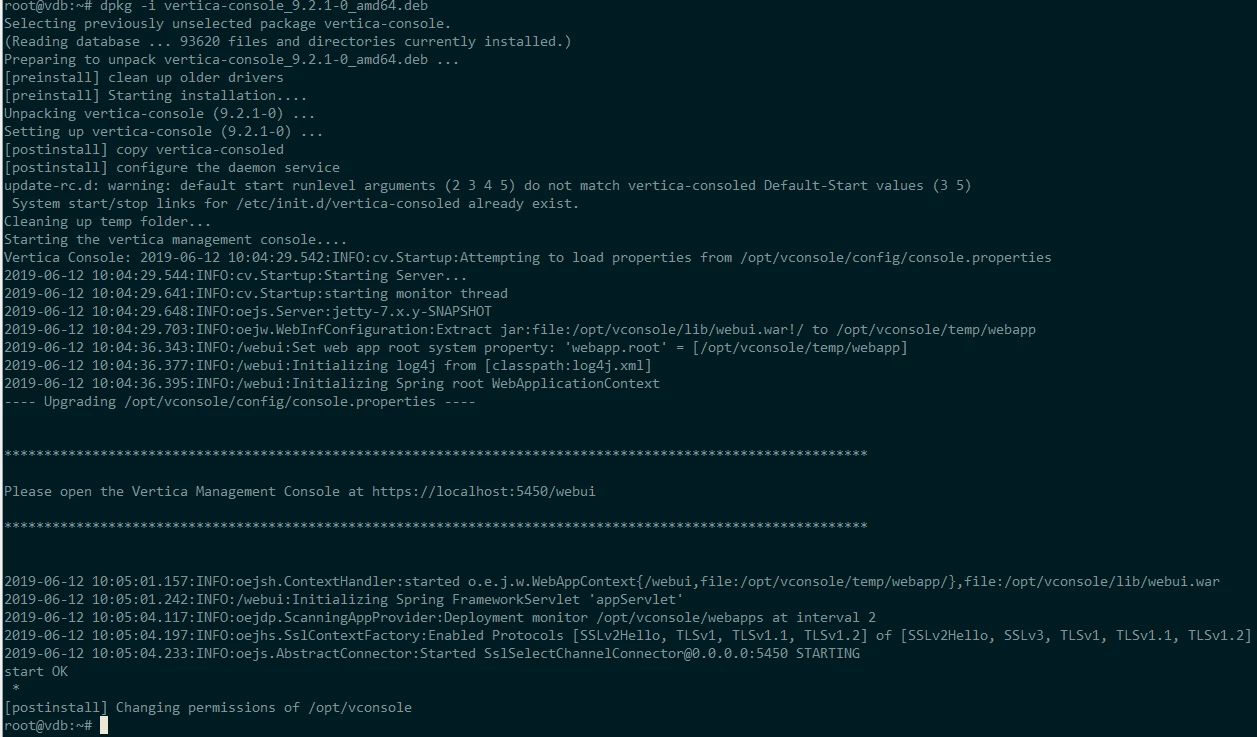
Installation:

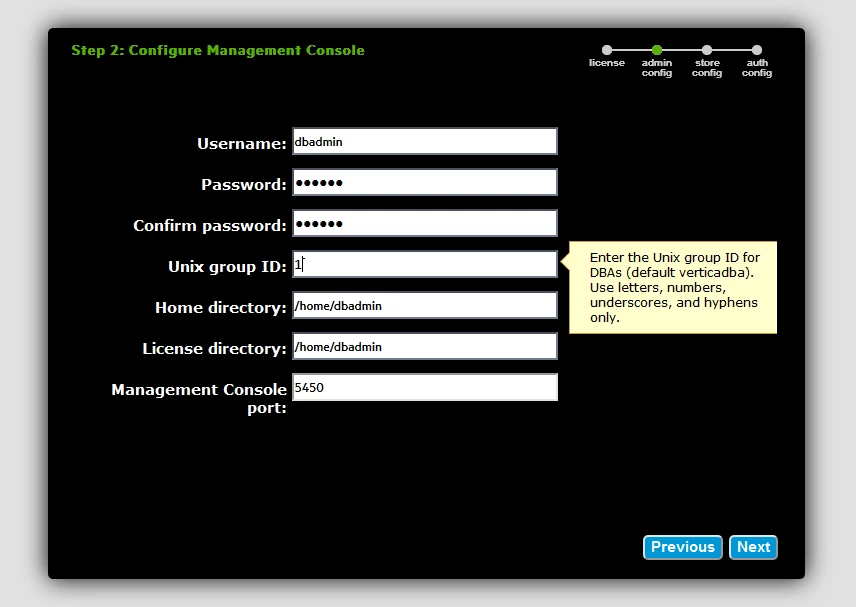
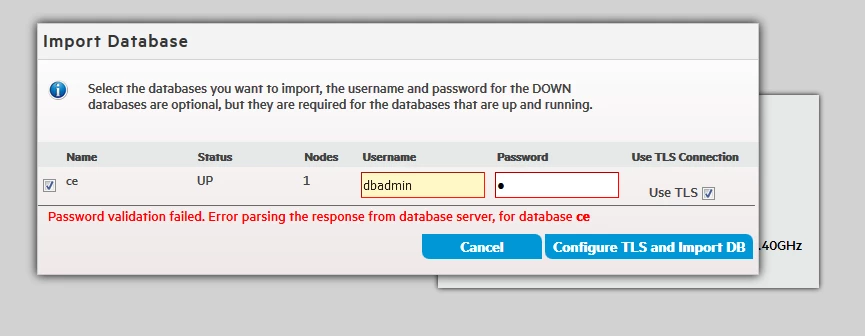
Configuration (with simple password: 123456)

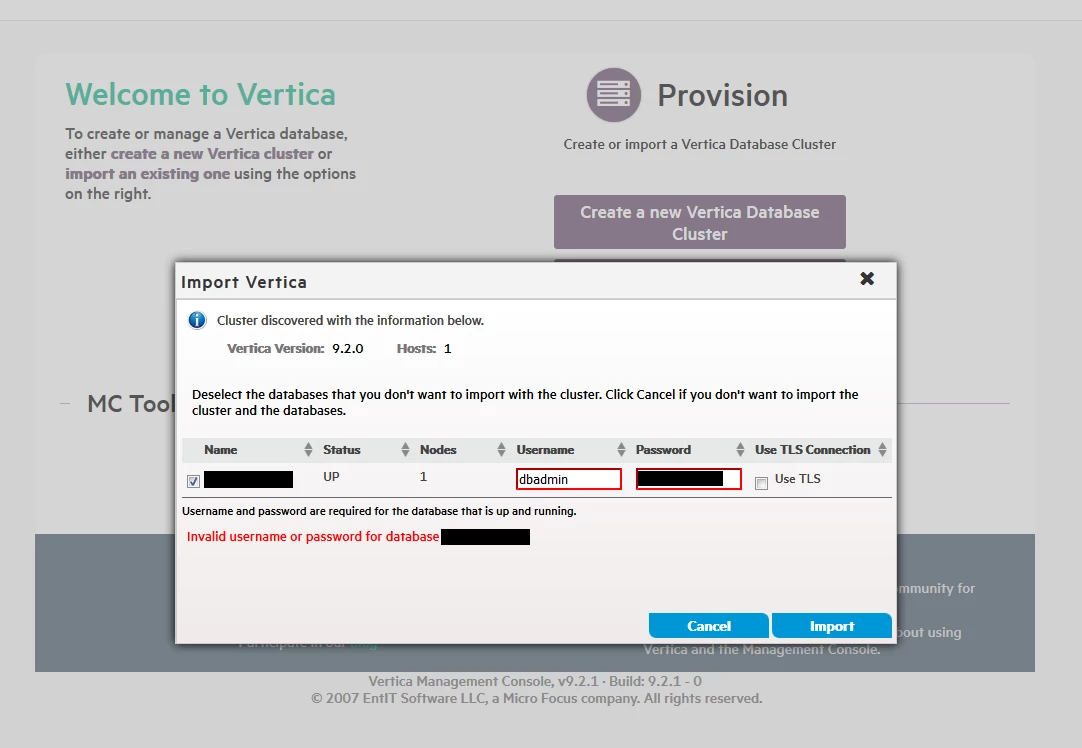
Same error again

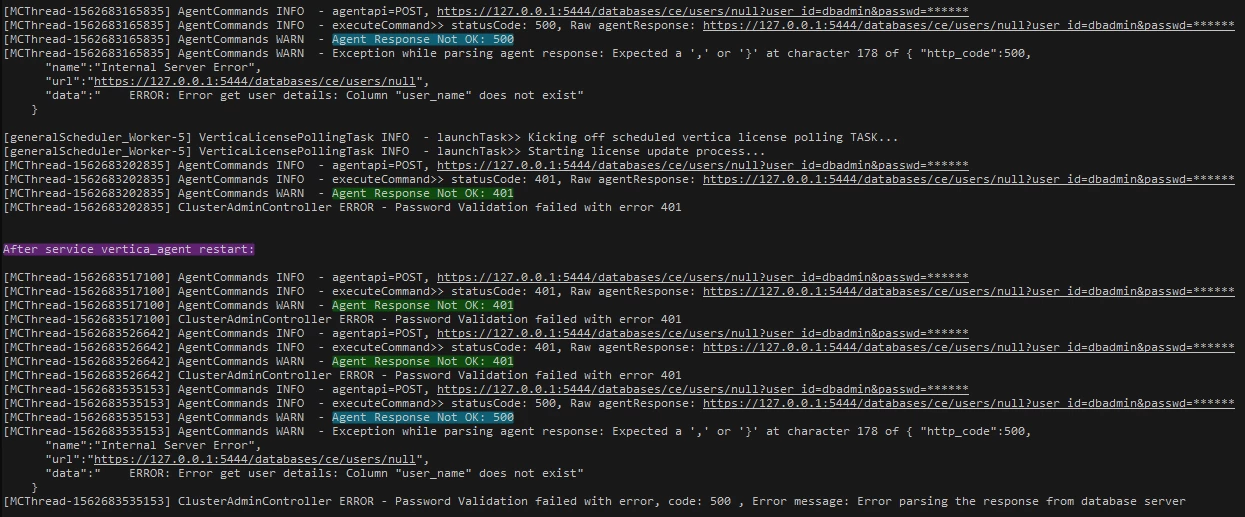
Log file /opt/vconsole/log/mc/mconsole.log
[Attached]

I hope it may help you to find the root cause (or maybe bug)


verban
Forum|alt.badge.img+1
  • Author
  • Participating Frequently
  • June 25, 2019

any update?
@Jim_Knicely


verban
Forum|alt.badge.img+1
  • Author
  • Participating Frequently
  • July 8, 2019

any update?
Is there any bug fix?

@Jim_Knicely


Bryan_H
Forum|alt.badge.img+2
  • Participating Frequently
  • July 8, 2019

Hi, I looked at the log you posted and I see a few issues:
When installing, set group ID to "verticadba" to match dbadmin's primary group, otherwise chown/chmod will fail on invalid group.
The dbadmin password used for MC is not sent to Vertica. For the second screen "Import Vertica", use the same password for dbadmin that is used in vsql.
Have you upgraded Vertica recently? There seems to be some issue with agent communication. It might help to restart all services include agent, e.g. "sudo systemctl restart vertica_agent"


Jim_Knicely
Forum|alt.badge.img+2
  • Participating Frequently
  • July 8, 2019

@Bryan_H is on to something. Can you check the file permissions?


verban
Forum|alt.badge.img+1
  • Author
  • Participating Frequently
  • July 9, 2019

@Jim_Knicely which file you mean?


Jim_Knicely
Forum|alt.badge.img+2
  • Participating Frequently
  • July 9, 2019

Check the file and directory permissions.

Below I am the Linux user that runs MC (vconsole in my case):

[vconsole@SE-Sandbox-26-node1 ~]$ whoami
vconsole

[vconsole@SE-Sandbox-26-node1 ~]$ ls -lrt /opt/vconsole/
total 20
drwxr-x---. 2 vconsole verticadba    19 Apr 22 17:42 sbin
drwxr-x---. 5 vconsole verticadba   104 Apr 22 17:42 bin
drwxr-x---. 2 vconsole verticadba     6 Apr 22 17:50 pluggable
drwxr-x---. 3 vconsole verticadba 12288 Jul  9 08:43 reports
drwxr-x---. 2 vconsole verticadba    30 Jul  9 08:43 shared
drwxr-x---. 4 vconsole verticadba    52 Jul  9 08:43 vendor
drwxrwx---. 3 vconsole verticadba    19 Jul  9 08:43 mcdb
drwxr-x---. 3 vconsole verticadba    58 Jul  9 08:43 lib
drwxr-x---. 2 vconsole verticadba     6 Jul  9 08:43 tools
drwxr-x---. 3 vconsole verticadba    16 Jul  9 08:43 log
drwxr-x---. 4 vconsole verticadba    31 Jul  9 08:43 temp
drwxr-x---. 5 vconsole verticadba  4096 Jul  9 08:51 config

[vconsole@SE-Sandbox-26-node1 ~]$ ls -lrt /opt/vconsole/config/
total 48
-rwxr-----. 1 vconsole verticadba   155 Apr 22 17:50 version.properties
-rwxr-----. 1 vconsole verticadba   999 Apr 22 17:50 openssl.cnf
-rwxr-----. 1 vconsole verticadba   731 Apr 22 17:50 keystore_README.txt
-rwxr-----. 1 vconsole verticadba  3514 Apr 22 17:50 keystore.key
-rwxr-----. 1 vconsole verticadba  2253 Apr 22 17:50 keystore.jks
-rwxr-----. 1 vconsole verticadba   894 Apr 22 17:50 console.properties.before.9.2.1
-rwxr-----. 1 vconsole verticadba   349 Apr 22 17:50 console.properties.before.7.0.0
-rwxr-----. 1 vconsole verticadba 10592 Apr 22 17:50 aws-instances.json
drwxr-x---. 3 vconsole verticadba    17 Jul  9 08:43 ansible
drwxr-x---. 2 vconsole verticadba    75 Jul  9 08:43 logrotate
drwx------. 4 vconsole verticadba    42 Jul  9 08:43 security
-rwxr-----. 1 vconsole verticadba  2864 Jul  9 08:51 console.properties.9.2.1.nonUpgradeBackup
-rw-rw-rw-. 1 vconsole verticadba  2979 Jul  9 09:21 console.properties

verban
Forum|alt.badge.img+1
  • Author
  • Participating Frequently
  • July 9, 2019

Thanks Jim_Knicely,

This is for old installation:

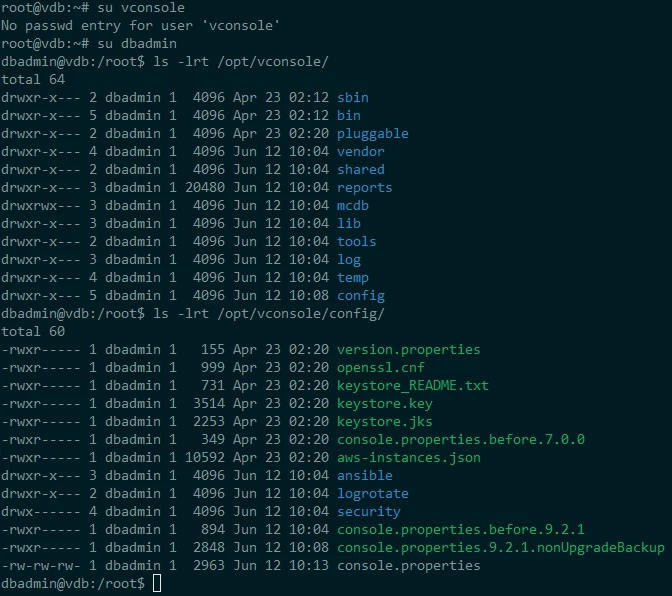
But i removed it completely (rm /opt/vconsole/* -rf)
and installed it again,
with verticadba group ID and simple password for dbadmin,

and also logfile:

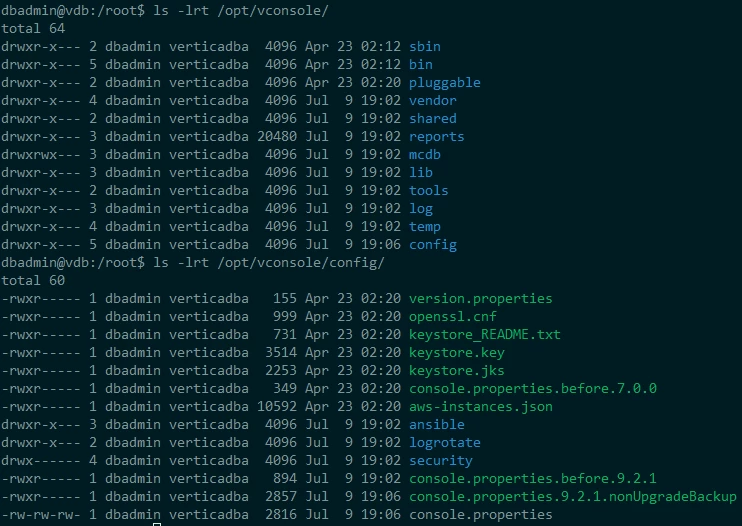
and file permission for new installation:


Jim_Knicely
Forum|alt.badge.img+2
  • Participating Frequently
  • July 9, 2019

When I installed MC it asked for an MC user. I used vconsole. Looks like you used dbadmin as the user, wich is fine.

But looks like there is something wrong with the group.

Can you list the groups for your dbadmin user? Here's mine for my dbadmin and vconsole users:

[dbadmin@SE-Sandbox-26-node1 ~]$ groups dbadmin
dbadmin : verticadba

[dbadmin@SE-Sandbox-26-node1 ~]$ groups vconsole
vconsole : verticadba

verban
Forum|alt.badge.img+1
  • Author
  • Participating Frequently
  • July 9, 2019

@Bryan_H ,
Thanks your help,
you mentioned to dbadmin password, but i think this is not dealing with wrong password, because as you can see in log i received 401 error code in case of wrong password (intentionally) and also i received 500 Error code in case of correct password (same as password used in vsql)!!
but i think it's a little complicated, it's talking about "Internal Server Error" in logfile!

AgentCommands WARN - Exception while parsing agent response: Expected a ',' or '}' at character 178 of { "http_code":500,
"name":"Internal Server Error",
"url":"https://127.0.0.1:5444/databases/ce/users/null",
"data":" ERROR: Error get user details: Column "user_name" does not exist"
}
ClusterAdminController ERROR - Password Validation failed with error, code: 500 , Error message: Error parsing the response from database server


Jim_Knicely
Forum|alt.badge.img+2
  • Participating Frequently
  • July 9, 2019

Curious. Does your dbadmin password contain any weird characters?


verban
Forum|alt.badge.img+1
  • Author
  • Participating Frequently
  • July 9, 2019

No, the password is one letter!! (bcoz it's test environment)
let me change it to longer....


verban
Forum|alt.badge.img+1
  • Author
  • Participating Frequently
  • July 9, 2019

I changed it to 6 letter (ASCII char), but same result :neutral:


verban
Forum|alt.badge.img+1
  • Author
  • Participating Frequently
  • July 14, 2019

@Jim_Knicely Helppppp!


Bryan_H
Forum|alt.badge.img+2
  • Participating Frequently
  • July 15, 2019

The request is going to port 5444, which is vertica_agent - can you check under /opt/vertica/logs and see if there is any output with more detail in agent*.log - there may be several files for the agent, some ending in log and some ending in err, and some possibly with a username.


Jim_Knicely
Forum|alt.badge.img+2
  • Participating Frequently
  • July 15, 2019

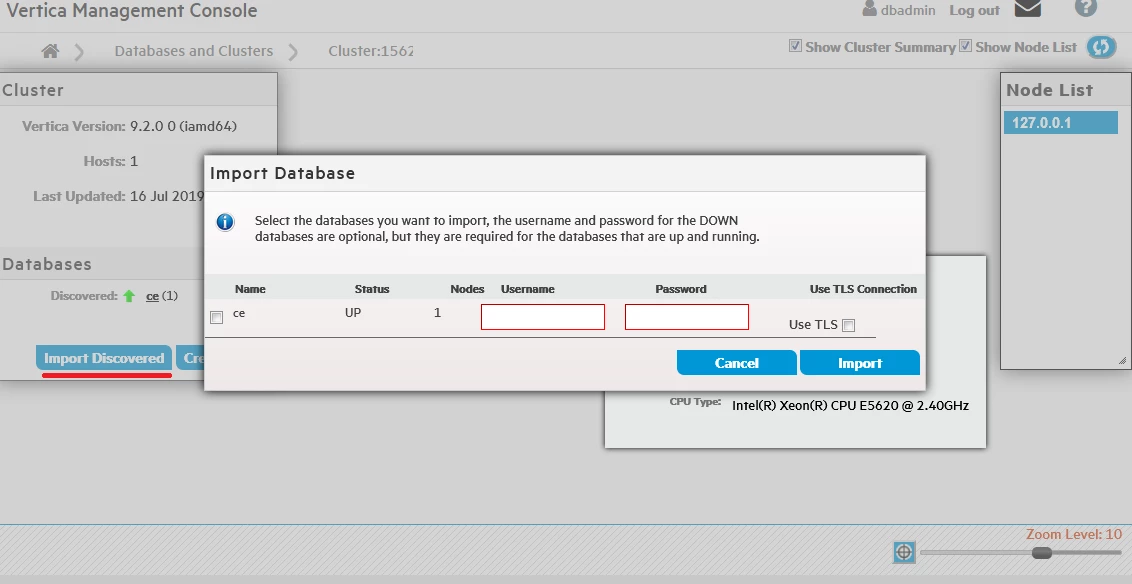
@verban - Just noticed that you checked the "Use TLS Connection" on one import attempt, and you unchecked the "Use TLS Connection" on another import attempt.

Which is it?

Also, can you try to import again, and if you get the invalid PW error, check the LOGIN_FAILURES system table to see if MC is even hitting the DB?

SELECT login_timestamp, client_hostname, client_os_user_name, reason FROM login_failures ORDER BY 1 DESC LIMIT 5;

Next, did you set up any client authentication rules?

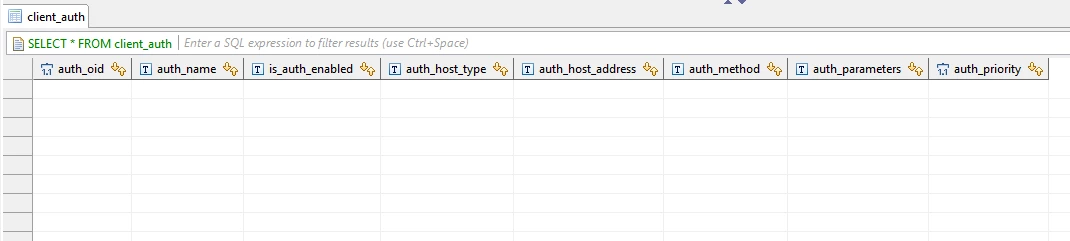
SELECT * FROM client_auth;


verban
Forum|alt.badge.img+1
  • Author
  • Participating Frequently
  • July 16, 2019

@Bryan_H
This is the output for me on:
ls -a /opt/vertica/log/agent* |grep -v gz|xargs tail -f

first line for incorrect password and 2nd one for correct password!


verban
Forum|alt.badge.img+1
  • Author
  • Participating Frequently
  • July 16, 2019

@Jim_Knicely

About "Use TLS Connection" checking, i tried both and send output for both test (checked and unchecked)

I checked LOGIN_FAILURES (but without new import, i continued last import by "Import Discovered" button), and i have new record on LOGIN_FAILURES when get incorrect pass (and no record for correct pass)

And also no rules for client authentication :


Bryan_H
Forum|alt.badge.img+2
  • Participating Frequently
  • July 16, 2019

Can you try using the adapter IP address rather than localhost/127.0.0.1 when importing? Sometimes localhost is configured differently (bind rules, for example) and real IP address works, as shown on mine:
agent.log:INFO:wsgi:192.168.1.206 - - [16/Jul/2019:10:57:01 -0400] "POST /databases/docker/users/null HTTP/1.1" 200 618 "-" "Apache-HttpClient/4.5 (Java/1.7.0_191)"


verban
Forum|alt.badge.img+1
  • Author
  • Participating Frequently
  • July 16, 2019

I don't know why it logs 127.0.0.1, because i opened web gui from interface ip address (192.168.x.x)
But i guess this is due to vertica_db and vertica_console are installed on same machine