

I have Visual COBOL + Microsoft Visual Studio on my Windows 11 laptop. I inadvertently deleted the shortcut that I used to launch Visual COBOL+VS. I cannot figure out how to restore the shortcut. Can anyone advise me on how to rebuild the correct shortcut? Thanks
- Home
- Sitemap
- Product Forums
- Rocket® COBOL
- Rocket® Visual COBOL®
- Deleted Shortcut
Question
Deleted Shortcut
- May 22, 2026
- 14 replies
- 191 views
14 replies

 +4
+4- Moderator
- May 22, 2026

Hi Paul,
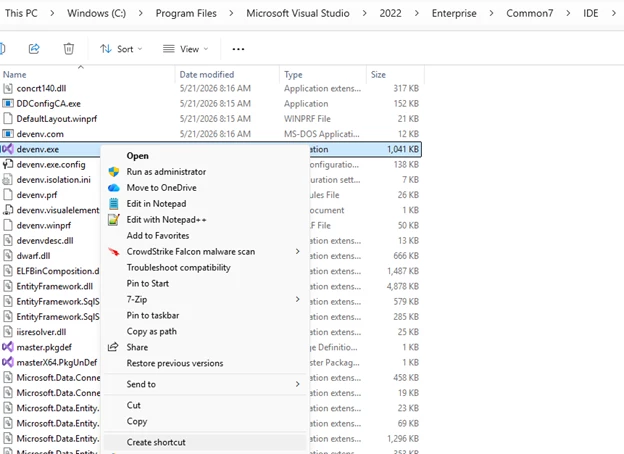
You can navigate to the devenv.exe file and right-click and select “create shortcut” or “send to->Desktop” or you can pin it to the taskbar.
 +2
+2- Author
- Participating Frequently
- May 22, 2026
Chris
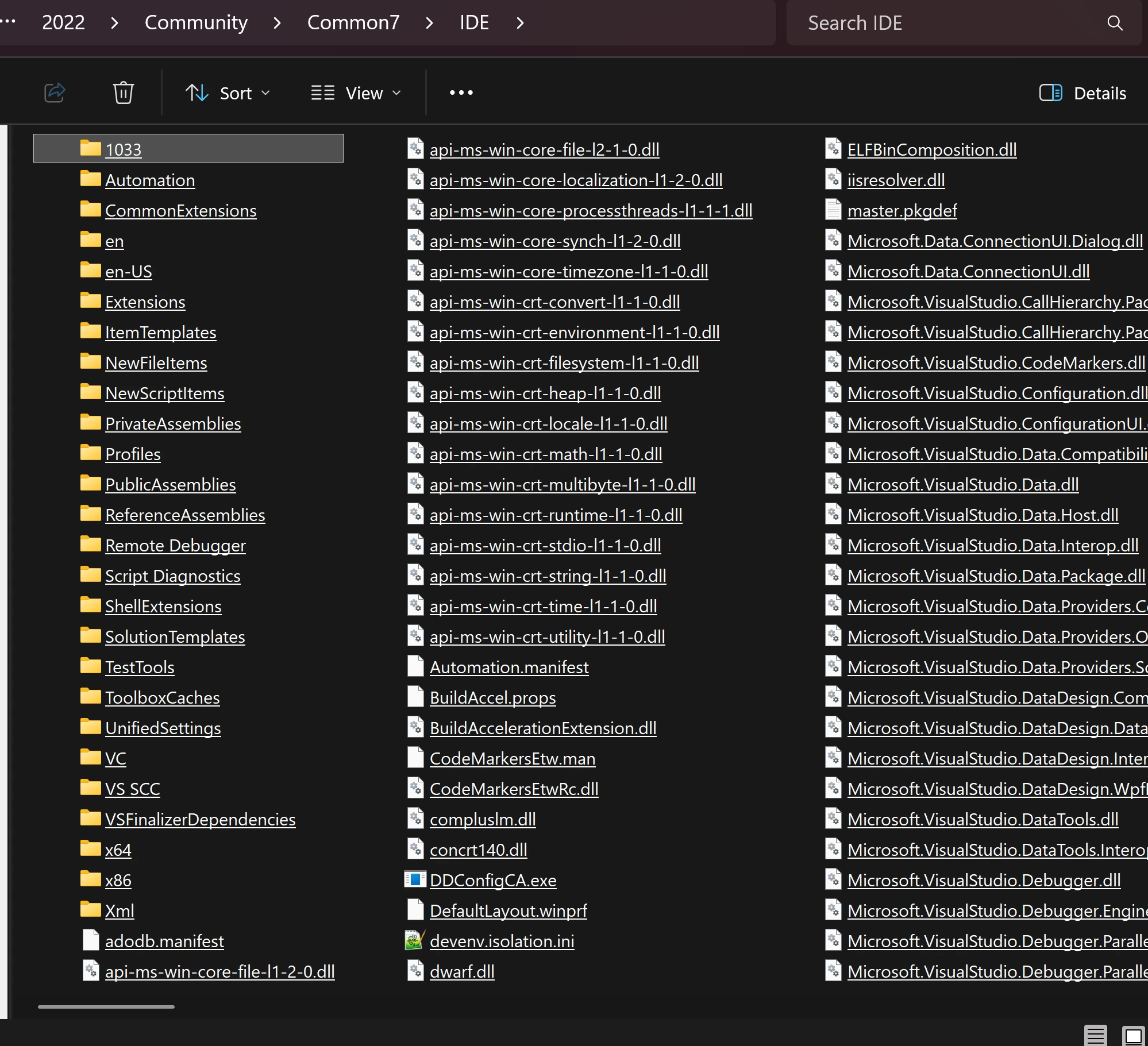
I don’t appear to have devenv.exe on my laptop. I’m using Visual Studio Community Edition but surely this does not make a difference.
+4- Moderator
- May 26, 2026
I believe that you may have deleted more than just the shortcut as devenv.exe (which is Visual Studio) should be in that folder.
Try moving back a few folders to open C:\Program Files\Microsoft Visual Studio\2022\ and then in the search bar search for devenv.exe. If it is not found then I would recommend that you either repair or reinstall Visual Studio.
+2- Author
- Participating Frequently
- May 30, 2026
Chris
I’m stymied. I cannot download either VC or VS Selecting the option to download or install them does not work. I’ve been in contact with Rocket Software and they are looking into the VC issue.
+4- Moderator
- June 1, 2026
Hi Paul,
I believe, in order to download Visual Studio versions prior to VS2026, Microsoft now requires you to have a valid subscription. I know there are still locations, besides Microsoft where you can download VS2022 Community Edition though.
How are you trying to download the Visual COBOL product?
If you are trying to download the latest Personal Edition and you have used your email address to download a previous version, then an email may not be sent to you. If this is the case, I would recommend using a different email address (if you have one), this time.
As of V11.0 PU5, if you have a maintenance agreement with Rocket, Visual COBOL for Visual Studio can now be installed into Visual Studio 2026. There is a new GA base release that can be downloaded from the RCC for this and then you can install PU5 on top of that.
We have not however, made this available for the VC PE version yet.
+2- Author
- Participating Frequently
- June 3, 2026
Chris, I’m afraid I can’t download either VS Community or VC Personal edition. I’ve only tried Microsoft’s website - I don’t know any other non-Microsoft locations where I could download it. And I still can’t download VC Personal edition despite going round the houses following the Rocket website.
+2- Author
- Participating Frequently
- June 4, 2026
Chris
I have found in my backups that I have vcvs2022_100.exe. Can I reinstall this over the existing broken VC? I did try to repair VC but I was unable to, presumably because of missing software. I presume that an attempt to delete would fail for the same reason.
I also have VisualStudio2022setup.exe. I presume, apart from the fact that there have been a lot of updates since I originally installed this, that I could use this to reinstall VS - and add the updates following this.Correct?
+4- Moderator
- June 4, 2026
You will need to uninstall Visual COBOL first and then uninstall Visual Studio and then reinstall Visual Studio and then Visual COBOL again.
If you cannot uninstall Visual COBOL then please show me what the error looks like...
+2- Author
- Participating Frequently
- June 5, 2026
Chris
I opened vcvs2022_100.exe and got the’ Micro Focus Visual COBOL for Visual Studio 2022’ screen with ‘Repair’ and ‘Uninstall’ options. I chose ‘Uninstall’ which failed:
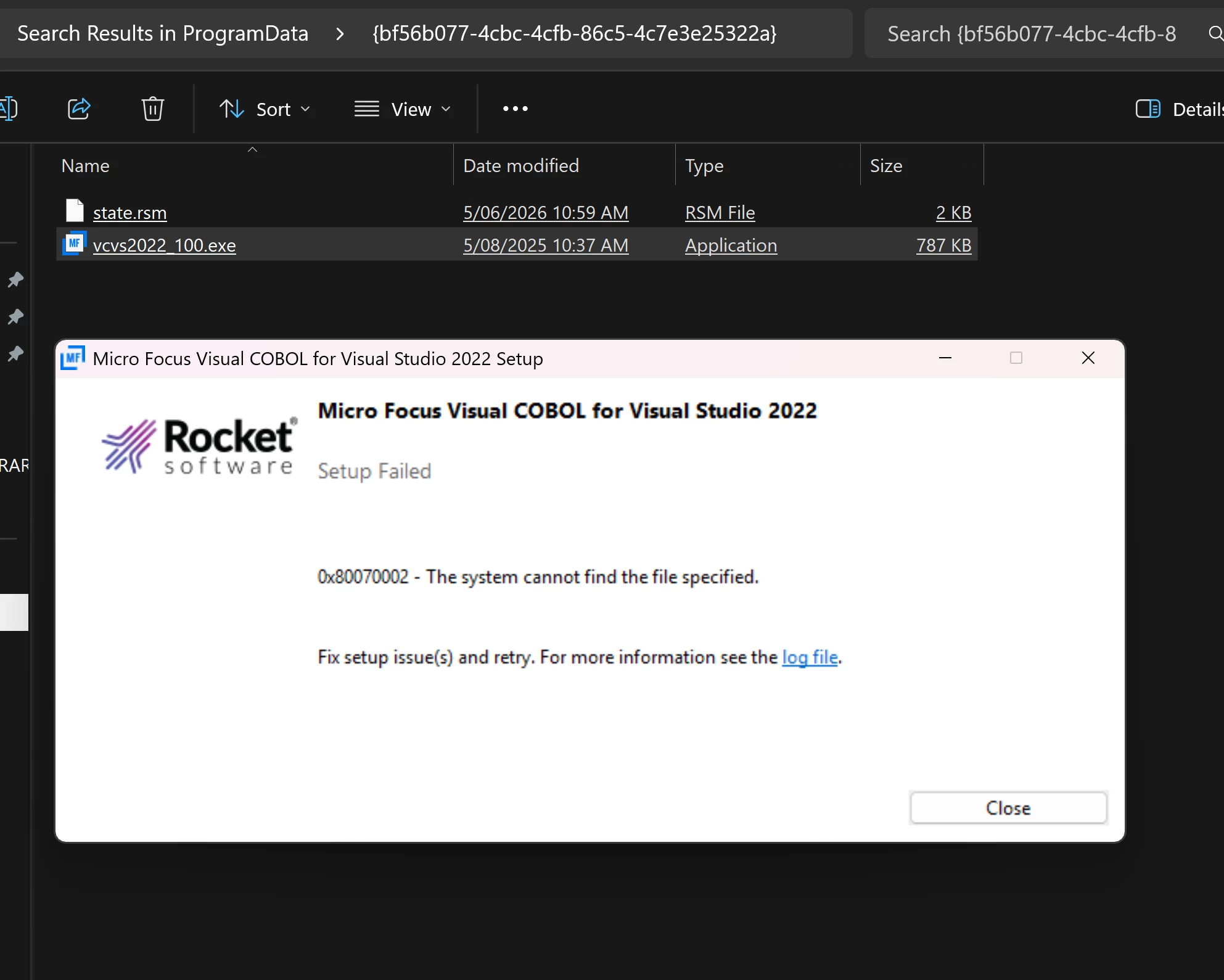
The log file is below:
[3AA4:3A60][2026-06-05T10:55:42]i001: Burn v3.14.0.1703, Windows v10.0 (Build 26200: Service Pack 0), path: C:\ProgramData\Package Cache\{bf56b077-4cbc-4cfb-86c5-4c7e3e25322a}\vcvs2022_100.exe
[3AA4:3A60][2026-06-05T10:55:42]i000: Initializing string variable 'ProductRevision' to value '10.0.00259'
[3AA4:3A60][2026-06-05T10:55:42]i000: Initializing string variable 'InstallFolder' to value '[ProgramFilesFolder]Micro Focus\Visual COBOL'
[3AA4:3A60][2026-06-05T10:55:42]i000: Initializing string variable 'EclipseLabelState' to value 'disable'
[3AA4:3A60][2026-06-05T10:55:42]i000: Initializing string variable 'FolderEditbox2State' to value 'disable'
[3AA4:3A60][2026-06-05T10:55:42]i000: Initializing string variable 'BrowseButton2State' to value 'disable'
[3AA4:3A60][2026-06-05T10:55:42]i000: Initializing numeric variable 'ignorechecks' to value '0'
[3AA4:3A60][2026-06-05T10:55:42]i000: Initializing numeric variable 'skipdotnet' to value '0'
[3AA4:3A60][2026-06-05T10:55:42]i000: Initializing numeric variable 'novsix' to value '0'
[3AA4:3A60][2026-06-05T10:55:42]i000: Initializing string variable 'accepteula' to value 'no'
[3AA4:3A60][2026-06-05T10:55:42]i000: Initializing numeric variable 'VS2022ValidInstance' to value '0'
[3AA4:3A60][2026-06-05T10:55:42]i000: Initializing numeric variable 'skipces' to value '0'
[3AA4:3A60][2026-06-05T10:55:42]i000: Initializing numeric variable 'skipautopass' to value '0'
[3AA4:3A60][2026-06-05T10:55:42]i000: Initializing string variable 'SafeNetCheck' to value 'yes'
[3AA4:3A60][2026-06-05T10:55:42]i000: Initializing string variable 'UsingSafeNetMsgState' to value 'disable'
[3AA4:3A60][2026-06-05T10:55:42]i000: Initializing string variable 'DockerService' to value 'SYSTEM\CurrentControlSet\Services\cexecsvc'
[3AA4:3A60][2026-06-05T10:55:42]i000: Initializing string variable 'VS2022ValidCheck' to value 'yes'
[3AA4:3A60][2026-06-05T10:55:42]i000: Initializing string variable 'UpgradeRegKey' to value 'SOFTWARE\Micro Focus\Visual COBOL\10.0'
[3AA4:3A60][2026-06-05T10:55:42]i009: Command Line: '"-burn.clean.room=C:\ProgramData\Package Cache\{bf56b077-4cbc-4cfb-86c5-4c7e3e25322a}\vcvs2022_100.exe" -burn.filehandle.attached=600 -burn.filehandle.self=720'
[3AA4:3A60][2026-06-05T10:55:42]i000: Setting string variable 'WixBundleLog' to value 'C:\Users\paulr\AppData\Local\Temp\Micro_Focus_Visual_COBOL_for_Visual_Studio_2022_20260605105542.log'
[3AA4:3A60][2026-06-05T10:55:42]i000: Setting string variable 'WixBundleManufacturer' to value 'Micro Focus'
[3AA4:43B0][2026-06-05T10:55:42]i000: Running detect BA function
[3AA4:43B0][2026-06-05T10:55:42]i000: Setting string variable 'InstallFolder' to value 'C:\Program Files (x86)\Micro Focus\Visual COBOL\'
[3AA4:43B0][2026-06-05T10:55:42]i000: Setting string variable 'FolderEditboxState' to value 'disable'
[3AA4:43B0][2026-06-05T10:55:42]i000: Setting string variable 'BrowseButtonState' to value 'disable'
[3AA4:43B0][2026-06-05T10:55:42]i000: Setting string variable 'HFDetected' to value '0'
[3AA4:43B0][2026-06-05T10:55:42]i000: Setting string variable 'HFDetected' to value '1'
[3AA4:43B0][2026-06-05T10:55:42]i000: Setting string variable '32BitOSEclipseMsgState' to value 'disable'
[3AA4:43B0][2026-06-05T10:55:42]i000: Setting string variable 'VS2022ValidInstance' to value '1'
[3AA4:43B0][2026-06-05T10:55:42]i000: Setting string variable 'UsingSafeNetMsgState' to value 'disable'
[3AA4:3A60][2026-06-05T10:55:42]i100: Detect begin, 9 packages
[3AA4:3A60][2026-06-05T10:55:42]i000: Registry key not found. Key = 'SYSTEM\CurrentControlSet\Services\cexecsvc'
[3AA4:3A60][2026-06-05T10:55:42]i000: Setting numeric variable 'isdocker' to value 0
[3AA4:3A60][2026-06-05T10:55:42]i000: Registry key not found. Key = 'SOFTWARE\Microsoft\Edge\WindowsSandbox'
[3AA4:3A60][2026-06-05T10:55:42]i000: Setting numeric variable 'issandbox' to value 0
[3AA4:3A60][2026-06-05T10:55:42]i000: Setting string variable 'NetfxFullVersion' to value '533509'
[3AA4:3A60][2026-06-05T10:55:42]i000: Registry key not found. Key = 'SOFTWARE\Micro Focus\Visual COBOL\4.0'
[3AA4:3A60][2026-06-05T10:55:42]i000: Registry key not found. Key = 'SOFTWARE\Micro Focus\Visual COBOL\5.0'
[3AA4:3A60][2026-06-05T10:55:42]i000: Registry key not found. Key = 'SOFTWARE\Micro Focus\Visual COBOL\6.0'
[3AA4:3A60][2026-06-05T10:55:42]i000: Registry key not found. Key = 'SOFTWARE\Micro Focus\Visual COBOL\7.0'
[3AA4:3A60][2026-06-05T10:55:42]i000: Registry key not found. Key = 'SOFTWARE\Micro Focus\Visual COBOL\8.0'
[3AA4:3A60][2026-06-05T10:55:42]i000: Registry key not found. Key = 'SOFTWARE\Micro Focus\Visual COBOL\9.0'
[3AA4:3A60][2026-06-05T10:55:42]i000: Setting string variable 'regbtLatest' to value 'Micro Focus Visual COBOL'
[3AA4:3A60][2026-06-05T10:55:42]i000: Registry key not found. Key = 'SOFTWARE\Micro Focus\Visual COBOL\7.0'
[3AA4:3A60][2026-06-05T10:55:42]i000: Registry key not found. Key = 'SOFTWARE\Micro Focus\Visual COBOL\8.0'
[3AA4:3A60][2026-06-05T10:55:42]i000: Registry key not found. Key = 'SOFTWARE\Micro Focus\Visual COBOL\9.0'
[3AA4:3A60][2026-06-05T10:55:42]i000: Setting string variable 'regbtx64Latest' to value 'Micro Focus Visual COBOL'
[3AA4:3A60][2026-06-05T10:55:42]i000: Setting string variable 'regCOBOLVS2022' to value '1'
[3AA4:3A60][2026-06-05T10:55:42]i000: Registry key not found. Key = 'SOFTWARE\Microsoft\Windows\CurrentVersion\Uninstall\{9E6EDAFC-611B-4ED4-80D8-222EFBE7A162}'
[3AA4:3A60][2026-06-05T10:55:42]i000: Registry key not found. Key = 'SOFTWARE\Micro Focus\Visual COBOL\2.3'
[3AA4:3A60][2026-06-05T10:55:42]i000: Registry key not found. Key = 'SOFTWARE\Micro Focus\Visual COBOL\3.0'
[3AA4:3A60][2026-06-05T10:55:42]i000: Registry key not found. Key = 'SOFTWARE\Micro Focus\Visual COBOL\4.0'
[3AA4:3A60][2026-06-05T10:55:42]i000: Registry key not found. Key = 'SOFTWARE\Micro Focus\Visual COBOL\5.0'
[3AA4:3A60][2026-06-05T10:55:42]i000: Registry key not found. Key = 'SOFTWARE\Micro Focus\Visual COBOL\6.0'
[3AA4:3A60][2026-06-05T10:55:42]i000: Registry key not found. Key = 'SOFTWARE\Micro Focus\Visual COBOL\7.0'
[3AA4:3A60][2026-06-05T10:55:42]i000: Registry key not found. Key = 'SOFTWARE\Micro Focus\Visual COBOL\8.0'
[3AA4:3A60][2026-06-05T10:55:42]i000: Registry key not found. Key = 'SOFTWARE\Micro Focus\Visual COBOL\9.0'
[3AA4:3A60][2026-06-05T10:55:42]i000: Registry value not found. Key = 'SOFTWARE\Micro Focus\Visual COBOL\10.0', Value = 'VCEProductName'
[3AA4:3A60][2026-06-05T10:55:42]i000: Registry key not found. Key = 'SOFTWARE\Micro Focus\Visual COBOL\3.0'
[3AA4:3A60][2026-06-05T10:55:42]i000: Registry key not found. Key = 'SOFTWARE\Micro Focus\Visual COBOL\4.0'
[3AA4:3A60][2026-06-05T10:55:42]i000: Registry key not found. Key = 'SOFTWARE\Micro Focus\Visual COBOL\5.0'
[3AA4:3A60][2026-06-05T10:55:42]i000: Registry key not found. Key = 'SOFTWARE\Micro Focus\Visual COBOL\6.0'
[3AA4:3A60][2026-06-05T10:55:42]i000: Registry key not found. Key = 'SOFTWARE\Micro Focus\Visual COBOL\7.0'
[3AA4:3A60][2026-06-05T10:55:42]i000: Registry key not found. Key = 'SOFTWARE\Micro Focus\Visual COBOL\8.0'
[3AA4:3A60][2026-06-05T10:55:42]i000: Registry key not found. Key = 'SOFTWARE\Micro Focus\Visual COBOL\9.0'
[3AA4:3A60][2026-06-05T10:55:42]i000: Setting string variable 'regModSuppLatest' to value 'Micro Focus Visual COBOL'
[3AA4:3A60][2026-06-05T10:55:42]i000: Registry key not found. Key = 'SOFTWARE\Micro Focus\Visual COBOL\10.0\Microsoft'
[3AA4:3A60][2026-06-05T10:55:42]i000: Setting numeric variable 'regMS' to value 0
[3AA4:3A60][2026-06-05T10:55:42]i000: Registry key not found. Key = 'SOFTWARE\Micro Focus\Visual COBOL\2.3'
[3AA4:3A60][2026-06-05T10:55:42]i000: Registry key not found. Key = 'SOFTWARE\Micro Focus\Visual COBOL\3.0'
[3AA4:3A60][2026-06-05T10:55:42]i000: Registry key not found. Key = 'SOFTWARE\Micro Focus\Visual COBOL\4.0'
[3AA4:3A60][2026-06-05T10:55:42]i000: Registry key not found. Key = 'SOFTWARE\Micro Focus\Visual COBOL\5.0'
[3AA4:3A60][2026-06-05T10:55:42]i000: Registry key not found. Key = 'SOFTWARE\Micro Focus\Visual COBOL\6.0'
[3AA4:3A60][2026-06-05T10:55:42]i000: Registry key not found. Key = 'SOFTWARE\Micro Focus\Visual COBOL\7.0'
[3AA4:3A60][2026-06-05T10:55:42]i000: Registry key not found. Key = 'SOFTWARE\Micro Focus\Visual COBOL\8.0'
[3AA4:3A60][2026-06-05T10:55:42]i000: Registry key not found. Key = 'SOFTWARE\Micro Focus\Visual COBOL\9.0'
[3AA4:3A60][2026-06-05T10:55:42]i000: Setting string variable 'regServerLatest' to value 'Micro Focus Visual COBOL'
[3AA4:3A60][2026-06-05T10:55:42]i000: Registry key not found. Key = 'SOFTWARE\Micro Focus\Visual COBOL\7.0'
[3AA4:3A60][2026-06-05T10:55:42]i000: Registry key not found. Key = 'SOFTWARE\Micro Focus\Visual COBOL\8.0'
[3AA4:3A60][2026-06-05T10:55:42]i000: Registry key not found. Key = 'SOFTWARE\Micro Focus\Visual COBOL\9.0'
[3AA4:3A60][2026-06-05T10:55:42]i000: Setting string variable 'regServerx64Latest' to value 'Micro Focus Visual COBOL'
[3AA4:3A60][2026-06-05T10:55:42]i000: Registry key not found. Key = 'SOFTWARE\Micro Focus\Visual COBOL\2.3'
[3AA4:3A60][2026-06-05T10:55:42]i000: Registry key not found. Key = 'SOFTWARE\Micro Focus\Visual COBOL\3.0'
[3AA4:3A60][2026-06-05T10:55:42]i000: Registry key not found. Key = 'SOFTWARE\Micro Focus\Visual COBOL\2.3'
[3AA4:3A60][2026-06-05T10:55:42]i000: Registry key not found. Key = 'SOFTWARE\Micro Focus\Visual COBOL\3.0'
[3AA4:3A60][2026-06-05T10:55:42]i000: Registry key not found. Key = 'SOFTWARE\Micro Focus\Visual COBOL\4.0'
[3AA4:3A60][2026-06-05T10:55:42]i000: Registry key not found. Key = 'SOFTWARE\Micro Focus\Visual COBOL\2.3'
[3AA4:3A60][2026-06-05T10:55:42]i000: Registry key not found. Key = 'SOFTWARE\Micro Focus\Visual COBOL\3.0'
[3AA4:3A60][2026-06-05T10:55:42]i000: Registry key not found. Key = 'SOFTWARE\Micro Focus\Visual COBOL\4.0'
[3AA4:3A60][2026-06-05T10:55:42]i000: Registry key not found. Key = 'SOFTWARE\Micro Focus\Visual COBOL\2.3'
[3AA4:3A60][2026-06-05T10:55:42]i000: Registry key not found. Key = 'SOFTWARE\Micro Focus\Visual COBOL\3.0'
[3AA4:3A60][2026-06-05T10:55:42]i000: Registry key not found. Key = 'SOFTWARE\Micro Focus\Visual COBOL\4.0'
[3AA4:3A60][2026-06-05T10:55:42]i000: Registry key not found. Key = 'SOFTWARE\Micro Focus\Visual COBOL\5.0'
[3AA4:3A60][2026-06-05T10:55:42]i000: Registry key not found. Key = 'SOFTWARE\Micro Focus\Visual COBOL\6.0'
[3AA4:3A60][2026-06-05T10:55:42]i000: Registry key not found. Key = 'SOFTWARE\Micro Focus\Visual COBOL\7.0'
[3AA4:3A60][2026-06-05T10:55:42]i000: Registry key not found. Key = 'SOFTWARE\Micro Focus\Visual COBOL\8.0'
[3AA4:3A60][2026-06-05T10:55:42]i000: Registry key not found. Key = 'SOFTWARE\Micro Focus\Visual COBOL\5.0'
[3AA4:3A60][2026-06-05T10:55:42]i000: Registry key not found. Key = 'SOFTWARE\Micro Focus\Visual COBOL\6.0'
[3AA4:3A60][2026-06-05T10:55:42]i000: Registry key not found. Key = 'SOFTWARE\Micro Focus\Visual COBOL\7.0'
[3AA4:3A60][2026-06-05T10:55:42]i000: Registry key not found. Key = 'SOFTWARE\Micro Focus\Visual COBOL\8.0'
[3AA4:3A60][2026-06-05T10:55:42]i000: Registry key not found. Key = 'SOFTWARE\Micro Focus\Visual COBOL\8.0'
[3AA4:3A60][2026-06-05T10:55:42]i000: Registry key not found. Key = 'SOFTWARE\Micro Focus\Visual COBOL\9.0'
[3AA4:3A60][2026-06-05T10:55:42]i000: Setting string variable 'regvs2022Latest' to value 'Micro Focus Visual COBOL for Visual Studio 2022'
[3AA4:3A60][2026-06-05T10:55:42]i000: Setting string variable 'vcredist20152022x64' to value 'v14.44.35211.00'
[3AA4:3A60][2026-06-05T10:55:42]i000: Registry key not found. Key = 'SOFTWARE\Microsoft\VisualStudio\14.0\VC\Runtimes\x86'
[3AA4:3A60][2026-06-05T10:55:42]i000: Setting string variable 'Windows10Build' to value '26200'
[3AA4:3A60][2026-06-05T10:55:42]i052: Condition 'vcredist20152022x86 AND vcredist20152022x86 >= v14.32.31332.00' evaluates to false.
[3AA4:3A60][2026-06-05T10:55:42]i052: Condition 'vcredist20152022x64 AND vcredist20152022x64 >= v14.32.31332.00' evaluates to true.
[3AA4:3A60][2026-06-05T10:55:42]i052: Condition 'NetfxFullVersion AND (NetfxFullVersion >= 528049)' evaluates to true.
[3AA4:3A60][2026-06-05T10:55:42]i052: Condition 'regCOBOLVS2022=1' evaluates to true.
[3AA4:3A60][2026-06-05T10:55:42]i052: Condition 'regMS=1' evaluates to false.
[3AA4:3A60][2026-06-05T10:55:42]i101: Detected package: vcredist2015_2022_x86, state: Absent, cached: None
[3AA4:3A60][2026-06-05T10:55:42]i101: Detected package: vcredist2015_2022_x64, state: Present, cached: None
[3AA4:3A60][2026-06-05T10:55:42]i101: Detected package: dotnetfx48, state: Present, cached: None
[3AA4:3A60][2026-06-05T10:55:42]i101: Detected package: lmsetupx64, state: Present, cached: Complete
[3AA4:3A60][2026-06-05T10:55:42]i101: Detected package: visualcobol_100x64, state: Present, cached: Complete
[3AA4:3A60][2026-06-05T10:55:42]i101: Detected package: visualcobolvisualstudio2022_100x64, state: Present, cached: Complete
[3AA4:3A60][2026-06-05T10:55:42]i101: Detected package: asintegrationx64, state: Present, cached: Complete
[3AA4:3A60][2026-06-05T10:55:42]i101: Detected package: MFVSIXINSTALL, state: Present, cached: Complete
[3AA4:3A60][2026-06-05T10:55:42]i101: Detected package: cblms_x86, state: Absent, cached: Complete
[3AA4:3A60][2026-06-05T10:55:42]i052: Condition 'Privileged' evaluates to true.
[3AA4:3A60][2026-06-05T10:55:42]i052: Condition 'ignorechecks="1" or (VersionNT64=v6.1 AND ServicePackLevel>=1) OR VersionNT64=v6.3 OR (VersionNT64=v10.0 AND Windows10Build >= v14393)' evaluates to true.
[3AA4:3A60][2026-06-05T10:55:42]i052: Condition 'WixBundleInstalled or ignorechecks="1" or (isdocker="0" or issandbox="1") or (accepteula="yes" and isdocker="1" and issandbox="0")' evaluates to true.
[3AA4:3A60][2026-06-05T10:55:42]i052: Condition 'WixBundleInstalled or ignorechecks="1" or regEclipse23<>"Micro Focus Visual COBOL for Eclipse"' evaluates to true.
[3AA4:3A60][2026-06-05T10:55:42]i052: Condition 'WixBundleInstalled or ignorechecks="1" or regvs201223<>"Micro Focus Visual COBOL for Visual Studio 2012"' evaluates to true.
[3AA4:3A60][2026-06-05T10:55:42]i052: Condition 'WixBundleInstalled or ignorechecks="1" or regvs201323<>"Micro Focus Visual COBOL for Visual Studio 2013"' evaluates to true.
[3AA4:3A60][2026-06-05T10:55:42]i052: Condition 'WixBundleInstalled or ignorechecks="1" or regvs201523<>"Micro Focus Visual COBOL for Visual Studio 2015"' evaluates to true.
[3AA4:3A60][2026-06-05T10:55:42]i052: Condition 'WixBundleInstalled or ignorechecks="1" or regServer23<>"Micro Focus COBOL Server"' evaluates to true.
[3AA4:3A60][2026-06-05T10:55:42]i052: Condition 'WixBundleInstalled or ignorechecks="1" or regEclipse23<>"Micro Focus Enterprise Developer for Eclipse"' evaluates to true.
[3AA4:3A60][2026-06-05T10:55:42]i052: Condition 'WixBundleInstalled or ignorechecks="1" or regvs201223<>"Micro Focus Enterprise Developer for Visual Studio 2012"' evaluates to true.
[3AA4:3A60][2026-06-05T10:55:42]i052: Condition 'WixBundleInstalled or ignorechecks="1" or regvs201323<>"Micro Focus Enterprise Developer for Visual Studio 2013"' evaluates to true.
[3AA4:3A60][2026-06-05T10:55:42]i052: Condition 'WixBundleInstalled or ignorechecks="1" or regvs201523<>"Micro Focus Enterprise Developer for Visual Studio 2015"' evaluates to true.
[3AA4:3A60][2026-06-05T10:55:42]i052: Condition 'WixBundleInstalled or ignorechecks="1" or regServer23<>"Micro Focus Enterprise Server"' evaluates to true.
[3AA4:3A60][2026-06-05T10:55:42]i052: Condition 'WixBundleInstalled or ignorechecks="1" or regServer23<>"Micro Focus Enterprise Test Server"' evaluates to true.
[3AA4:3A60][2026-06-05T10:55:42]i052: Condition 'WixBundleInstalled or ignorechecks="1" or regComPatAddPack230<>"Micro Focus Compatibility AddPack For Visual COBOL"' evaluates to true.
[3AA4:3A60][2026-06-05T10:55:42]i052: Condition 'WixBundleInstalled or ignorechecks="1" or regModSupp30<>"Micro Focus Modelling Support for Eclipse"' evaluates to true.
[3AA4:3A60][2026-06-05T10:55:42]i052: Condition 'WixBundleInstalled or ignorechecks="1" or regEclipse30<>"Micro Focus Visual COBOL for Eclipse"' evaluates to true.
[3AA4:3A60][2026-06-05T10:55:42]i052: Condition 'WixBundleInstalled or ignorechecks="1" or regvs201230<>"Micro Focus Visual COBOL for Visual Studio 2012"' evaluates to true.
[3AA4:3A60][2026-06-05T10:55:42]i052: Condition 'WixBundleInstalled or ignorechecks="1" or regvs201330<>"Micro Focus Visual COBOL for Visual Studio 2013"' evaluates to true.
[3AA4:3A60][2026-06-05T10:55:42]i052: Condition 'WixBundleInstalled or ignorechecks="1" or regvs201530<>"Micro Focus Visual COBOL for Visual Studio 2015"' evaluates to true.
[3AA4:3A60][2026-06-05T10:55:42]i052: Condition 'WixBundleInstalled or ignorechecks="1" or regvs201730<>"Micro Focus Visual COBOL for Visual Studio 2017"' evaluates to true.
[3AA4:3A60][2026-06-05T10:55:42]i052: Condition 'WixBundleInstalled or ignorechecks="1" or regServer30<>"Micro Focus COBOL Server"' evaluates to true.
[3AA4:3A60][2026-06-05T10:55:42]i052: Condition 'WixBundleInstalled or ignorechecks="1" or regEclipse30<>"Micro Focus Enterprise Developer for Eclipse"' evaluates to true.
[3AA4:3A60][2026-06-05T10:55:42]i052: Condition 'WixBundleInstalled or ignorechecks="1" or regvs201230<>"Micro Focus Enterprise Developer for Visual Studio 2012"' evaluates to true.
[3AA4:3A60][2026-06-05T10:55:42]i052: Condition 'WixBundleInstalled or ignorechecks="1" or regvs201330<>"Micro Focus Enterprise Developer for Visual Studio 2013"' evaluates to true.
[3AA4:3A60][2026-06-05T10:55:42]i052: Condition 'WixBundleInstalled or ignorechecks="1" or regvs201530<>"Micro Focus Enterprise Developer for Visual Studio 2015"' evaluates to true.
[3AA4:3A60][2026-06-05T10:55:42]i052: Condition 'WixBundleInstalled or ignorechecks="1" or regvs201730<>"Micro Focus Enterprise Developer for Visual Studio 2017"' evaluates to true.
[3AA4:3A60][2026-06-05T10:55:42]i052: Condition 'WixBundleInstalled or ignorechecks="1" or regServer30<>"Micro Focus Enterprise Server"' evaluates to true.
[3AA4:3A60][2026-06-05T10:55:42]i052: Condition 'WixBundleInstalled or ignorechecks="1" or regServer30<>"Micro Focus Enterprise Test Server"' evaluates to true.
[3AA4:3A60][2026-06-05T10:55:42]i052: Condition 'WixBundleInstalled or ignorechecks="1" or regbt40<>"Micro Focus Visual COBOL Build Tools for Windows"' evaluates to true.
[3AA4:3A60][2026-06-05T10:55:42]i052: Condition 'WixBundleInstalled or ignorechecks="1" or regModSupp40<>"Micro Focus Modelling Support for Eclipse"' evaluates to true.
[3AA4:3A60][2026-06-05T10:55:42]i052: Condition 'WixBundleInstalled or ignorechecks="1" or regEclipse40<>"Micro Focus Visual COBOL for Eclipse"' evaluates to true.
[3AA4:3A60][2026-06-05T10:55:42]i052: Condition 'WixBundleInstalled or ignorechecks="1" or regvs201340<>"Micro Focus Visual COBOL for Visual Studio 2013"' evaluates to true.
[3AA4:3A60][2026-06-05T10:55:42]i052: Condition 'WixBundleInstalled or ignorechecks="1" or regvs201540<>"Micro Focus Visual COBOL for Visual Studio 2015"' evaluates to true.
[3AA4:3A60][2026-06-05T10:55:42]i052: Condition 'WixBundleInstalled or ignorechecks="1" or regvs201740<>"Micro Focus Visual COBOL for Visual Studio 2017"' evaluates to true.
[3AA4:3A60][2026-06-05T10:55:42]i052: Condition 'WixBundleInstalled or ignorechecks="1" or regServer40<>"Micro Focus COBOL Server"' evaluates to true.
[3AA4:3A60][2026-06-05T10:55:42]i052: Condition 'WixBundleInstalled or ignorechecks="1" or regEclipse40<>"Micro Focus Enterprise Developer for Eclipse"' evaluates to true.
[3AA4:3A60][2026-06-05T10:55:42]i052: Condition 'WixBundleInstalled or ignorechecks="1" or regvs201340<>"Micro Focus Enterprise Developer for Visual Studio 2013"' evaluates to true.
[3AA4:3A60][2026-06-05T10:55:42]i052: Condition 'WixBundleInstalled or ignorechecks="1" or regvs201540<>"Micro Focus Enterprise Developer for Visual Studio 2015"' evaluates to true.
[3AA4:3A60][2026-06-05T10:55:42]i052: Condition 'WixBundleInstalled or ignorechecks="1" or regvs201740<>"Micro Focus Enterprise Developer for Visual Studio 2017"' evaluates to true.
[3AA4:3A60][2026-06-05T10:55:42]i052: Condition 'WixBundleInstalled or ignorechecks="1" or regServer40<>"Micro Focus Enterprise Server"' evaluates to true.
[3AA4:3A60][2026-06-05T10:55:42]i052: Condition 'WixBundleInstalled or ignorechecks="1" or regServer40<>"Micro Focus Enterprise Test Server"' evaluates to true.
[3AA4:3A60][2026-06-05T10:55:42]i052: Condition 'WixBundleInstalled or ignorechecks="1" or regbt40<>"Micro Focus Enterprise Developer Build Tools for Windows"' evaluates to true.
[3AA4:3A60][2026-06-05T10:55:42]i052: Condition 'WixBundleInstalled or ignorechecks="1" or regbt50<>"Micro Focus Visual COBOL Build Tools for Windows"' evaluates to true.
[3AA4:3A60][2026-06-05T10:55:42]i052: Condition 'WixBundleInstalled or ignorechecks="1" or regbt50<>"Micro Focus Enterprise Developer Build Tools for Windows"' evaluates to true.
[3AA4:3A60][2026-06-05T10:55:42]i052: Condition 'WixBundleInstalled or ignorechecks="1" or regModSupp50<>"Micro Focus Modelling Support for Eclipse"' evaluates to true.
[3AA4:3A60][2026-06-05T10:55:42]i052: Condition 'WixBundleInstalled or ignorechecks="1" or regEclipse50<>"Micro Focus Visual COBOL for Eclipse"' evaluates to true.
[3AA4:3A60][2026-06-05T10:55:42]i052: Condition 'WixBundleInstalled or ignorechecks="1" or regvs201750<>"Micro Focus Visual COBOL for Visual Studio 2017"' evaluates to true.
[3AA4:3A60][2026-06-05T10:55:42]i052: Condition 'WixBundleInstalled or ignorechecks="1" or regServer50<>"Micro Focus COBOL Server"' evaluates to true.
[3AA4:3A60][2026-06-05T10:55:42]i052: Condition 'WixBundleInstalled or ignorechecks="1" or regEclipse50<>"Micro Focus Enterprise Developer for Eclipse"' evaluates to true.
[3AA4:3A60][2026-06-05T10:55:42]i052: Condition 'WixBundleInstalled or ignorechecks="1" or regvs201750<>"Micro Focus Enterprise Developer for Visual Studio 2017"' evaluates to true.
[3AA4:3A60][2026-06-05T10:55:42]i052: Condition 'WixBundleInstalled or ignorechecks="1" or regServer50<>"Micro Focus Enterprise Server"' evaluates to true.
[3AA4:3A60][2026-06-05T10:55:42]i052: Condition 'WixBundleInstalled or ignorechecks="1" or regServer50<>"Micro Focus Enterprise Test Server"' evaluates to true.
[3AA4:3A60][2026-06-05T10:55:42]i052: Condition 'WixBundleInstalled or ignorechecks="1" or regvs201950<>"Micro Focus Enterprise Developer for Visual Studio 2019"' evaluates to true.
[3AA4:3A60][2026-06-05T10:55:42]i052: Condition 'WixBundleInstalled or ignorechecks="1" or regvs201950<>"Micro Focus Visual COBOL for Visual Studio 2019"' evaluates to true.
[3AA4:3A60][2026-06-05T10:55:42]i052: Condition 'WixBundleInstalled or ignorechecks="1" or regbt60<>"Micro Focus Visual COBOL Build Tools for Windows"' evaluates to true.
[3AA4:3A60][2026-06-05T10:55:42]i052: Condition 'WixBundleInstalled or ignorechecks="1" or regbt60<>"Micro Focus Enterprise Developer Build Tools for Windows"' evaluates to true.
[3AA4:3A60][2026-06-05T10:55:42]i052: Condition 'WixBundleInstalled or ignorechecks="1" or regModSupp60<>"Micro Focus Modelling Support for Eclipse"' evaluates to true.
[3AA4:3A60][2026-06-05T10:55:42]i052: Condition 'WixBundleInstalled or ignorechecks="1" or regEclipse60<>"Micro Focus Visual COBOL for Eclipse"' evaluates to true.
[3AA4:3A60][2026-06-05T10:55:42]i052: Condition 'WixBundleInstalled or ignorechecks="1" or regvs201760<>"Micro Focus Visual COBOL for Visual Studio 2017"' evaluates to true.
[3AA4:3A60][2026-06-05T10:55:42]i052: Condition 'WixBundleInstalled or ignorechecks="1" or regServer60<>"Micro Focus COBOL Server"' evaluates to true.
[3AA4:3A60][2026-06-05T10:55:42]i052: Condition 'WixBundleInstalled or ignorechecks="1" or regEclipse60<>"Micro Focus Enterprise Developer for Eclipse"' evaluates to true.
[3AA4:3A60][2026-06-05T10:55:42]i052: Condition 'WixBundleInstalled or ignorechecks="1" or regvs201760<>"Micro Focus Enterprise Developer for Visual Studio 2017"' evaluates to true.
[3AA4:3A60][2026-06-05T10:55:42]i052: Condition 'WixBundleInstalled or ignorechecks="1" or regServer60<>"Micro Focus Enterprise Server"' evaluates to true.
[3AA4:3A60][2026-06-05T10:55:42]i052: Condition 'WixBundleInstalled or ignorechecks="1" or regServer60<>"Micro Focus Enterprise Test Server"' evaluates to true.
[3AA4:3A60][2026-06-05T10:55:42]i052: Condition 'WixBundleInstalled or ignorechecks="1" or regvs201960<>"Micro Focus Enterprise Developer for Visual Studio 2019"' evaluates to true.
[3AA4:3A60][2026-06-05T10:55:42]i052: Condition 'WixBundleInstalled or ignorechecks="1" or regvs201960<>"Micro Focus Visual COBOL for Visual Studio 2019"' evaluates to true.
[3AA4:3A60][2026-06-05T10:55:42]i052: Condition 'WixBundleInstalled or ignorechecks="1" or regbt70<>"Micro Focus Visual COBOL Build Tools for Windows"' evaluates to true.
[3AA4:3A60][2026-06-05T10:55:42]i052: Condition 'WixBundleInstalled or ignorechecks="1" or regbt70<>"Micro Focus Enterprise Developer Build Tools for Windows"' evaluates to true.
[3AA4:3A60][2026-06-05T10:55:42]i052: Condition 'WixBundleInstalled or ignorechecks="1" or regModSupp70<>"Micro Focus Modelling Support for Eclipse"' evaluates to true.
[3AA4:3A60][2026-06-05T10:55:42]i052: Condition 'WixBundleInstalled or ignorechecks="1" or regEclipse70<>"Micro Focus Visual COBOL for Eclipse"' evaluates to true.
[3AA4:3A60][2026-06-05T10:55:42]i052: Condition 'WixBundleInstalled or ignorechecks="1" or regvs201770<>"Micro Focus Visual COBOL for Visual Studio 2017"' evaluates to true.
[3AA4:3A60][2026-06-05T10:55:42]i052: Condition 'WixBundleInstalled or ignorechecks="1" or regServer70<>"Micro Focus COBOL Server"' evaluates to true.
[3AA4:3A60][2026-06-05T10:55:42]i052: Condition 'WixBundleInstalled or ignorechecks="1" or regEclipse70<>"Micro Focus Enterprise Developer for Eclipse"' evaluates to true.
[3AA4:3A60][2026-06-05T10:55:42]i052: Condition 'WixBundleInstalled or ignorechecks="1" or regvs201770<>"Micro Focus Enterprise Developer for Visual Studio 2017"' evaluates to true.
[3AA4:3A60][2026-06-05T10:55:42]i052: Condition 'WixBundleInstalled or ignorechecks="1" or regServer70<>"Micro Focus Enterprise Server"' evaluates to true.
[3AA4:3A60][2026-06-05T10:55:42]i052: Condition 'WixBundleInstalled or ignorechecks="1" or regServer70<>"Micro Focus Enterprise Test Server"' evaluates to true.
[3AA4:3A60][2026-06-05T10:55:42]i052: Condition 'WixBundleInstalled or ignorechecks="1" or regvs201970<>"Micro Focus Enterprise Developer for Visual Studio 2019"' evaluates to true.
[3AA4:3A60][2026-06-05T10:55:42]i052: Condition 'WixBundleInstalled or ignorechecks="1" or regvs201970<>"Micro Focus Visual COBOL for Visual Studio 2019"' evaluates to true.
[3AA4:3A60][2026-06-05T10:55:42]i052: Condition 'WixBundleInstalled or ignorechecks="1" or regServerx6470<>"Micro Focus COBOL Server"' evaluates to true.
[3AA4:3A60][2026-06-05T10:55:42]i052: Condition 'WixBundleInstalled or ignorechecks="1" or regbtx6470<>"Micro Focus Visual COBOL Build Tools for Windows"' evaluates to true.
[3AA4:3A60][2026-06-05T10:55:42]i052: Condition 'WixBundleInstalled or ignorechecks="1" or regbt80<>"Micro Focus Visual COBOL Build Tools for Windows"' evaluates to true.
[3AA4:3A60][2026-06-05T10:55:42]i052: Condition 'WixBundleInstalled or ignorechecks="1" or regbt80<>"Micro Focus Enterprise Developer Build Tools for Windows"' evaluates to true.
[3AA4:3A60][2026-06-05T10:55:42]i052: Condition 'WixBundleInstalled or ignorechecks="1" or regModSupp80<>"Micro Focus Modelling Support for Eclipse"' evaluates to true.
[3AA4:3A60][2026-06-05T10:55:42]i052: Condition 'WixBundleInstalled or ignorechecks="1" or regEclipse80<>"Micro Focus Visual COBOL for Eclipse"' evaluates to true.
[3AA4:3A60][2026-06-05T10:55:42]i052: Condition 'WixBundleInstalled or ignorechecks="1" or regvs201780<>"Micro Focus Visual COBOL for Visual Studio 2017"' evaluates to true.
[3AA4:3A60][2026-06-05T10:55:42]i052: Condition 'WixBundleInstalled or ignorechecks="1" or regServer80<>"Micro Focus COBOL Server"' evaluates to true.
[3AA4:3A60][2026-06-05T10:55:42]i052: Condition 'WixBundleInstalled or ignorechecks="1" or regEclipse80<>"Micro Focus Enterprise Developer for Eclipse"' evaluates to true.
[3AA4:3A60][2026-06-05T10:55:42]i052: Condition 'WixBundleInstalled or ignorechecks="1" or regvs201780<>"Micro Focus Enterprise Developer for Visual Studio 2017"' evaluates to true.
[3AA4:3A60][2026-06-05T10:55:42]i052: Condition 'WixBundleInstalled or ignorechecks="1" or regServer80<>"Micro Focus Enterprise Server"' evaluates to true.
[3AA4:3A60][2026-06-05T10:55:42]i052: Condition 'WixBundleInstalled or ignorechecks="1" or regServer80<>"Micro Focus Enterprise Test Server"' evaluates to true.
[3AA4:3A60][2026-06-05T10:55:42]i052: Condition 'WixBundleInstalled or ignorechecks="1" or regvs201980<>"Micro Focus Enterprise Developer for Visual Studio 2019"' evaluates to true.
[3AA4:3A60][2026-06-05T10:55:42]i052: Condition 'WixBundleInstalled or ignorechecks="1" or regvs201980<>"Micro Focus Visual COBOL for Visual Studio 2019"' evaluates to true.
[3AA4:3A60][2026-06-05T10:55:42]i052: Condition 'WixBundleInstalled or ignorechecks="1" or regvs202280<>"Micro Focus Visual COBOL for Visual Studio 2022"' evaluates to true.
[3AA4:3A60][2026-06-05T10:55:42]i052: Condition 'WixBundleInstalled or ignorechecks="1" or regvs202280<>"Micro Focus Enterprise Developer for Visual Studio 2022"' evaluates to true.
[3AA4:3A60][2026-06-05T10:55:42]i052: Condition 'WixBundleInstalled or ignorechecks="1" or regServerx6480<>"Micro Focus COBOL Server 64-bit"' evaluates to true.
[3AA4:3A60][2026-06-05T10:55:42]i052: Condition 'WixBundleInstalled or ignorechecks="1" or regbtx6480<>"Micro Focus Visual COBOL Build Tools for Windows 64-bit"' evaluates to true.
[3AA4:3A60][2026-06-05T10:55:42]i052: Condition 'WixBundleInstalled or ignorechecks="1" or regbt90<>"Micro Focus Visual COBOL Build Tools for Windows"' evaluates to true.
[3AA4:3A60][2026-06-05T10:55:42]i052: Condition 'WixBundleInstalled or ignorechecks="1" or regbt90<>"Micro Focus Enterprise Developer Build Tools for Windows"' evaluates to true.
[3AA4:3A60][2026-06-05T10:55:42]i052: Condition 'WixBundleInstalled or ignorechecks="1" or regModSupp90<>"Micro Focus Modelling Support for Eclipse"' evaluates to true.
[3AA4:3A60][2026-06-05T10:55:42]i052: Condition 'WixBundleInstalled or ignorechecks="1" or regEclipse90<>"Micro Focus Visual COBOL for Eclipse"' evaluates to true.
[3AA4:3A60][2026-06-05T10:55:42]i052: Condition 'WixBundleInstalled or ignorechecks="1" or regServer90<>"Micro Focus COBOL Server"' evaluates to true.
[3AA4:3A60][2026-06-05T10:55:42]i052: Condition 'WixBundleInstalled or ignorechecks="1" or regEclipse90<>"Micro Focus Enterprise Developer for Eclipse"' evaluates to true.
[3AA4:3A60][2026-06-05T10:55:42]i052: Condition 'WixBundleInstalled or ignorechecks="1" or regServer90<>"Micro Focus Enterprise Server"' evaluates to true.
[3AA4:3A60][2026-06-05T10:55:42]i052: Condition 'WixBundleInstalled or ignorechecks="1" or regServer90<>"Micro Focus Enterprise Test Server"' evaluates to true.
[3AA4:3A60][2026-06-05T10:55:42]i052: Condition 'WixBundleInstalled or ignorechecks="1" or regvs202290<>"Micro Focus Visual COBOL for Visual Studio 2022"' evaluates to true.
[3AA4:3A60][2026-06-05T10:55:42]i052: Condition 'WixBundleInstalled or ignorechecks="1" or regvs202290<>"Micro Focus Enterprise Developer for Visual Studio 2022"' evaluates to true.
[3AA4:3A60][2026-06-05T10:55:42]i052: Condition 'WixBundleInstalled or ignorechecks="1" or regServerx6490<>"Micro Focus COBOL Server 64-bit"' evaluates to true.
[3AA4:3A60][2026-06-05T10:55:42]i052: Condition 'WixBundleInstalled or ignorechecks="1" or regbtx6490<>"Micro Focus Visual COBOL Build Tools for Windows 64-bit"' evaluates to true.
[3AA4:3A60][2026-06-05T10:55:42]i052: Condition 'WixBundleInstalled or ignorechecks="1" or regServer90<>"Micro Focus Enterprise Server Stored Procedures"' evaluates to true.
[3AA4:3A60][2026-06-05T10:55:42]i052: Condition 'WixBundleInstalled or ignorechecks="1" or VS2022ValidInstance="1"' evaluates to true.
[3AA4:3A60][2026-06-05T10:55:42]i052: Condition 'WixBundleInstalled or ignorechecks="1" or regbtLatest<>"Micro Focus Visual COBOL Build Tools for Windows"' evaluates to true.
[3AA4:3A60][2026-06-05T10:55:42]i052: Condition 'WixBundleInstalled or ignorechecks="1" or regbtLatest<>"Micro Focus Enterprise Developer Build Tools for Windows"' evaluates to true.
[3AA4:3A60][2026-06-05T10:55:42]i052: Condition 'WixBundleInstalled or ignorechecks="1" or regServerLatest<>"Micro Focus COBOL Server"' evaluates to true.
[3AA4:3A60][2026-06-05T10:55:42]i052: Condition 'WixBundleInstalled or ignorechecks="1" or regEclipseLatest<>"Micro Focus Enterprise Developer for Eclipse"' evaluates to true.
[3AA4:3A60][2026-06-05T10:55:42]i052: Condition 'WixBundleInstalled or ignorechecks="1" or regvs2022Latest<>"Micro Focus Enterprise Developer for Visual Studio 2022"' evaluates to true.
[3AA4:3A60][2026-06-05T10:55:42]i052: Condition 'WixBundleInstalled or ignorechecks="1" or regServerLatest<>"Micro Focus Enterprise Server"' evaluates to true.
[3AA4:3A60][2026-06-05T10:55:42]i052: Condition 'WixBundleInstalled or ignorechecks="1" or regServerLatest<>"Micro Focus Enterprise Test Server"' evaluates to true.
[3AA4:3A60][2026-06-05T10:55:42]i052: Condition 'WixBundleInstalled or ignorechecks="1" or regServerx64Latest<>"Micro Focus COBOL Server 64-bit"' evaluates to true.
[3AA4:3A60][2026-06-05T10:55:42]i052: Condition 'WixBundleInstalled or ignorechecks="1" or regbtx64Latest<>"Micro Focus Visual COBOL Build Tools for Windows 64-bit"' evaluates to true.
[3AA4:3A60][2026-06-05T10:55:42]i052: Condition 'WixBundleInstalled or ignorechecks="1" or regServerLatest<>"Micro Focus Enterprise Server Stored Procedures"' evaluates to true.
[3AA4:3A60][2026-06-05T10:55:42]i199: Detect complete, result: 0x0
[3AA4:43B0][2026-06-05T10:58:26]i000: Running plan BA function
[3AA4:43B0][2026-06-05T10:58:26]i000: Setting numeric variable 'RadioButton' to value 0
[3AA4:3A60][2026-06-05T10:58:26]i200: Plan begin, 9 packages, action: Uninstall
[3AA4:3A60][2026-06-05T10:58:26]w321: Skipping dependency registration on package with no dependency providers: cblms_x86
[3AA4:3A60][2026-06-05T10:58:26]w321: Skipping dependency registration on package with no dependency providers: MFVSIXINSTALL
[3AA4:3A60][2026-06-05T10:58:26]i000: Setting string variable 'WixBundleLog_MFVSIXINSTALL' to value 'C:\Users\paulr\AppData\Local\Temp\Micro_Focus_Visual_COBOL_for_Visual_Studio_2022_20260605105542_000_MFVSIXINSTALL.log'
[3AA4:3A60][2026-06-05T10:58:26]i000: Setting string variable 'WixBundleRollbackLog_MFVSIXINSTALL' to value 'C:\Users\paulr\AppData\Local\Temp\Micro_Focus_Visual_COBOL_for_Visual_Studio_2022_20260605105542_000_MFVSIXINSTALL_rollback.log'
[3AA4:3A60][2026-06-05T10:58:26]i000: Setting string variable 'WixBundleRollbackLog_asintegrationx64' to value 'C:\Users\paulr\AppData\Local\Temp\Micro_Focus_Visual_COBOL_for_Visual_Studio_2022_20260605105542_001_asintegrationx64_rollback.log'
[3AA4:3A60][2026-06-05T10:58:26]i000: Setting string variable 'WixBundleLog_asintegrationx64' to value 'C:\Users\paulr\AppData\Local\Temp\Micro_Focus_Visual_COBOL_for_Visual_Studio_2022_20260605105542_001_asintegrationx64.log'
[3AA4:3A60][2026-06-05T10:58:26]i000: Setting string variable 'WixBundleRollbackLog_visualcobolvisualstudio2022_100x64' to value 'C:\Users\paulr\AppData\Local\Temp\Micro_Focus_Visual_COBOL_for_Visual_Studio_2022_20260605105542_002_visualcobolvisualstudio2022_100x64_rollback.log'
[3AA4:3A60][2026-06-05T10:58:26]i000: Setting string variable 'WixBundleLog_visualcobolvisualstudio2022_100x64' to value 'C:\Users\paulr\AppData\Local\Temp\Micro_Focus_Visual_COBOL_for_Visual_Studio_2022_20260605105542_002_visualcobolvisualstudio2022_100x64.log'
[3AA4:3A60][2026-06-05T10:58:26]i000: Setting string variable 'WixBundleRollbackLog_visualcobol_100x64' to value 'C:\Users\paulr\AppData\Local\Temp\Micro_Focus_Visual_COBOL_for_Visual_Studio_2022_20260605105542_003_visualcobol_100x64_rollback.log'
[3AA4:3A60][2026-06-05T10:58:26]i000: Setting string variable 'WixBundleLog_visualcobol_100x64' to value 'C:\Users\paulr\AppData\Local\Temp\Micro_Focus_Visual_COBOL_for_Visual_Studio_2022_20260605105542_003_visualcobol_100x64.log'
[3AA4:3A60][2026-06-05T10:58:26]w321: Skipping dependency registration on package with no dependency providers: dotnetfx48
[3AA4:3A60][2026-06-05T10:58:26]w321: Skipping dependency registration on package with no dependency providers: vcredist2015_2022_x64
[3AA4:3A60][2026-06-05T10:58:26]w321: Skipping dependency registration on package with no dependency providers: vcredist2015_2022_x86
[3AA4:3A60][2026-06-05T10:58:26]i201: Planned package: cblms_x86, state: Absent, default requested: Absent, ba requested: Absent, execute: None, rollback: None, cache: No, uncache: Yes, dependency: None
[3AA4:3A60][2026-06-05T10:58:26]i201: Planned package: MFVSIXINSTALL, state: Present, default requested: Absent, ba requested: Absent, execute: Uninstall, rollback: Install, cache: No, uncache: Yes, dependency: None
[3AA4:3A60][2026-06-05T10:58:26]i201: Planned package: asintegrationx64, state: Present, default requested: Absent, ba requested: Absent, execute: Uninstall, rollback: Install, cache: No, uncache: Yes, dependency: Unregister
[3AA4:3A60][2026-06-05T10:58:26]i201: Planned package: visualcobolvisualstudio2022_100x64, state: Present, default requested: Absent, ba requested: Absent, execute: Uninstall, rollback: Install, cache: No, uncache: Yes, dependency: Unregister
[3AA4:3A60][2026-06-05T10:58:26]i201: Planned package: visualcobol_100x64, state: Present, default requested: Absent, ba requested: Absent, execute: Uninstall, rollback: Install, cache: No, uncache: Yes, dependency: Unregister
[3AA4:3A60][2026-06-05T10:58:26]i201: Planned package: lmsetupx64, state: Present, default requested: None, ba requested: None, execute: None, rollback: None, cache: No, uncache: No, dependency: Unregister
[3AA4:3A60][2026-06-05T10:58:26]i201: Planned package: dotnetfx48, state: Present, default requested: None, ba requested: None, execute: None, rollback: None, cache: No, uncache: No, dependency: None
[3AA4:3A60][2026-06-05T10:58:26]i201: Planned package: vcredist2015_2022_x64, state: Present, default requested: None, ba requested: None, execute: None, rollback: None, cache: No, uncache: No, dependency: None
[3AA4:3A60][2026-06-05T10:58:26]i201: Planned package: vcredist2015_2022_x86, state: Absent, default requested: None, ba requested: None, execute: None, rollback: None, cache: No, uncache: No, dependency: None
[3AA4:3A60][2026-06-05T10:58:26]i000: Running plan complete BA function
[3AA4:3A60][2026-06-05T10:58:26]i299: Plan complete, result: 0x0
[3AA4:3A60][2026-06-05T10:58:26]i300: Apply begin
[3AA4:3A60][2026-06-05T10:58:26]i010: Launching elevated engine process.
[3AA4:3A60][2026-06-05T10:58:28]i011: Launched elevated engine process.
[3AA4:3A60][2026-06-05T10:58:29]i012: Connected to elevated engine.
[1AEC:3A34][2026-06-05T10:58:29]i358: Pausing automatic updates.
[1AEC:3A34][2026-06-05T10:58:29]i359: Paused automatic updates.
[1AEC:3A34][2026-06-05T10:58:29]i360: Creating a system restore point.
[1AEC:3A34][2026-06-05T10:59:03]i361: Created a system restore point.
[1AEC:3A34][2026-06-05T10:59:03]i371: Updating session, registration key: SOFTWARE\Microsoft\Windows\CurrentVersion\Uninstall\{bf56b077-4cbc-4cfb-86c5-4c7e3e25322a}, resume: Active, restart initiated: No, disable resume: No
[1AEC:4254][2026-06-05T10:59:05]i304: Verified existing payload: MFVSIXINSTALL at path: C:\ProgramData\Package Cache\77F82E319493C8A0EEC4A1920924BEED0681CE93\MFVSIXInstall.exe.
[1AEC:3A34][2026-06-05T10:59:05]i301: Applying execute package: MFVSIXINSTALL, action: Uninstall, path: C:\ProgramData\Package Cache\77F82E319493C8A0EEC4A1920924BEED0681CE93\MFVSIXInstall.exe, arguments: '"C:\ProgramData\Package Cache\77F82E319493C8A0EEC4A1920924BEED0681CE93\MFVSIXInstall.exe" -u -q'
[1AEC:3A34][2026-06-05T10:59:05]e000: Error 0x80070002: Process returned error: 0x80070002
[1AEC:3A34][2026-06-05T10:59:05]e000: Error 0x80070002: Failed to execute EXE package.
[3AA4:3A60][2026-06-05T10:59:05]e000: Error 0x80070002: Failed to configure per-machine EXE package.
[3AA4:3A60][2026-06-05T10:59:05]i319: Applied execute package: MFVSIXINSTALL, result: 0x80070002, restart: None
[3AA4:3A60][2026-06-05T10:59:05]e000: Error 0x80070002: Failed to execute EXE package.
[1AEC:3A34][2026-06-05T10:59:05]i372: Session end, registration key: SOFTWARE\Microsoft\Windows\CurrentVersion\Uninstall\{bf56b077-4cbc-4cfb-86c5-4c7e3e25322a}, resume: ARP, restart: None, disable resume: No
[1AEC:3A34][2026-06-05T10:59:05]i371: Updating session, registration key: SOFTWARE\Microsoft\Windows\CurrentVersion\Uninstall\{bf56b077-4cbc-4cfb-86c5-4c7e3e25322a}, resume: ARP, restart initiated: No, disable resume: No
[3AA4:3A60][2026-06-05T10:59:05]i399: Apply complete, result: 0x80070002, restart: None, ba requested restart: No
+2- Author
- Participating Frequently
- June 6, 2026
I replied to your last message but received a message that my input was held pending moderator’s input. Presumably it has not yet been cleared. It contained a screen shot of the result of trying to delete VC and also a cut and paste of the log file.
+4- Moderator
- June 8, 2026
I did not see that held message yet. Can you please tell me what the error code is that you receive and try uploading the log file instead of pasting it in?
+2- Author
- Participating Frequently
- June 8, 2026
Chris
Attempting to uninstall VC, got the message ‘Setup failed’, the error code was: 0x8007002 and ‘the system cannot find the file specified’
Log file loaded.
+4- Moderator
- June 9, 2026
Does a Repair on Visual COBOL return the same error?
Will it allow you to run the Visual COBOL installer while the existing Visual COBOL is still in this state?
If it will, try installing Visual COBOL from the installer and then immediately try uninstalling it again.
If these things don’t work you might try running the following from an administrative command prompt:
wmic product where "name like '%%Visual COBOL%%'" call uninstall
+2- Author
- Participating Frequently
- June 10, 2026
Chris
I am astounded. I originally ran the Repair option and received the error message ‘Setup failed’, the error code was: 0x8007002 and ‘the system cannot find the file specified’ as previously reported and then subsequently failed to uninstall.
As you suggested I reran the Repair option and to my amazement the process finished with a successful message. I can now load VC having seen devenv.exe reappear in the C:\Program Files\Microsoft Visual Studio\2022\Community\Common7\IDE folder.
You may have more insight as to why this attempt succeeded and previous attempts failed. I am just relieved that I’ve got VS/VC back. Thanks Chris.

Sign up
Already have an account? Login
Welcome to the Rocket Forum!
Please log in or register:
Employee Login | Registration Member Login | RegistrationEnter your E-mail address. We'll send you an e-mail with instructions to reset your password.
 77 4th Avenue
Waltham, MA 02451 USA
77 4th Avenue
Waltham, MA 02451 USA


