Question

Getting a 9D,03 - But XFD is correct

  • October 9, 2026
  • 5 replies
  • 24 views

Amy McDonough
Forum|alt.badge.img+2

When running my program, I am getting this error:  
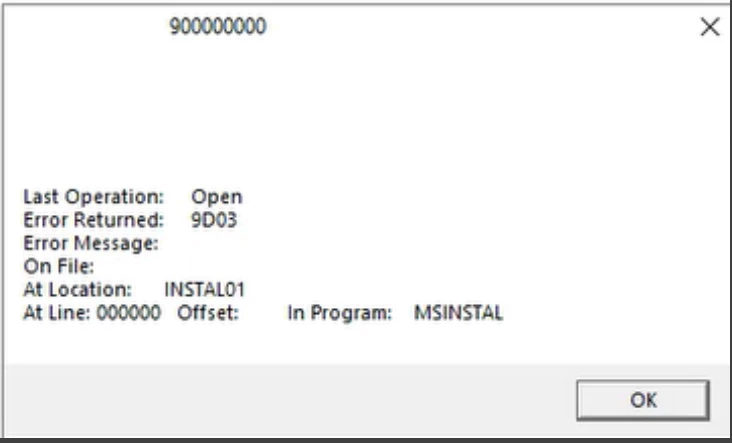


A 9D,03 error means the XFD is missing - but it is in the folder that our batch file is pointing to, and it is the correct layout.  

Anything else that would be causing this error?

5 replies

Claudio Contardi
Forum|alt.badge.img+2

Good afternoon, ​@Amy McDonough 

Which release of Visual COBOL are you working with?

Can you try to set the XFD_DIRECTORY configuration variable and see if things improve?

Home > Visual COBOL 12.0 for Visual Studio > Rocket® Visual COBOL® 12.0 for Visual Studio > Programming > Data Access > Database Connectors for Visual COBOL > Database Connectors Reference > Configuration Variables > XFD_DIRECTORY
https://docs.rocketsoftware.com/bundle/visualcobolvs_ug_120/page/aph1742952552496.html

Looking forward for your feedback.


Amy McDonough
Forum|alt.badge.img+2
  • Author
  • Inspiring
  • October 9, 2026

​@Claudio Contardi 

I am on version 5.0 of Visual COBOL. 

My support rep is the only one getting this issue - I cannot duplicate it on my PC. We are using the same setups on our PC’s.


Claudio Contardi
Forum|alt.badge.img+2

​@Amy McDonough can it be that your support rep does not have all the required permissions to access/read these XFD files?

Any security limitation?


Amy McDonough
Forum|alt.badge.img+2
  • Author
  • Inspiring
  • October 9, 2026

​@Claudio Contardi 

He does  - He has never had this problem before. 

He is setting up a new customer, and he is getting this error message on one XFD, which is in the folder, and the correct layout


Chris Glazier
Forum|alt.badge.img+4

Hi Amy,

A ctf trace file might help.

Add the following to your aconfig.cfg file:

FILE_TRACE=9
FILE_TRACE_FLUSH=1
 

Create a file called ctf.cfg and place it in the same folder in which you have your A_CONFIG file.

Then set the environment variable MFTRACE_CONFIG= c:\<folder-name>\ctf.cfg
replacing <folder-name> with your actual folder.

The file should contain the following:

mftrace.dest = textfile
mftrace.emitter.textfile#location  = ./
mftrace.emitter.textfile#file = $(APPNAME).$(EMITTER).$(PID).$(PLATFORM).log
mftrace.emitter.textfile#multiproc=true
mftrace.level= debug
mftrace.comp.mf.rts#eprintf=true

When you run your application,, it should create one or more files starting with the name of your application with the extension .log. This will be in the folder where you started your application.

The entry in the file you are looking for should look like the following:

05:12:26.086 MF.RTS 51 1 " Attempting to open XFD file '/home/support/chrisg/xfds/testdbc1.xfd'"