Solved

Component editors

  • April 13, 2026
  • 6 replies
  • 49 views

Roger Wallin
Forum|alt.badge.img+3

Hello
We have installed Uniface IDE locally on every developer laptop/pc.
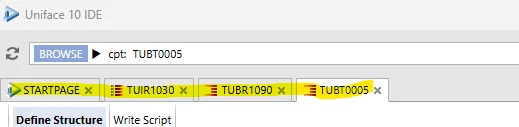
I wonder where the tabs (editors?) are saved as you also see the components edited by other programmers?
Is it possible to see only your own editors?

Regards RogerW


Best answer by Iain Sharp

We have changed ours to 

e.g. 


ide_state.zip    \\server\States_%%($USERNAME)\develide_state.zip

ide_state.zip    \\server\States_%%($USERNAME)\testide_state.zip

So as to use the user name as a separator, and each repository then gets it’s own filename to separate them. 
The %%($username) is the new ‘environment variable’ syntax for inclusion in asn files. 



6 replies

Norbert Lauterbach
Forum|alt.badge.img+4

In asn-File :

[FILES]

ide_state.zip           = C:\Uniface\ide_state_entw.zip


Ingo Stiller
Forum|alt.badge.img+3
  • Participating Frequently
  • April 13, 2026

Norbert has already shown where this setup information is located.

About developers have individual setups:
There are several options for this.

a) If each developer has their own PC, simply use a local drive
ide_state.zip           = C:\Uniface\ide_state.zip

b) If each developer is assigned their own drive (e.g., U:), use that drive
ide_state.zip           = U:\Uniface\ide_state.zip
Where U is a drive letter assigned to a user directory on a server. 
This can be set up in Windows so that the mapping is established each time a user logs in
U:  =>  \\server\user\$user01

c) You must create a separate ASN file for each user, which is also accessed by the shortcut.
Solution c) can also be used if you want to have different environments with different setups


Iain Sharp
Forum|alt.badge.img+5
  • Inspiring
  • Answer
  • April 13, 2026

We have changed ours to 

e.g. 


ide_state.zip    \\server\States_%%($USERNAME)\develide_state.zip

ide_state.zip    \\server\States_%%($USERNAME)\testide_state.zip

So as to use the user name as a separator, and each repository then gets it’s own filename to separate them. 
The %%($username) is the new ‘environment variable’ syntax for inclusion in asn files. 


Ingo Stiller
Forum|alt.badge.img+3
  • Participating Frequently
  • April 13, 2026

Since when does “ %%($username)”  work ?
And does it work for all file/path names in ASN and/or INI?
And does it work in file-operations in UnifAce itself?


Roger Wallin
Forum|alt.badge.img+3
  • Author
  • Participating Frequently
  • April 14, 2026

Thanks to all that answered. I would have liked to put “Best answer” on every comment.

I solved it like this
[FILES]
ide_state.zip     = G:\myserver\Uniface10403\state\%%($USERNAME)\ide_state.zip


Apparently you need to use different files for every source-code, otherwise it empties the editors except for the last source used.

I also tried the Windows setting %userprofile% that I sometimes successfully use for customers as “Start in”-directory of the Application start definition.
It somehow worked but apparently didn’t write to the correct user home-directory, but just to some recent directories, and the state was lost.


Iain Sharp
Forum|alt.badge.img+5
  • Inspiring
  • April 14, 2026

Since when does “ %%($username)”  work ?
And does it work for all file/path names in ASN and/or INI?
And does it work in file-operations in UnifAce itself?

I can’t remember exactly where it came in, and searching patch notes is not helping, but here’s the documentation. 

Using Expressions in Assignment Files