

Question

Connect to SQL-Server takes 8 seconds

  • March 4, 2026
  • 4 replies
  • 105 views

Ingo Stiller
Forum|alt.badge.img+3

Hi freaks
I was forced to upgrade ourWindows-Server and SQL-Server to Version “2025”
No problem but now, when I connect (from our application) the first time to the database it takes 8 seconds

sql/print "SELECT top 1 1 FROM aTable", "DEF"

Profiling on MS-SQL give me no hint, as the duration of all action are a few microseconds.
Using procmon results in this picture
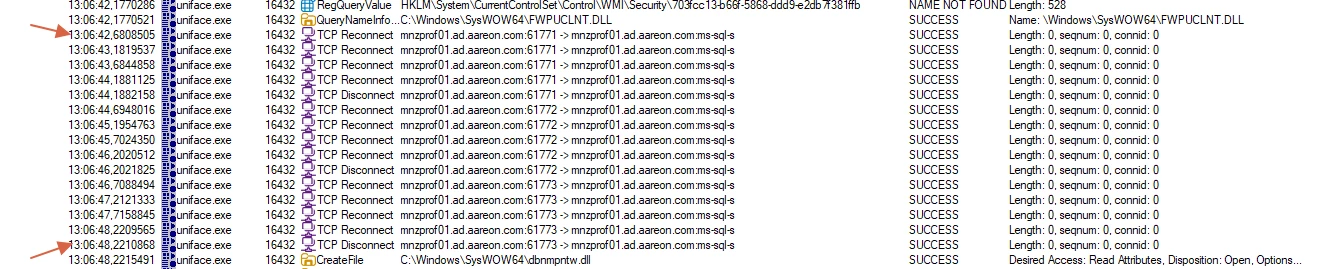
 

UnifAce connects and deconnect several time. Every reconnect last 0.5 seconds so in total we are near the eight seconds (measured by counting aloud)
So what’s going on here?
As I said, it's really just the simple SQL/print statement, nothing else.


Oh yes, when I start the IDF, I got this
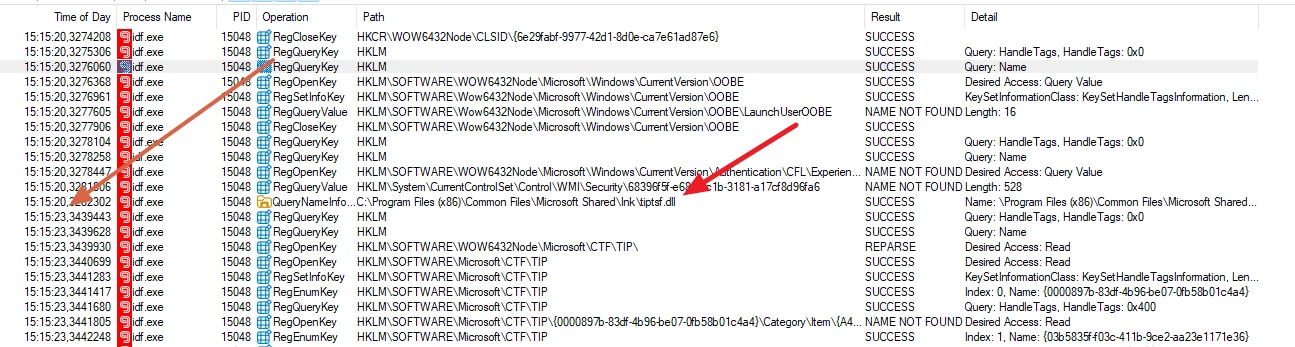
What happens here for about two seconds?

Thanks for any hint
Ingo



4 replies

Roger Wallin
Forum|alt.badge.img+3
  • Participating Frequently
  • March 9, 2026

Interesting.
Was the old database faster?
Do you have the same procmon log for the old database?
I suppose Uniface wouldn’t change it’s way to fetch, unless you have changed the driver. 
Or perhaps if the Sql-server closes the connection...


Ingo Stiller
Forum|alt.badge.img+3
  • Author
  • Participating Frequently
  • March 12, 2026

Hi Roger
Yes, our old  Database (SQL Server 2019) was much faster.
I have to chekc wether another driver from UnifAce will solve the “Pronlem”


Ingo Stiller
Forum|alt.badge.img+3
  • Author
  • Participating Frequently
  • March 26, 2026

Well, I think I've found the cause.
Up until now, we've been using SQLSRV32.DLL for the ODBC connection.
That worked just fine with SQL Server 2019, but no longer with SQL 2025.
The reason is that SQL 2025 now uses a version of TLS by default that SQLSRV32 doesn’t support yet. To work around this, the old driver has to go through a few rounds (handshakes) before it can connect (you could see that in the ProcMon output).
No more problems with MSODBCSQL18.DLL.

But here’s a quick note: 
You now need “proper” certificates for this. 
If you don’t have them, you’ll need to set “Trust server certificate” in the ODBC connection settings.

Ingo


Roger Wallin
Forum|alt.badge.img+3
  • Participating Frequently
  • March 27, 2026

Hi, 

Thanks for the update. The bad thing is what i wrote as the last message in the below question, ie. the "Microsoft ODBC Driver 17 for SQL Server (MSODBCSQL)" doubles the search-time compared to using the windows preinstalled "SQL Server Native Client (SQLNCLI)".

Let’s hope that this was due to some special parameter in our environment at that time.
Another bad thing is that MSODBCSQL isn’t preinstalled in Windows.
We will soon have to start using Sql Server 2025, so I’ll see further then.

Regards RogerW.

