
Debugger

  • June 2, 2020
  • 3 replies
  • 0 views

Forum|alt.badge.img

Hi,

We have problems with starting the debugger after we migrated to the Windows 2012.

If I start the debugger in the application with CTRL-Y key then i get the next screen:
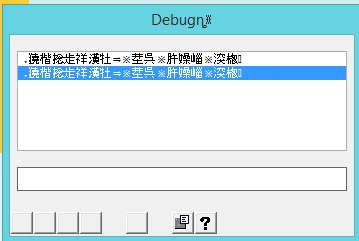

I can't do anything with this. The asn files and ini files seems to be ok.

What can I do to fix this problem.


regards,

Erhan

3 replies

Gianni Sandigliano
Forum|alt.badge.img

Hi,

We have problems with starting the debugger after we migrated to the Windows 2012.

If I start the debugger in the application with CTRL-Y key then i get the next screen:


I can't do anything with this. The asn files and ini files seems to be ok.

What can I do to fix this problem.


regards,

Erhan

Hi Erhan,

which Uniface version is in use with your migration?

Gianni


Forum|alt.badge.img
  • Author
  • Participating Frequently
  • June 3, 2020

Hi,

We have problems with starting the debugger after we migrated to the Windows 2012.

If I start the debugger in the application with CTRL-Y key then i get the next screen:


I can't do anything with this. The asn files and ini files seems to be ok.

What can I do to fix this problem.


regards,

Erhan

Uniface 9.7.04.02.

The runrime environment is migrated from Windows 2008 to Windows 2012.


Gianni Sandigliano
Forum|alt.badge.img

Hi,

We have problems with starting the debugger after we migrated to the Windows 2012.

If I start the debugger in the application with CTRL-Y key then i get the next screen:


I can't do anything with this. The asn files and ini files seems to be ok.

What can I do to fix this problem.


regards,

Erhan

Hi Erhan,

I was asking because I had the same problem in the past (U9.2) but it was solved migrating to a newer version (U9.6).

You are already on still further version so I've no more help to provide. Sorry!

Gianni