How do I access Panels, Glyphs, and Menus in Uniface 10

  • January 7, 2021
  • 4 replies
  • 0 views

Forum|alt.badge.img

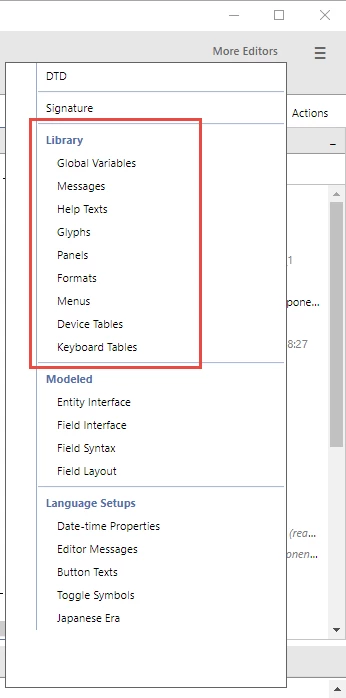
The help says go to More Editors>Panels/Glyphs/Menus. But these options don't exist.

I'm using 10.3.02.047.

4 replies

  • Rocketeer
  • January 7, 2021

The help says go to More Editors>Panels/Glyphs/Menus. But these options don't exist.

I'm using 10.3.02.047.

Hello Dave,

They all should be there:

I hope this helps.

Daniel


Forum|alt.badge.img
  • Author
  • Participating Frequently
  • January 7, 2021

The help says go to More Editors>Panels/Glyphs/Menus. But these options don't exist.

I'm using 10.3.02.047.

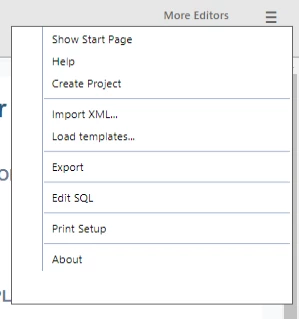
Wow, I don't have any of that stuff. Did I miss a step in the migration, or is there an ASN setting? Or maybe I have to be on a specific place in the IDE?


  • Rocketeer
  • January 7, 2021

Wow, I don't have any of that stuff. Did I miss a step in the migration, or is there an ASN setting? Or maybe I have to be on a specific place in the IDE?


That's the wrong menu. This is actually the main IDE (or Hamburger) menu.

You need to select the one to the left where it says "More Editors".


Forum|alt.badge.img
  • Author
  • Participating Frequently
  • January 7, 2021

Wow, I don't have any of that stuff. Did I miss a step in the migration, or is there an ASN setting? Or maybe I have to be on a specific place in the IDE?


I didn't realize that "More Editors" was actually a menu. I thought it was referring to the Hamburger menu.

Thank you, Daniel!