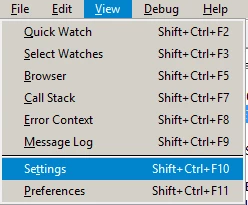
In the debugger enviroment the 'Settings' window can't be open

  • October 12, 2021
  • 6 replies
  • 0 views

Forum|alt.badge.img
Hello,

i can't open the "Settings" menu in uniface debugger under "View" > "Settings" any more.

Have somebody an idea why i cant open the settings or what can i do to open the settings in the uniface debugger?


------------------------------
Vi Mister
Rocket Forum Shared Account
------------------------------

6 replies

Jason Huggins
Forum|alt.badge.img
Hello,

i can't open the "Settings" menu in uniface debugger under "View" > "Settings" any more.

Have somebody an idea why i cant open the settings or what can i do to open the settings in the uniface debugger?


------------------------------
Vi Mister
Rocket Forum Shared Account
------------------------------
I've never seen this happen however try removing(/renaming) your udbg.cnf  file, which is normally found in the working directory of the debugger.

------------------------------
Jason Huggins
------------------------------

Forum|alt.badge.img
  • Author
  • Participating Frequently
  • October 14, 2021
I've never seen this happen however try removing(/renaming) your udbg.cnf  file, which is normally found in the working directory of the debugger.

------------------------------
Jason Huggins
------------------------------
Thank you, but your approach does'nt work  for me. The settings menu in the debugger still not shown.

------------------------------
Vi Mister
ARZ Haan AG
------------------------------

Iain Sharp
Forum|alt.badge.img+5
  • Inspiring
  • October 14, 2021
Hello,

i can't open the "Settings" menu in uniface debugger under "View" > "Settings" any more.

Have somebody an idea why i cant open the settings or what can i do to open the settings in the uniface debugger?


------------------------------
Vi Mister
Rocket Forum Shared Account
------------------------------
I wonder if it's opening, but 'off screen' due to window settings. Try resetting the app layout. 
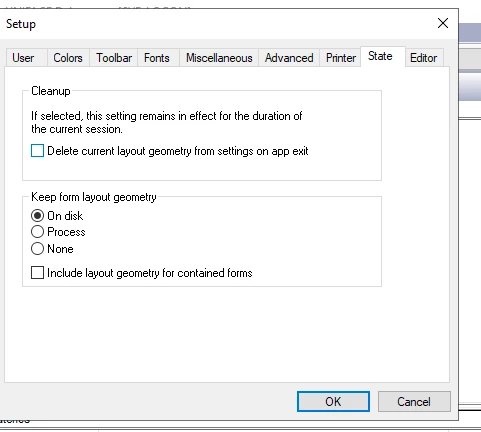
Click the uniface icon on the very top left of the debugger window, then settings then go to the state tab, and tick "Delete current layout.....". 
Then close out of the debugger, and try again. 

Alternatively, use the registry editor, find the key Computer\\HKEY_CURRENT_USER\\SOFTWARE\\Uniface\\Uniface 10\\State\\UDBG and delete the entire key.


------------------------------
Iain Sharp
Head of Technical Services
Pci Systems Ltd
Sheffield United Kingdom
------------------------------

Iain Sharp
Forum|alt.badge.img+5
  • Inspiring
  • October 14, 2021
I wonder if it's opening, but 'off screen' due to window settings. Try resetting the app layout. 
Click the uniface icon on the very top left of the debugger window, then settings then go to the state tab, and tick "Delete current layout.....". 
Then close out of the debugger, and try again. 

Alternatively, use the registry editor, find the key Computer\\HKEY_CURRENT_USER\\SOFTWARE\\Uniface\\Uniface 10\\State\\UDBG and delete the entire key.


------------------------------
Iain Sharp
Head of Technical Services
Pci Systems Ltd
Sheffield United Kingdom
------------------------------
Oopsie, version-specific key, you might find the path is Computer\\HKEY_CURRENT_USER\\SOFTWARE\\Uniface\\Uniface 9\\State\\UDBG or similar.

------------------------------
Iain Sharp
Head of Technical Services
Pci Systems Ltd
Sheffield United Kingdom
------------------------------

Forum|alt.badge.img
  • Author
  • Participating Frequently
  • October 15, 2021
I wonder if it's opening, but 'off screen' due to window settings. Try resetting the app layout. 
Click the uniface icon on the very top left of the debugger window, then settings then go to the state tab, and tick "Delete current layout.....". 
Then close out of the debugger, and try again. 

Alternatively, use the registry editor, find the key Computer\\HKEY_CURRENT_USER\\SOFTWARE\\Uniface\\Uniface 10\\State\\UDBG and delete the entire key.


------------------------------
Iain Sharp
Head of Technical Services
Pci Systems Ltd
Sheffield United Kingdom
------------------------------
Thank you very much Iain,

It works for me. I have reset the current layout.

------------------------------
Vi Mister
ARZ Haan AG
------------------------------

Iain Sharp
Forum|alt.badge.img+5
  • Inspiring
  • October 15, 2021
Thank you very much Iain,

It works for me. I have reset the current layout.

------------------------------
Vi Mister
ARZ Haan AG
------------------------------
Good to know.

------------------------------
Iain Sharp
Head of Technical Services
Pci Systems Ltd
Sheffield United Kingdom
------------------------------