

Printing on a label printer : how to configure the size of the label

  • May 11, 2021
  • 4 replies
  • 2 views

Forum|alt.badge.img

Hi

Currently , I'm using word  to print the label (I don't know the equivalence for "publipostage", but it is a pain the ass, with the macro, and under tse to get the files linked to the current user , path ...

With uniface  , how can I define the size of my label (ie  15x10 cm)  for width and length

I know is it within the device table , but I don't see wich parameter to configure

4 replies

Ingo Stiller
Forum|alt.badge.img+3
  • Participating Frequently
  • May 14, 2021

Hi

Currently , I'm using word  to print the label (I don't know the equivalence for "publipostage", but it is a pain the ass, with the macro, and under tse to get the files linked to the current user , path ...

With uniface  , how can I define the size of my label (ie  15x10 cm)  for width and length

I know is it within the device table , but I don't see wich parameter to configure

Hi Dominque

UnifAce and printing: Not easy and not straight forward 🙂

First, you have to define a "device translation table" (device table/device mode)

UF10→More Editors→Device Tables
Take P_MSWINX as base for your new table

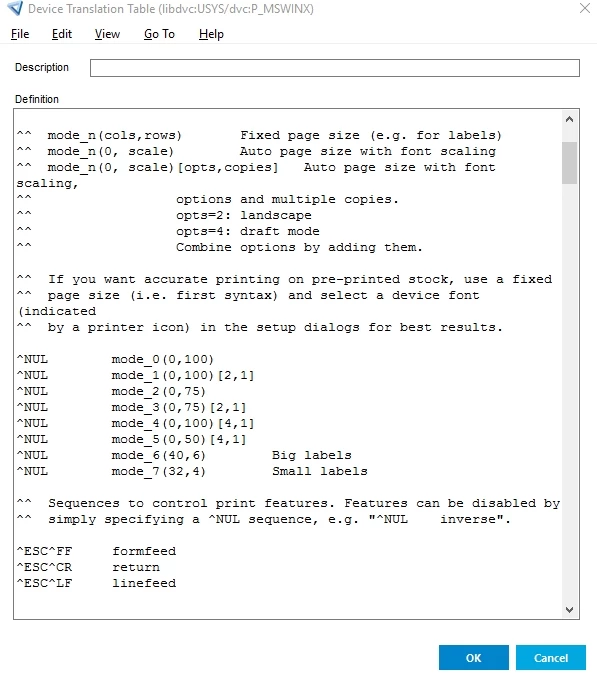
in P_MSWINX you find the line like  "^NUL        mode_1(0,100)[2,1]"
This defines the format of a printed side

Other attribues could also be changed but sometime its a little bit tricky to understand the syntax.
After editing compile the device table

First step done

No assign the device to the print model
(this infomations are in table PRATT on database)

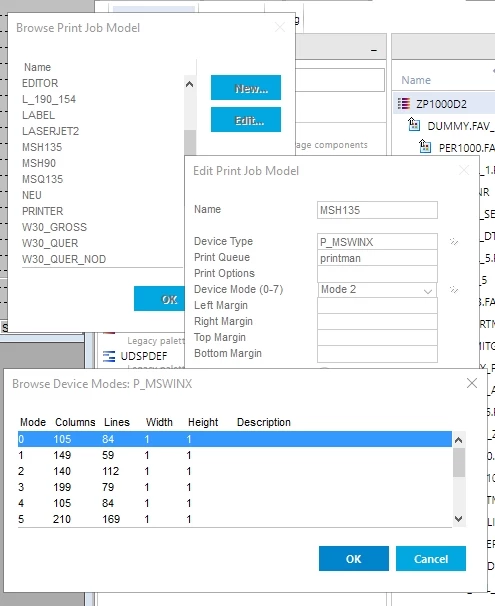
From IDF you can reach this by  "sandwich"→Printer setup
Create a new name and assign the device mode.
Then select the mode (drop dow box)
With ">>" you can see all possible modes

Second step done


Third step is to code the pront statement with the wanted printer model

Ready to use 🙂

But this setting are only recomendations for printer.
If a user select a A2 printer for a label, this could end in a "desaster" grin 


Another way is to use printers which understand PCL
https://en.wikipedia.org/wiki/Printer_Command_Language

Then you can send all necessary from your application direct to the printer.
We did this for label printing through a special barcode printer

Ingo


Forum|alt.badge.img

Hi

Currently , I'm using word  to print the label (I don't know the equivalence for "publipostage", but it is a pain the ass, with the macro, and under tse to get the files linked to the current user , path ...

With uniface  , how can I define the size of my label (ie  15x10 cm)  for width and length

I know is it within the device table , but I don't see wich parameter to configure
Thanks Ingo

I need this as well for a special barcode printer

I already has a look to the device table, but the thing not clear to me is how to configure the size of the page

ie : 15 cm

in word , we just enter it as a measure, but in the device table ????


Ingo Stiller
Forum|alt.badge.img+3
  • Participating Frequently
  • May 14, 2021

Hi

Currently , I'm using word  to print the label (I don't know the equivalence for "publipostage", but it is a pain the ass, with the macro, and under tse to get the files linked to the current user , path ...

With uniface  , how can I define the size of my label (ie  15x10 cm)  for width and length

I know is it within the device table , but I don't see wich parameter to configure
Hi Dominique

The "size dimension" is characters 😔
To set the character size, you have to set some other attributes in the device table.
I don't know which one, have to check it also
And then you are depends maybe to a printer

Is your barcode printer capable of using PCL and does have a DLL which could be installed on workstation?
Our customer use this printer
https://www.smart-label-printer.com/en/software
There is an interface which can be coded in UnifAce.
So your are able to set evry attribute you want.
BTW: With this DLL you can also select all printers by UnifAce code

Ingo


Forum|alt.badge.img

Hi

Currently , I'm using word  to print the label (I don't know the equivalence for "publipostage", but it is a pain the ass, with the macro, and under tse to get the files linked to the current user , path ...

With uniface  , how can I define the size of my label (ie  15x10 cm)  for width and length

I know is it within the device table , but I don't see wich parameter to configure

Made a mistake, It is a special printer for labels, but I don't print barcode, just data

as : article label,quantity,client name ....

Size in characters,  maybe I can use the A4 parameter and apply the ratio according to the size of my label
